
Summit Writeup
Analyzing and blocking five evolving malware stages across the Pyramid of Pain. From hashes to rules and behaviour blocking.
Important Notes:
- No Answers, but the methodologies will be explained thoroughly.
- Screenshots with answers will be blurred or censored
- No skipped step
Objective
After participating in one too many incident response activities, PicoSecure has decided to conduct a threat simulation and detection engineering engagement to bolster its malware detection capabilities. You have been assigned to work with an external penetration tester in an iterative purple-team scenario. The tester will be attempting to execute malware samples on a simulated internal user workstation. At the same time, you will need to configure PicoSecure’s security tools to detect and prevent the malware from executing.
Following the Pyramid of Pain’s ascending priority of indicators, your objective is to increase the simulated adversaries’ cost of operations and chase them away for good. Each level of the pyramid allows you to detect and prevent various indicators of attack.
Overview of the challenge
What is the first flag you receive after successfully detecting sample1.exe?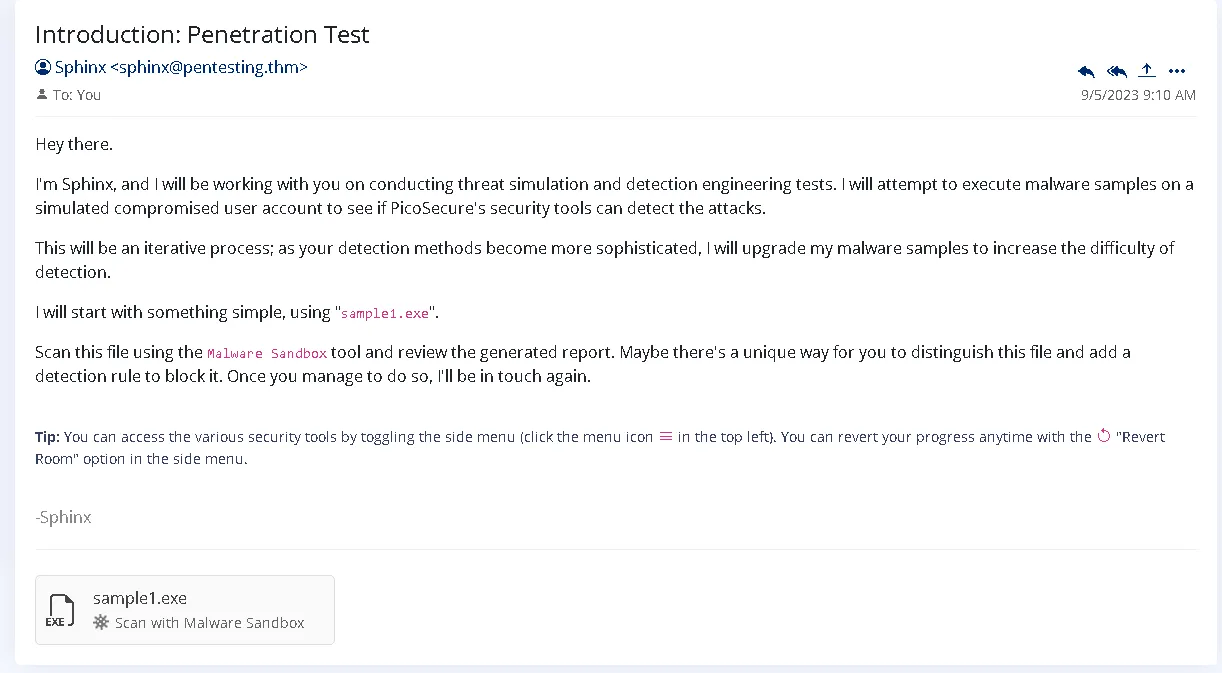 So, first, we can access different internal tools from the CTF, but I also used tools such as: AbuseIPDB, VirusTotal, Browserling, and others.
It only worked on the first flag. sample1.exe is available on VirusTotal to get more insights but the rest will be hidden, with little details outside the simulation.
Let’s focus on the first step.
Let’s check it in the Malware Sandbox.
This is the result: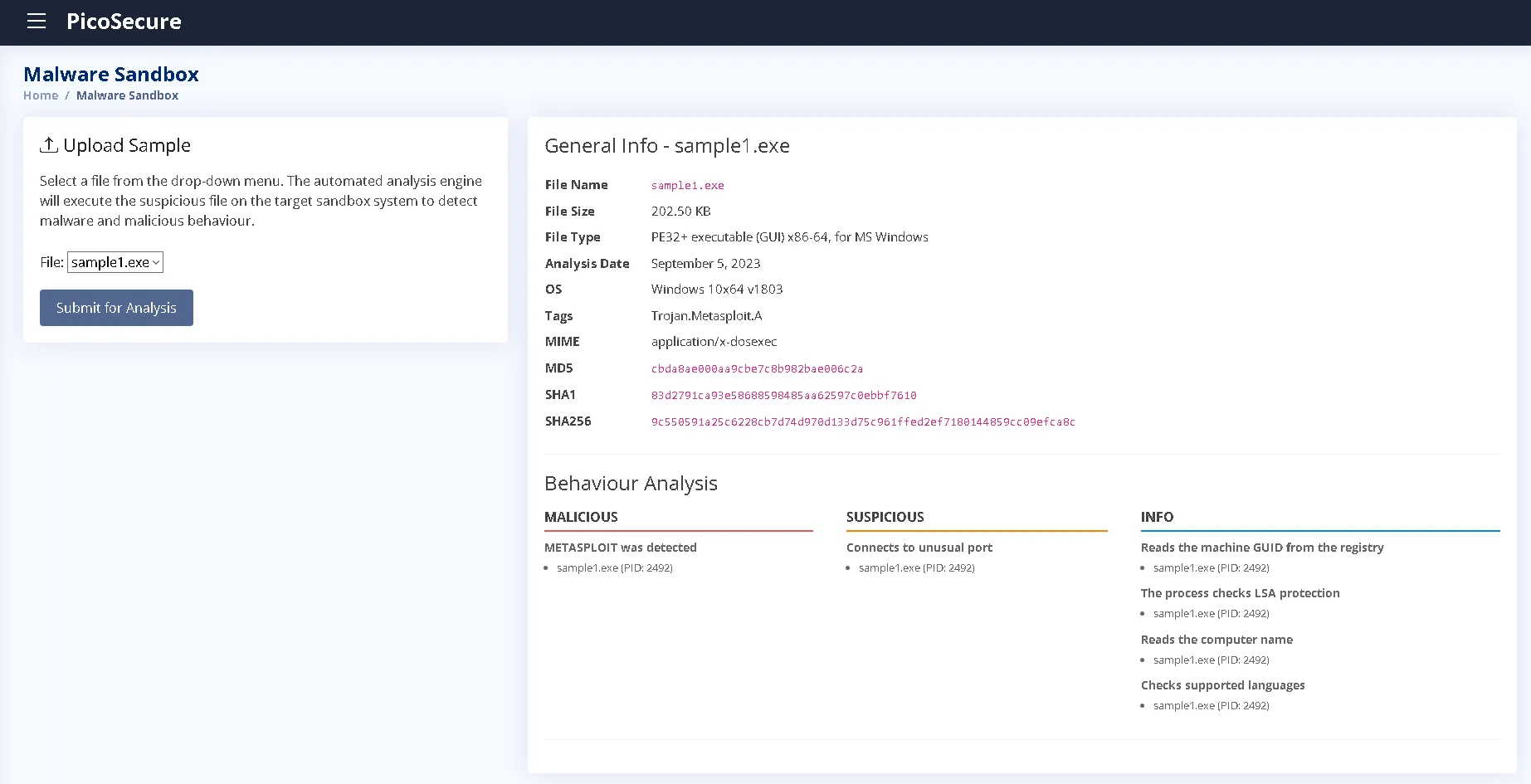
The given report looks similar to VirusTotal, giving three hashes (MD5, SHA1, SHA256), behaviour analysis, general information.
First sample - sample1
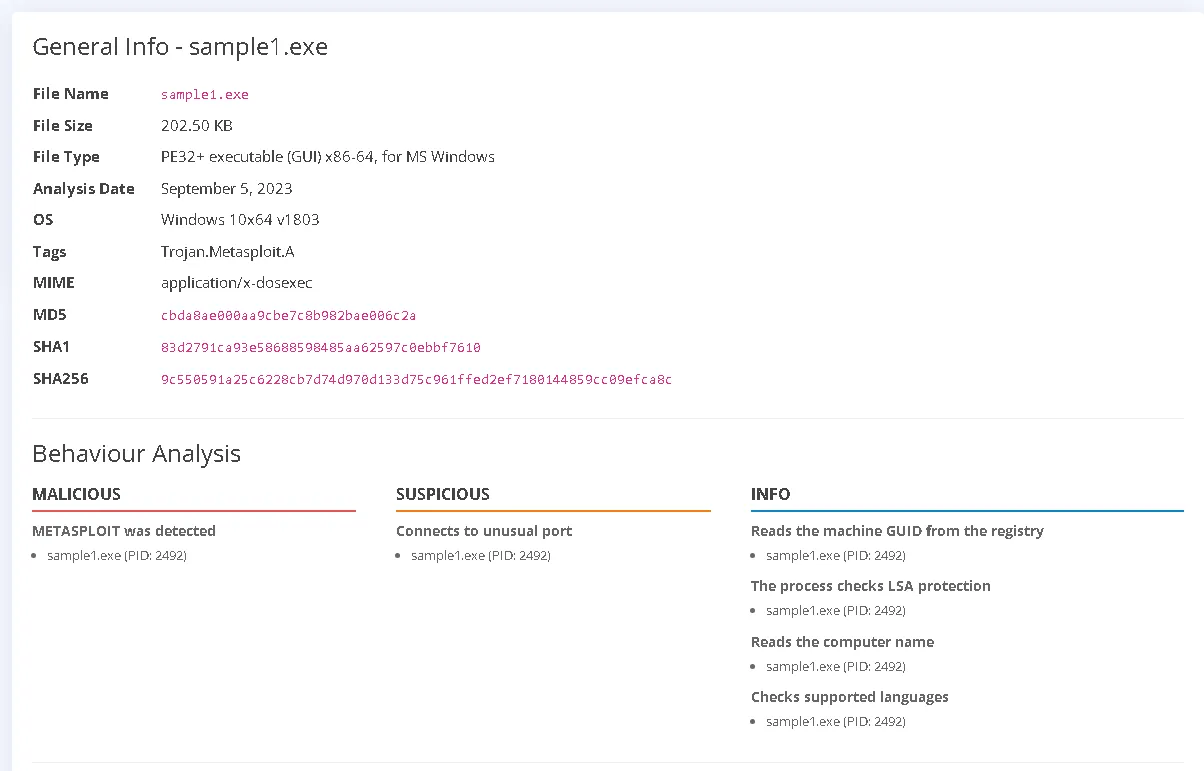
File Overview:
sample1.exeFile Name:
sample1.exe
File Size: 202.50 KB
File Type: PE32+ executable (GUI) x86-64, for MS Windows
MIME Type:application/x-dosexec
Analysis Date & OS: September 5, 2023 on Windows 10x64 v1803
Detection Tag: Trojan.Metasploit.AHashes
- MD5:
cbda8ae000aa9cbe7c8b982bae006c2a- SHA1:
83d2791ca93e58688598485aa62597c0ebbf7610- SHA256:
9c550591a25c6228cb7d74d970d133d75c961ffed2ef7180144859cc09efca8cBehaviour Analysis Summary
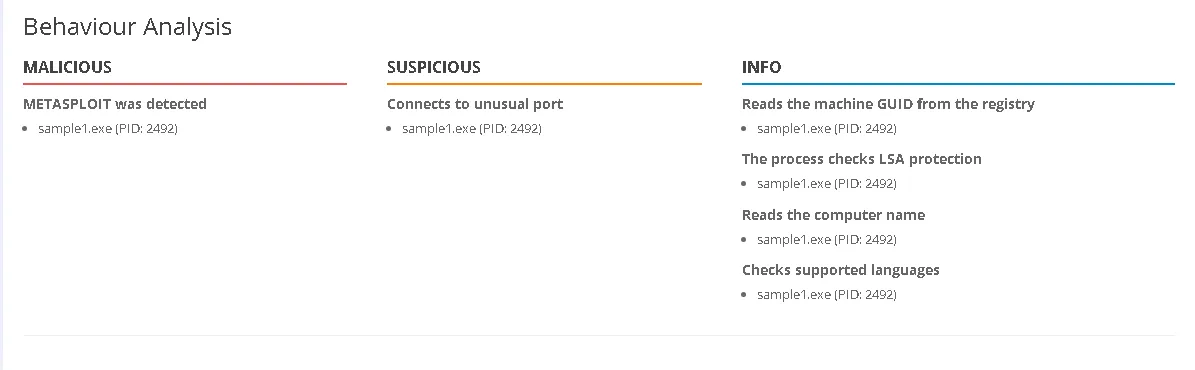
- Malicious: METASPLOIT was detected (Process ID: 2492).
- Suspicious: Connects to an unusual port (Process ID: 2492).
- Informational Actions (PID: 2492):
- Reads the machine GUID from the registry.
- Checks LSA protection.
- Reads the computer name.
- Checks supported system languages.
First step: Third party Verification / Internal Verification
Having a closer look at the results, we can see that is a Trojan made in / executed in Metasploit, an framework for finding vulnerabilities and exploiting them.
What is the file?sample1.exe is an executable file, with the size of 202.5KB (important for later) Before we look at any more details, let’s put the hash in a VirusTotal scan.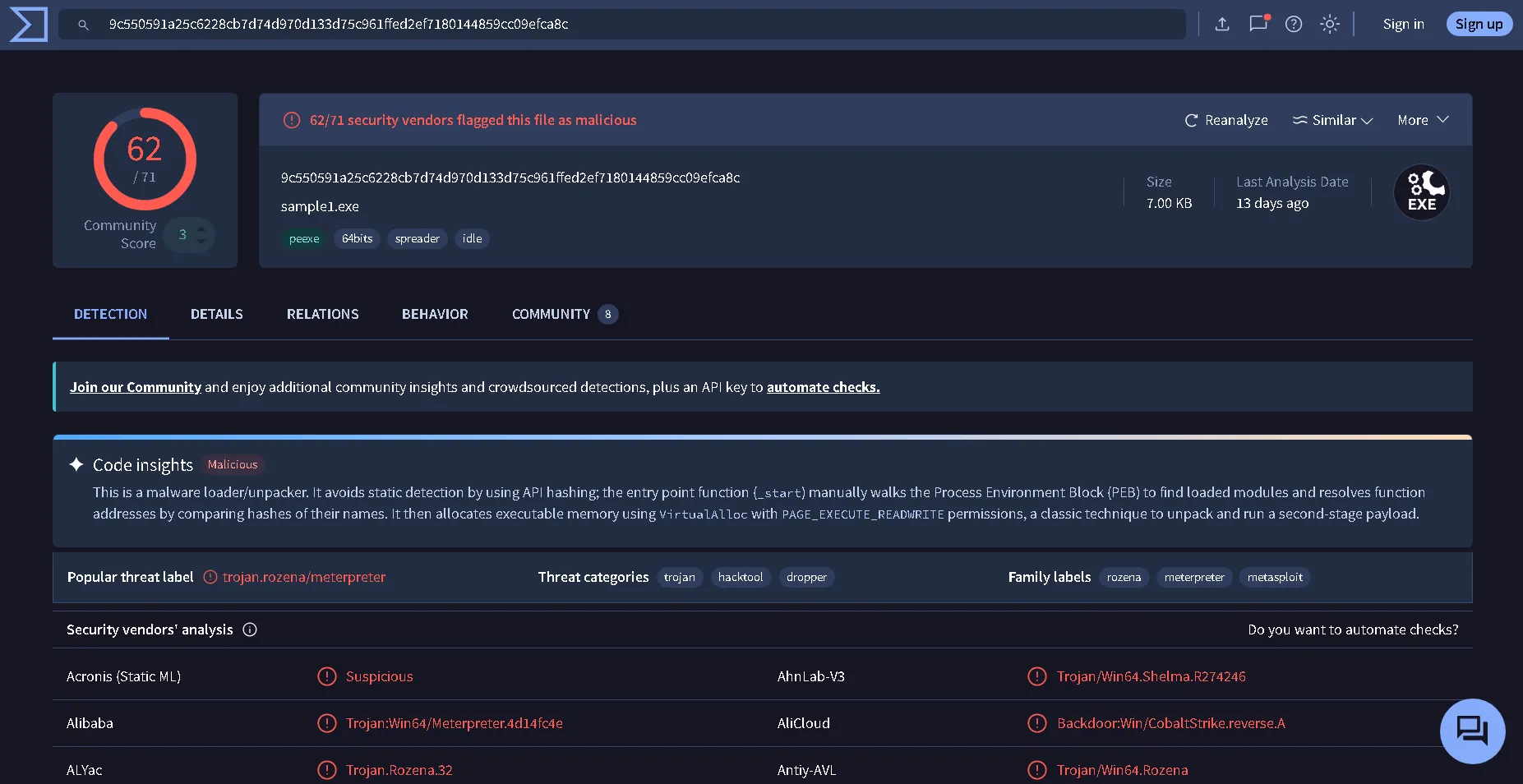 Detection Rate: 62 / 71 security vendors flagged the file as malicious, confirming high-confidence classification as a Metasploit-generated Trojan.
Anomaly Note: File Size Discrepancy
During cross-referencing, a discrepancy in file size was observed despite identical cryptographic hashes:
| File provided in the simulation | File shown in the VirusTotal |
|---|---|
202.50 KB | 7.00 KB |
The difference could be explained either by the difference between Memory and Virtual Size or by the way that simulated sandbox is working. In any case, the hashes being the same means the file is the same.
Why is this file malicious?
It is shown multiple times as being a Trojan (is an app that should look legit but actually hides a malicious payload, similar to the trojan horse analogy). Also, the metasploit is also mentioned, which is a pentesting framework packed with exploits and payloads. Also, meterpreter is mentioned, which is a payload used for post-exploitation with an command-and-control interface.
So, we know it is malicious, as seen in the bottom we got a couple of reasons on why based on behaviour.
Second step: Blocking the malicious file
Here we have limited options, but for this one we are going to block the sample with Hash Blocking File blocking via hash, generally is not recommended because of how hashing works. Changing even 1 byte will totally change the entire hash, which is a common practice to bypass the same target. It is also on the lowest level on the Pyramid of Pain.
Steps:
- Go to manage hashes
- Select the type of hash and paste it in the Hash Value
- Submit (if the hash is correctly blocked, it will turn green as in the picture below)
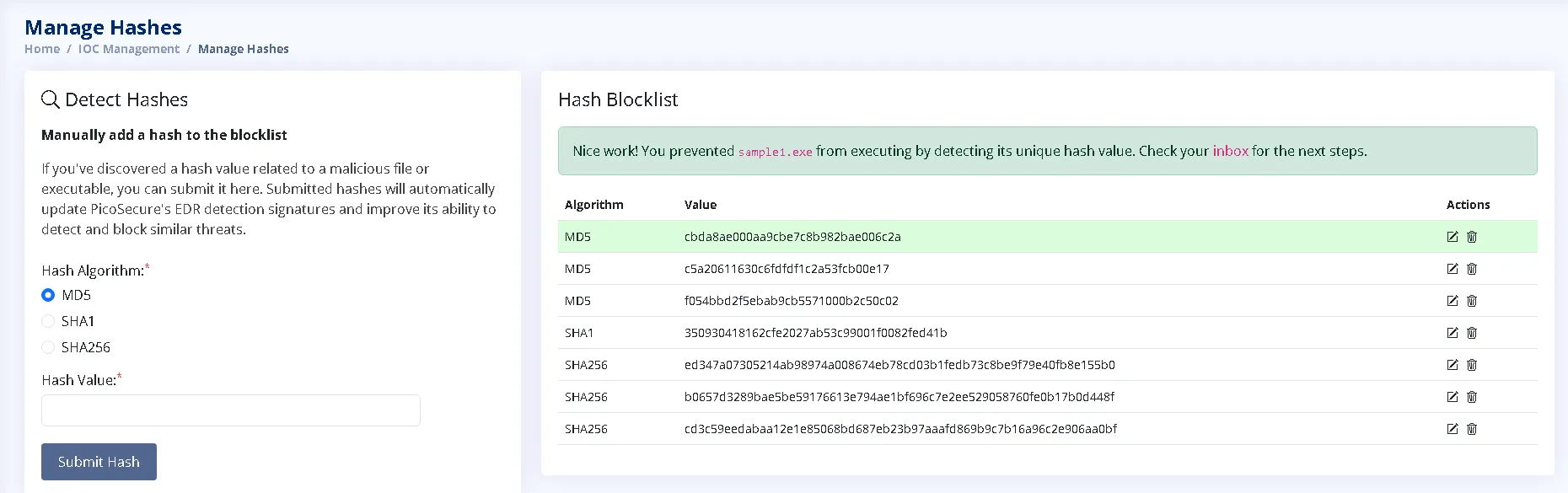
After we successfully blocked the hash, we receive the first flag along side with another email from the same sender. This time with another .exe file attached.
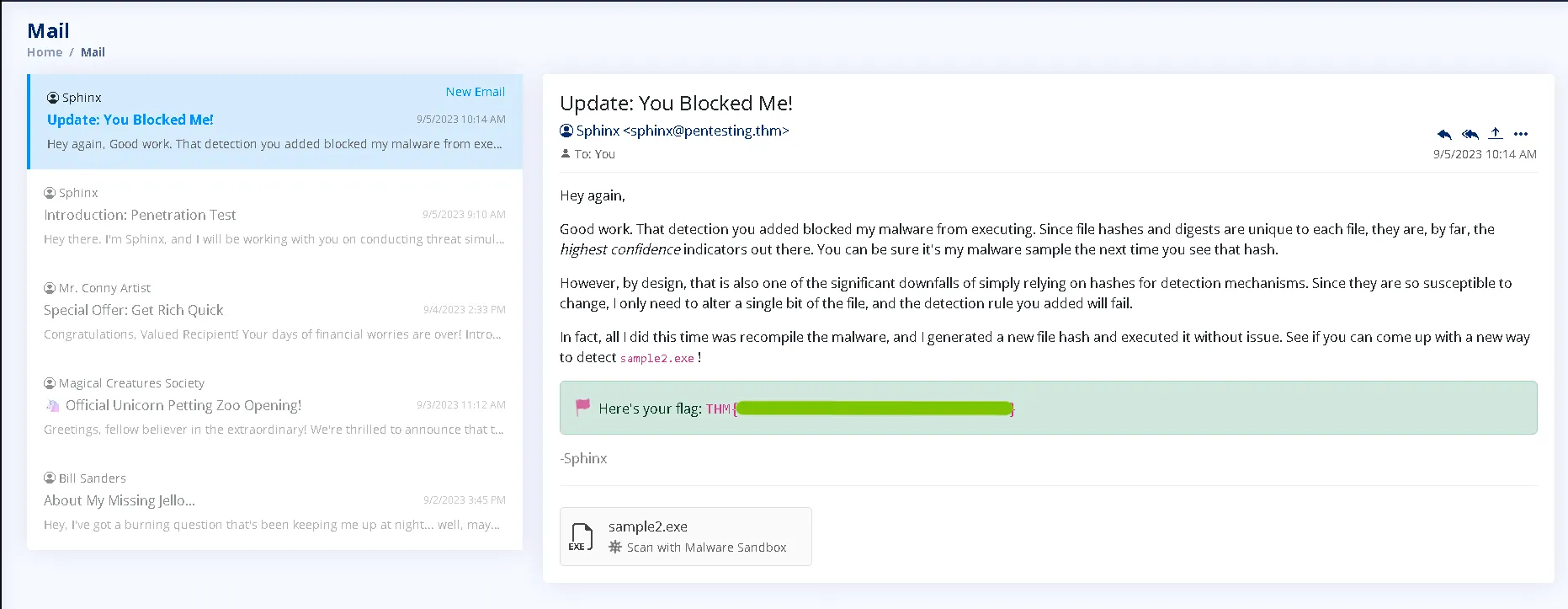
Second sample - sample2
File Overview:
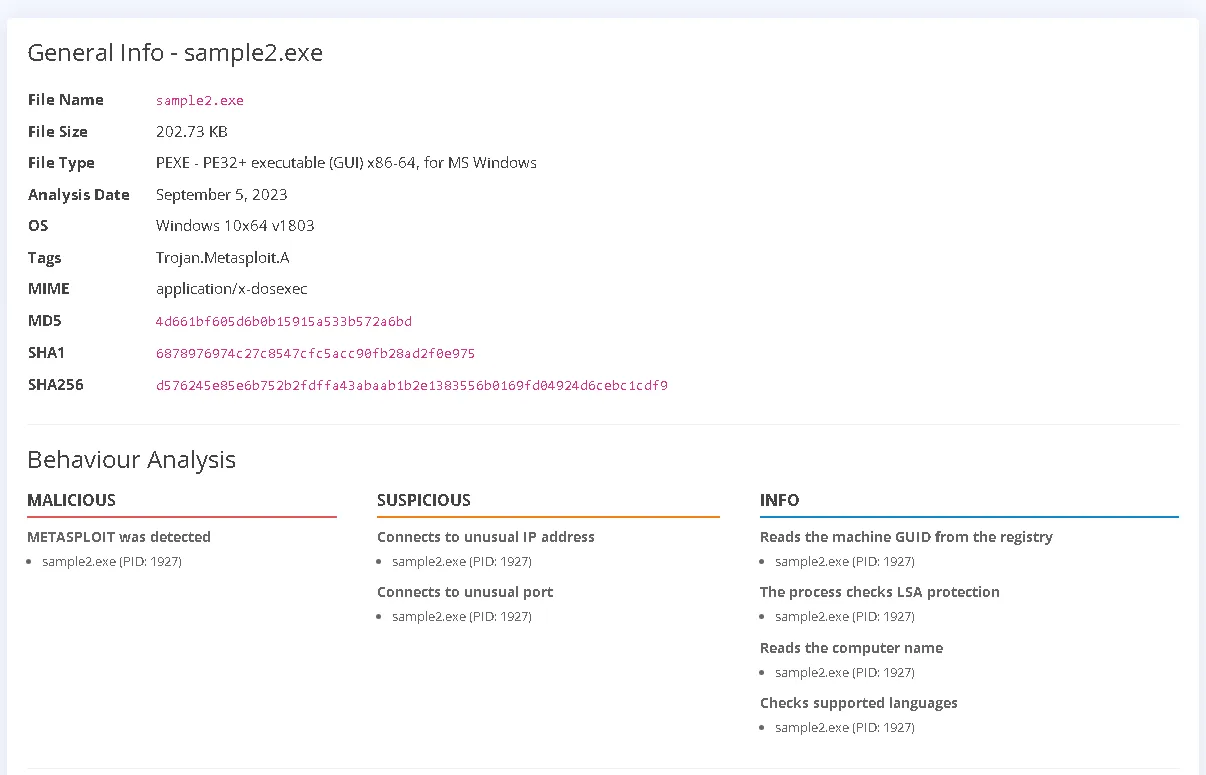
sample2.exeFile Name:
sample2.exe
File Size: 202.73 KB
File Type: PE32+ executable (GUI) x86-64, for MS Windows
MIME Type:application/x-dosexec
Analysis Date & OS: September 5, 2023 on Windows 10x64 v1803
Detection Tag: Trojan.Metasploit.AHashes
MD5:4d661bf605d6b0b15915a533b572a6bd
SHA1:6878976974c27c8547cfc5acc90fb28ad2f0e975
SHA256:d576245e85e6b752b2fdffa43abaab1b2e1383556b0169fd04924d6cebc1cdf9Behaviour Analysis Summary Malicious: METASPLOIT was detected (Process ID: 1927).
Suspicious: Connects to an unusual IP address and connects to an unusual port (Process ID: 1927).
- Informational Actions (PID: 1927): Reads the machine GUID from the registry.
- Checks LSA protection.
- Reads the computer name.
- Checks supported system languages.
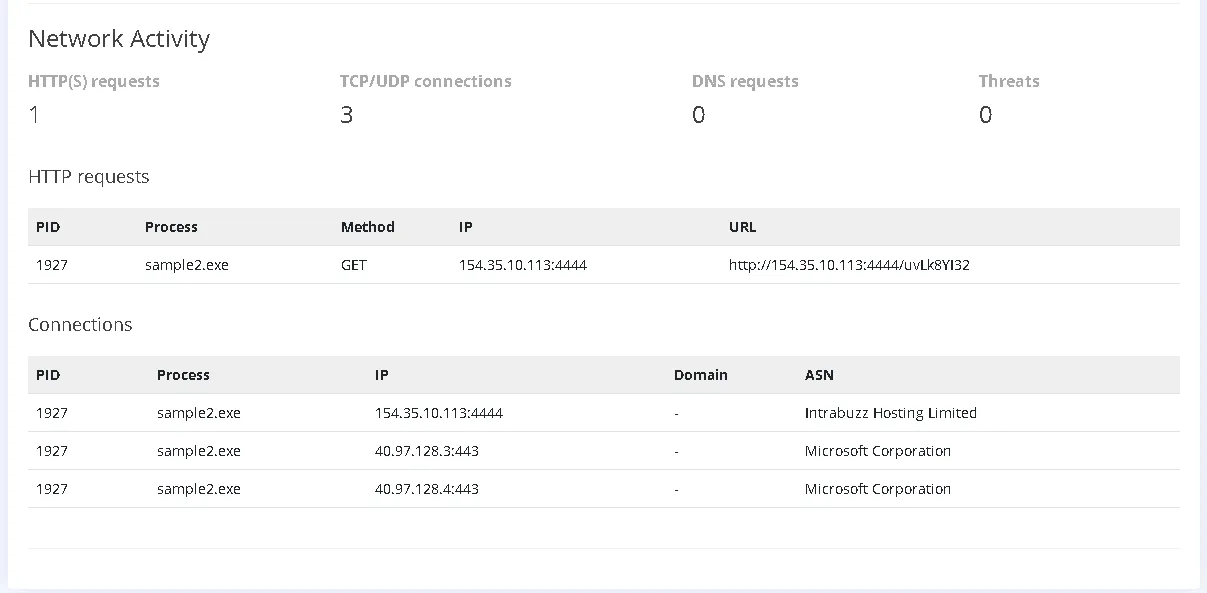
This time, we also have an Network Activity tab. Which is really important because we can see the exact connections that sample2.exe is doing when executed.
First, we see 3 connections and 1 HTTP request.
The first one is sketchy (154[.]35[.]10[.]113[:]4444) because is connecting to the 4444 port which is typically used on metasploit / reverse shells.
The last 2 seems legit, 443 port is port used for HTTPS. For this simulation we will be focusing on the first connection.
First step: Third party Verification / Internal Verification
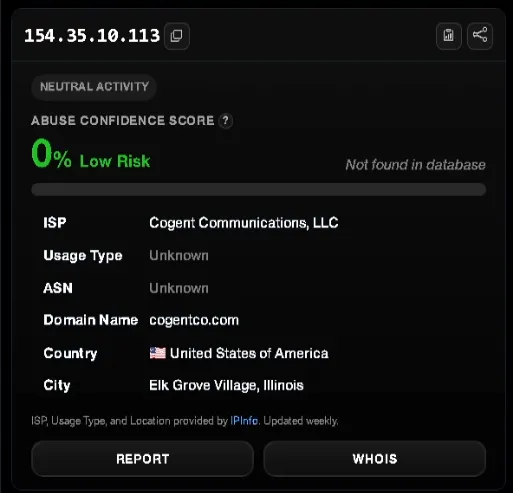
The goal is to understand the source of the attack and to find as much information before anything. We can check the IP provided in AbuseIPDB, but it could be useless because attackers use other infected machines to not be detected. In this case, the machine have a really low risk (0%) which could be, based on the attack, an pentesting exercise (which is the case in this simulation) or a new infected machine from Cognet Communications, LLC (U.S.A).
No valuable information provided from this basic search, but I did it for the sake of learning and curiosity.
An important thing to mention!
The file size of the sample2.exe is oddly similar to sample1.exe which is a sign that the attacker changed the code slightly to bypass the hash blocking.
Let’s compare the hashes.
| MD5 | Source |
|---|---|
| 4d661bf605d6b0b15915a533b572a6bd | sample2.exe |
| cbda8ae000aa9cbe7c8b982bae006c2a | sample1.exe |
The hashes are completely different, but it is not a totally completely different file, it was a bit changed to skip the hash verification. The behaviour is the same as in
sample1.exe.
Second step: Blocking the malicious file
This time, as mentioned in the email, blocking it by hash will not be enough. The next option would be to block via IP.
Steps:
- Go to Firewall Rule Manager
- Create a new rule with the following details
- Save rule (If done correctly, It should turn green and You should have a popup notification with the flag / an email )
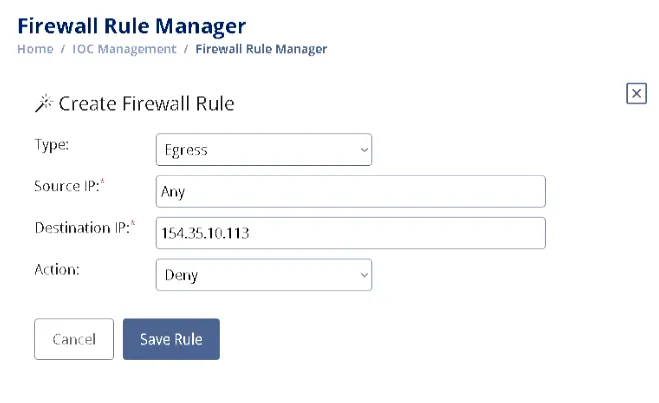
Before we move on, I wanted to explain the rule in case anyone needs it.
Type: Egress (Outgoing - The request is an GET request from our machine to another)
Source IP: Any (We don’t care what is our IP, if we have to block an Outgoing request we can block Any Source IPs)
Destination IP: 154.35.10.113 (Is the malicious address)
Action: Deny (To block the attack)
The email received after blocking: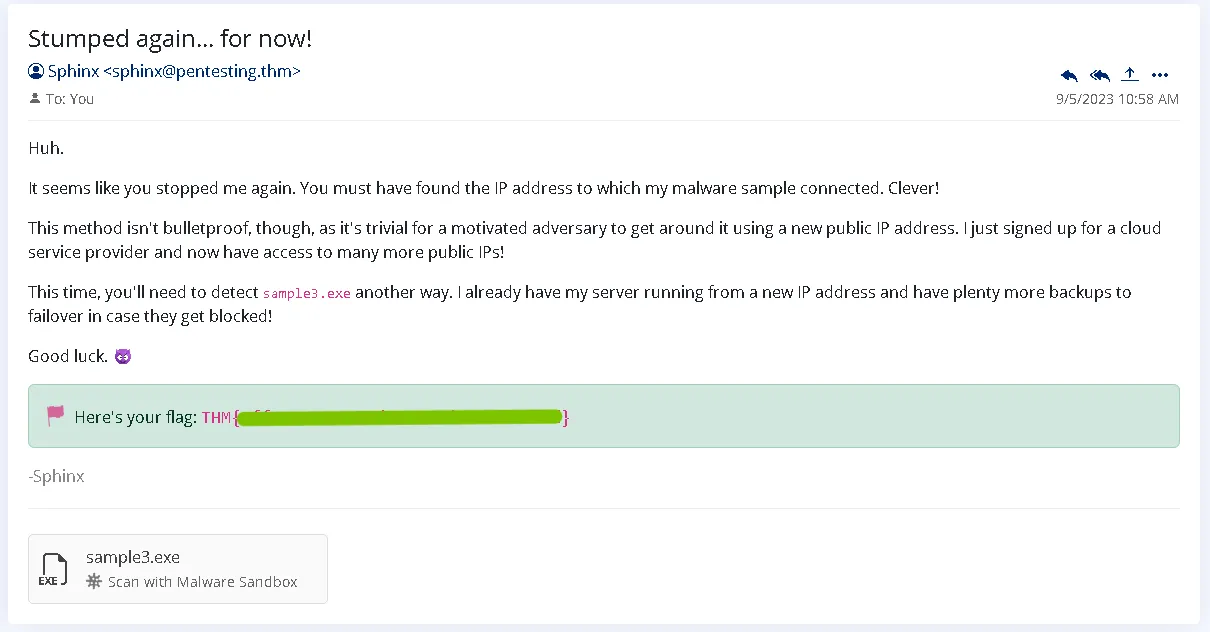
Third sample - sample3
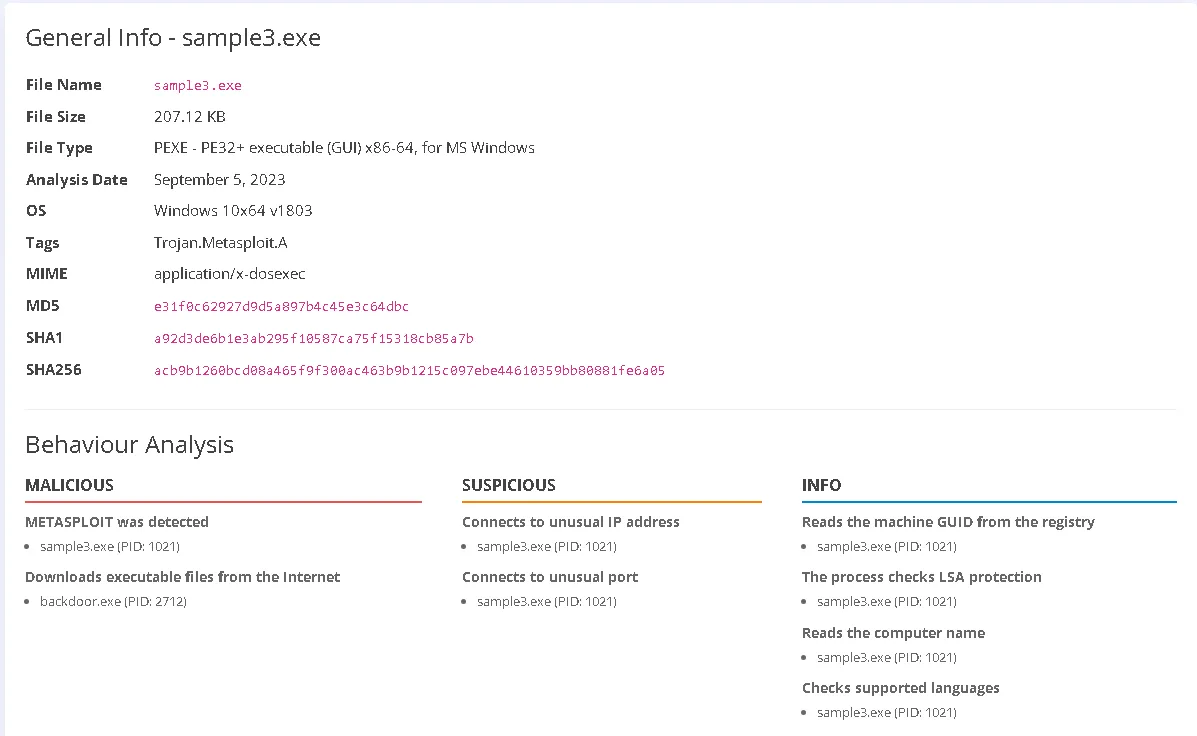
File Overview:
sample3.exeFile Name:
sample3.exe
File Size: 207.12 KB
File Type: PE32+ executable (GUI) x86-64, for MS Windows
MIME Type:application/x-dosexec
Analysis Date & OS: September 5, 2023 on Windows 10x64 v1803
Detection Tag: Trojan.Metasploit.AHash
MD5:e31f0c62927d9d5a897b4c45e3c64dbc
SHA1:a92d3de6b1e3ab295f10587ca75f15318cb85a7b
SHA256:acb9b1260bcd08a465f9f300ac463b9b1215c097ebe44610359bb80881fe6a05
Behaviour Analysis Summary
Malicious: METASPLOIT was detected (Process ID: 1021) and downloads executable files from the Internet via backdoor.exe (Process ID: 2712).
Suspicious: Connects to an unusual IP address and connects to an unusual port (Process ID: 1021).
- Informational Actions (PID: 1021): Reads the machine GUID from the registry.
- Checks LSA protection.
- Reads the computer name.
- Checks supported system languages.
First step: Third party Verification / Internal Verification
Similar as before, we receive a similar looking file where Hash checking is not working and IP blocking is useless.
What other options do we have? We can see that the sample3.exe is doing a couple of connections, such as Microsoft (which seems legit in this case, the right port, right domain), but also with emudyn.bresonicz.info which means we can block it via DNS (Domain Name System). I tried accessing it with Browserling (sandbox tool) but with no success.
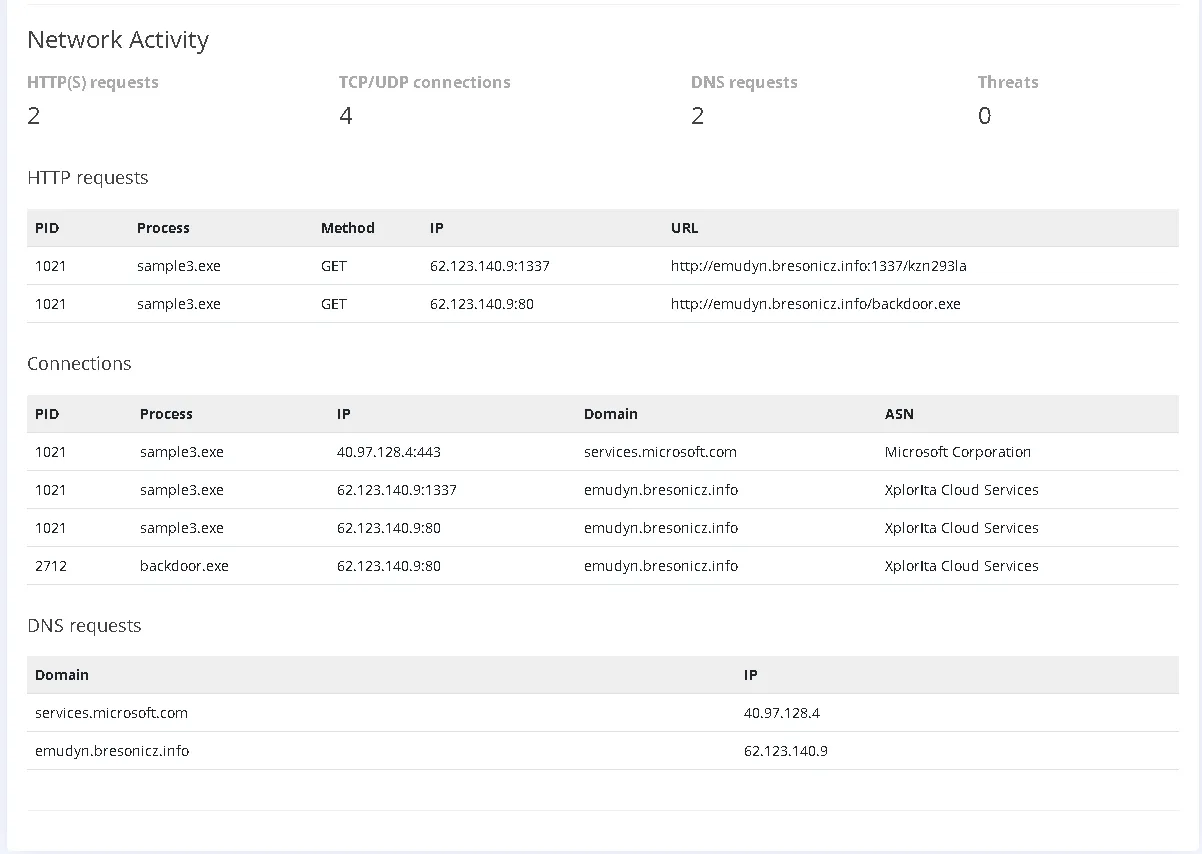
Also, file sizing is really close to the original sample2.exe. Which means, little to no changes, maybe 1-2 new instructions were added. But the behaviour stays the same, this time is mentioned an backdoor which is visible in the HTTP Request tab.
| Size (KB) | Filename |
|---|---|
| 207.12 | sample3.exe |
| 202.73 | sample2.exe |
| 202.50 | sample1.exe |
Second step: Blocking the malicious file
Let’s create DNS rule in the DNS Rule Manager. The rule should have
- A name for the rule to know exactly what it is blocking
- Category of the blocking (if we are blocking Malware for example)
- Domain Name (The domain blocked) ~ ! Blocking the subdomain will be inefficient, we have to block the whole domain, it doesn’t look legit so blocking the whole domain should not be a problem.
- Action should be Deny
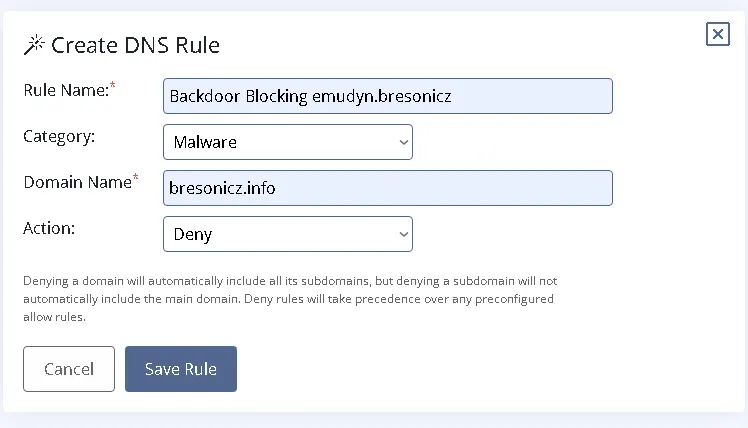
Steps:
- Go to DNS Rule Manager
- Create DNS Rule
- Copy the settings or make your own with the mentions
- Save rule
- Done, if it turns green, it is good to go
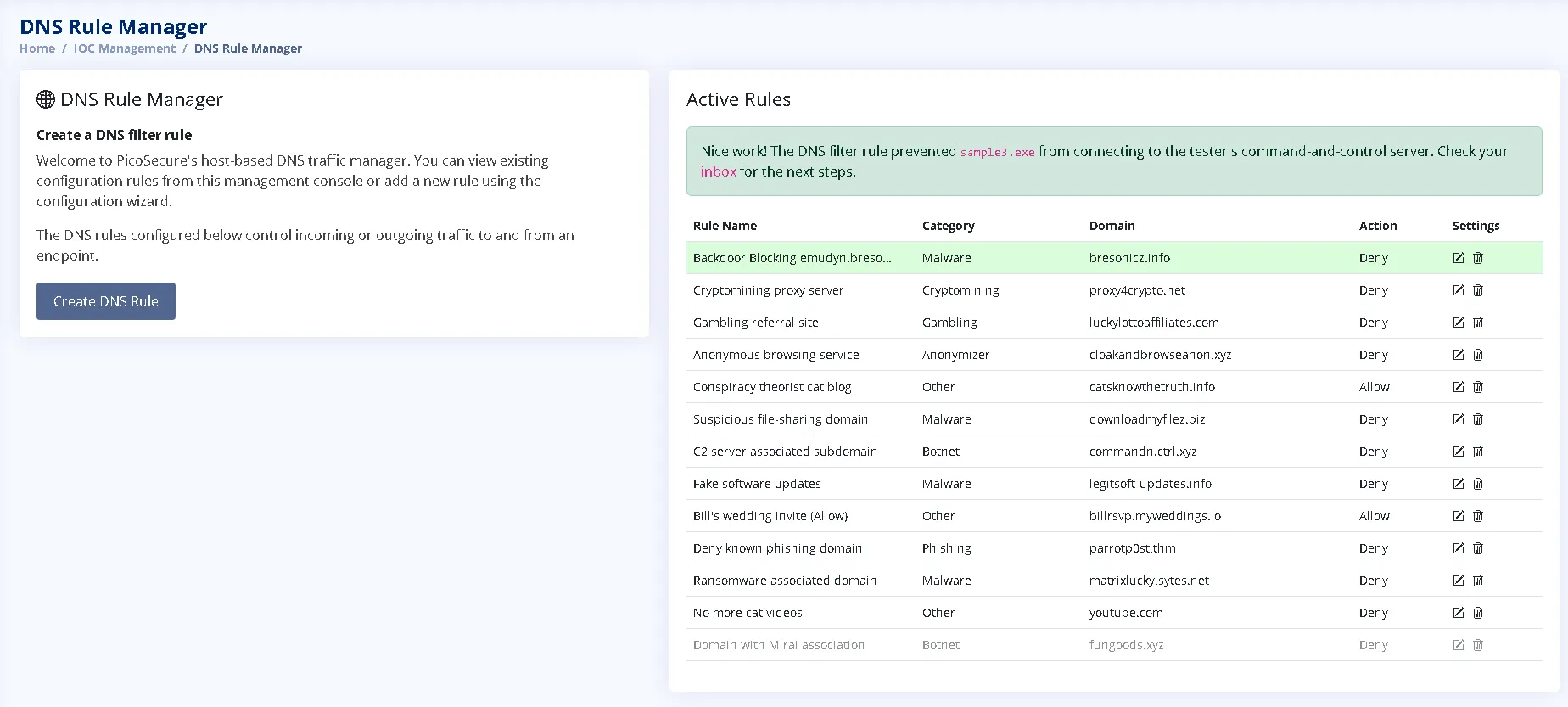
The email received after blocking: 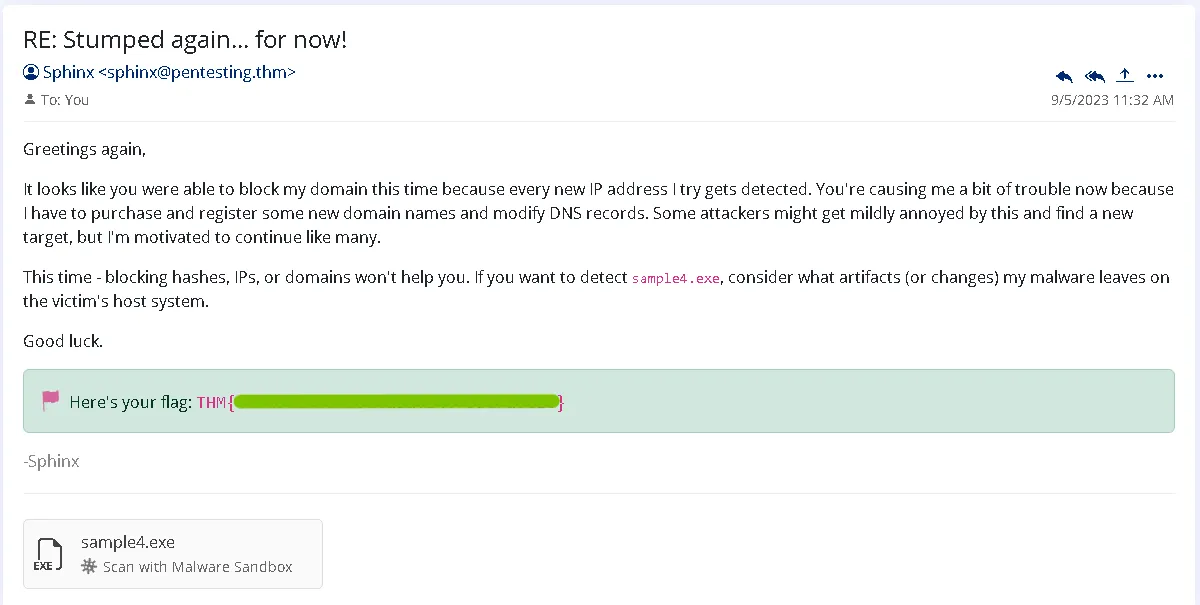
Fourth sample - sample4
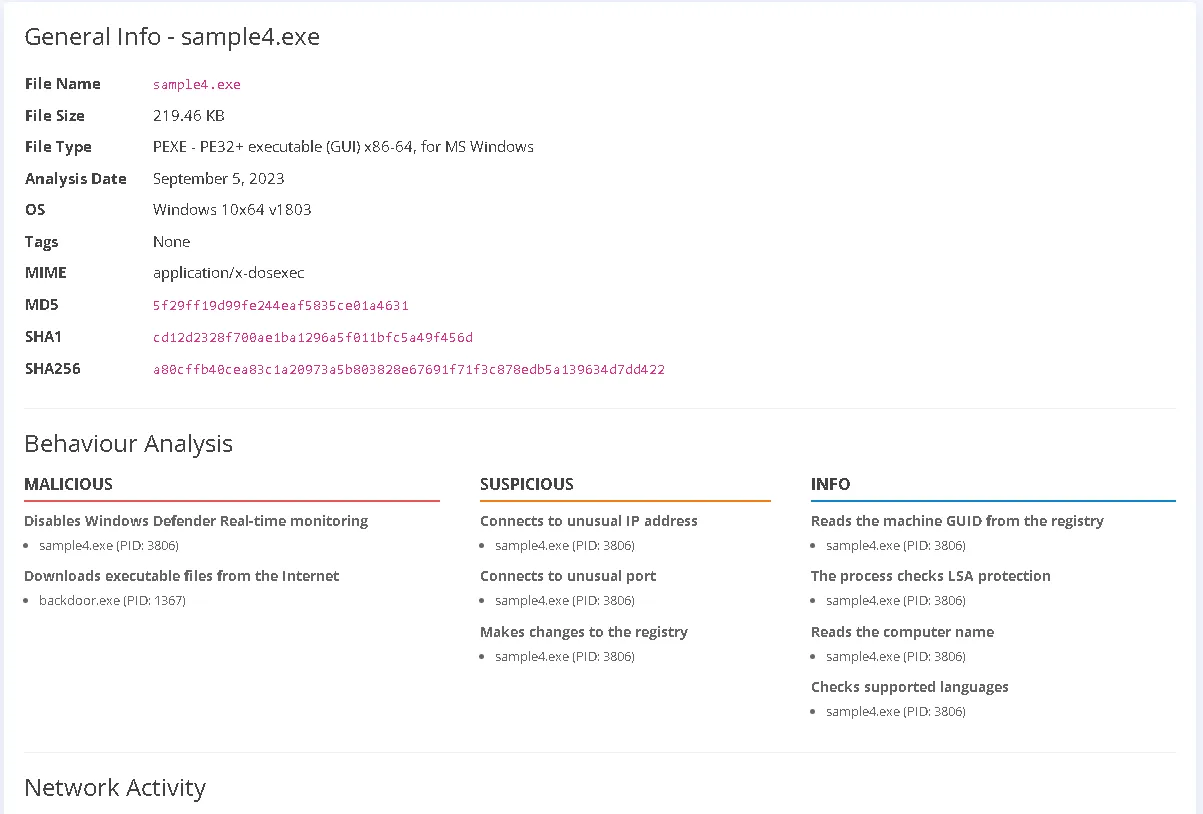
File Overview:
sample4.exeFile Name:
sample4.exe
File Size: 219.46 KB
File Type: PE32+ executable (GUI) x86-64, for MS Windows
MIME Type:application/x-dosexec
Analysis Date & OS: September 5, 2023 on Windows 10x64 v1803
Detection Tag: NoneHashes
MD5:5f29ff19d99fe244eaf5835ce01a4631
SHA1:cd12d2328f700ae1ba1296a5f011bfc5a49f456d
SHA256:a80cffb40cea83c1a20973a5b803828e67691f71f3c878edb5a139634d7dd422Behaviour Analysis Summary
Malicious: Disables Windows Defender Real-time monitoring (Process ID: 3806).
Malicious: Downloads executable files from the Internet via backdoor.exe (Process ID: 1367). Suspicious: Connects to an unusual IP address (Process ID: 3806).
Suspicious: Connects to an unusual port (Process ID: 3806).
Suspicious: Makes changes to the registry (Process ID: 3806).Informational Actions (PID: 3806):
Reads the machine GUID from the registry.
Informational Actions (PID: 3806):
Checks LSA protection.
Informational Actions (PID: 3806):
Reads the computer name.
Informational Actions (PID: 3806):
Checks supported system languages.
First step: Third party Verification / Internal Verification
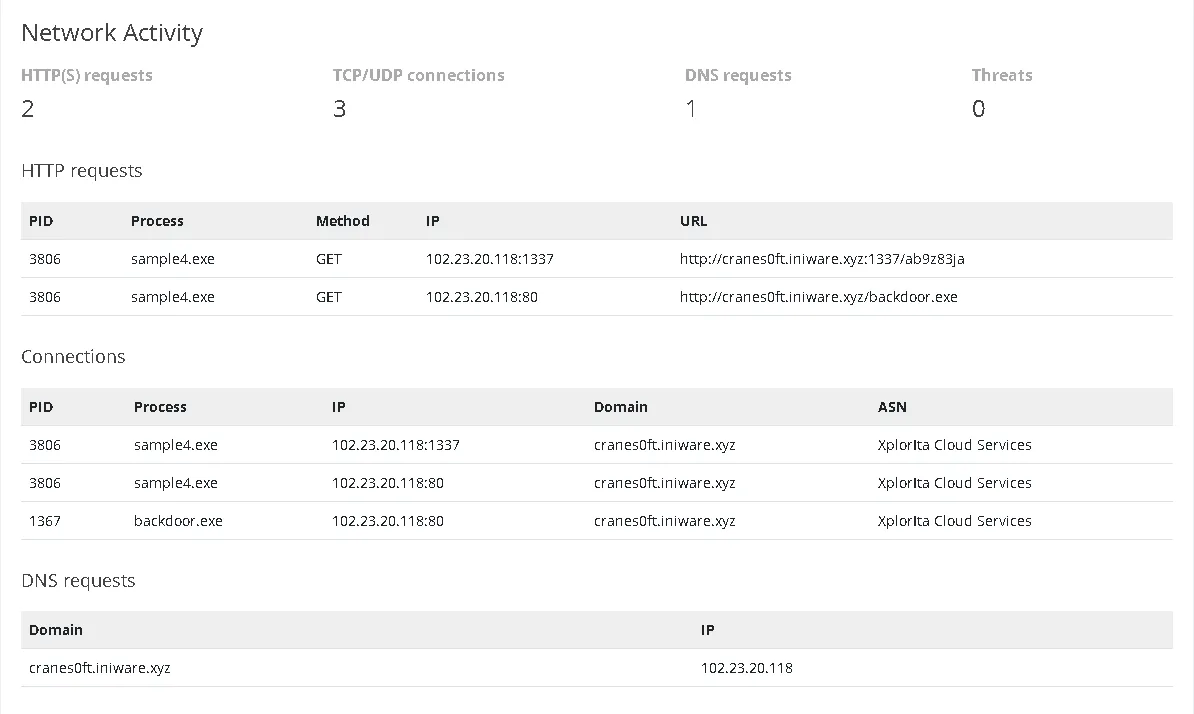
The DNS has changed to cranes0ft.iniware.xyz from emudyn.bresonicz.info.
So DNS blocking will be inefficient if the attacked already changes the DNS addresses that easily. Also accessing this DNS in browserling is not returning anything valuable.
The backdoor is still the same, backdoor.exe.
We have no VirusTotal report, AbuseIPDB return an 0 risk IP, browserling sandbox can’t access the DNS (it is not a real website). So we are limited by the simulation.
We also have a new Registry Activity tab. Here we can see other artifacts that sample4.exe is leaving behind such as Registry modifications.
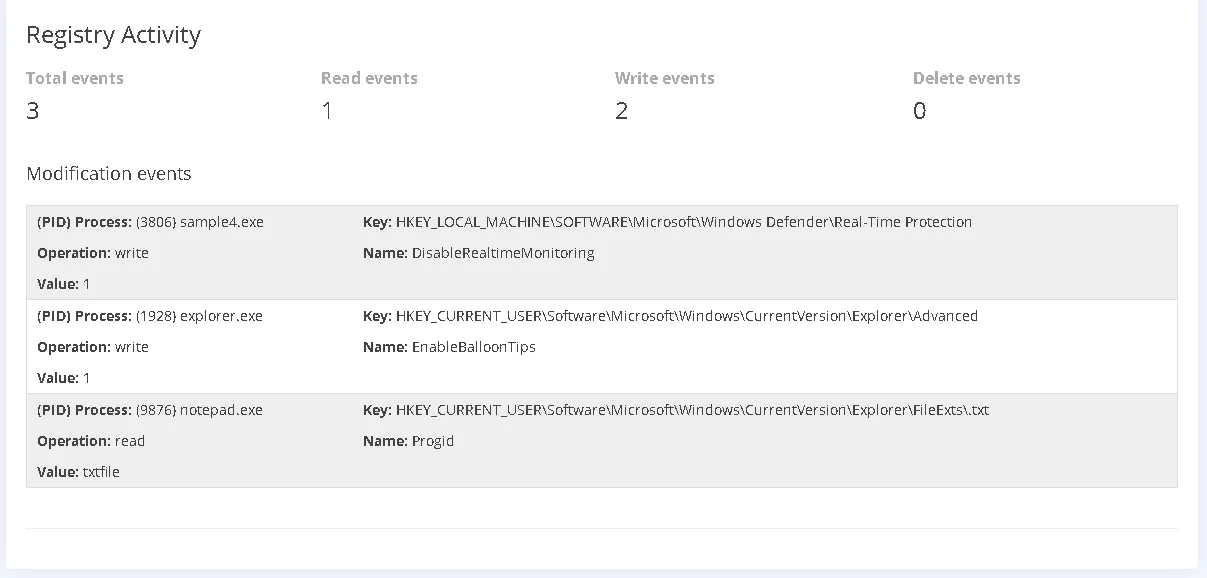
The first event means that sample4.exe is disabling the Windows Defender Real Time Protection. This technique is also called Defense Impairment (TA0112).
We can see by looking at the registry, it is changing the value from 0 to 1 on the DpaDisabled registry rule (in the simulation, due to the OS, it is called DisableRealtimeMonitoring), which actually disables the service.
The other 2 activities, seems legit, no need for further investigation, only if any other artifacts appear.
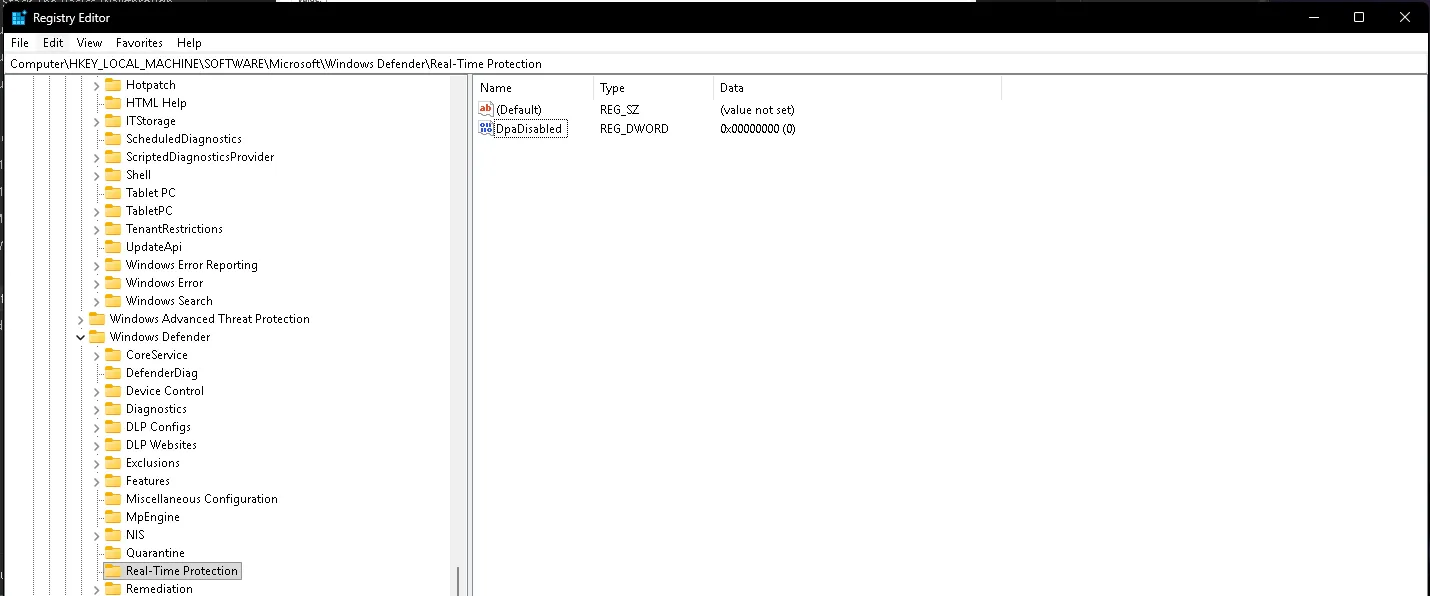
We are not able to find anything for IP, Hashes, DNS searches. So the next thing remaining is Dynamic Analysis or Just blocking the file, because we don’t have access to the file, we will just block it via Registry Restrictions.
Second step: Blocking the malicious file
Steps:
- Go to Sigma Rule Builder
- Select Sysmon Event Logs
- Select Registry Modification
- Add the key (Path towards the rule)
- Add Registry Name (The rule’s name)
- Add Value 1 (1 = Enable, 0 = Disable)
- ATTCK ID (We didn’t have the TA0112 available so the next option is TA0005 Defense Evasion)
- Validate Rule
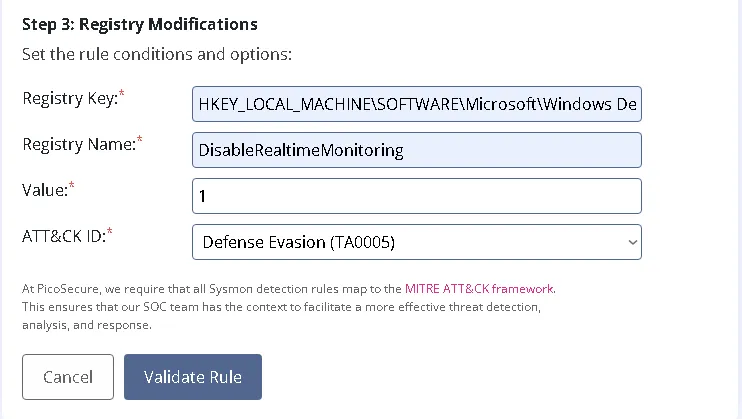
The result should look like this: 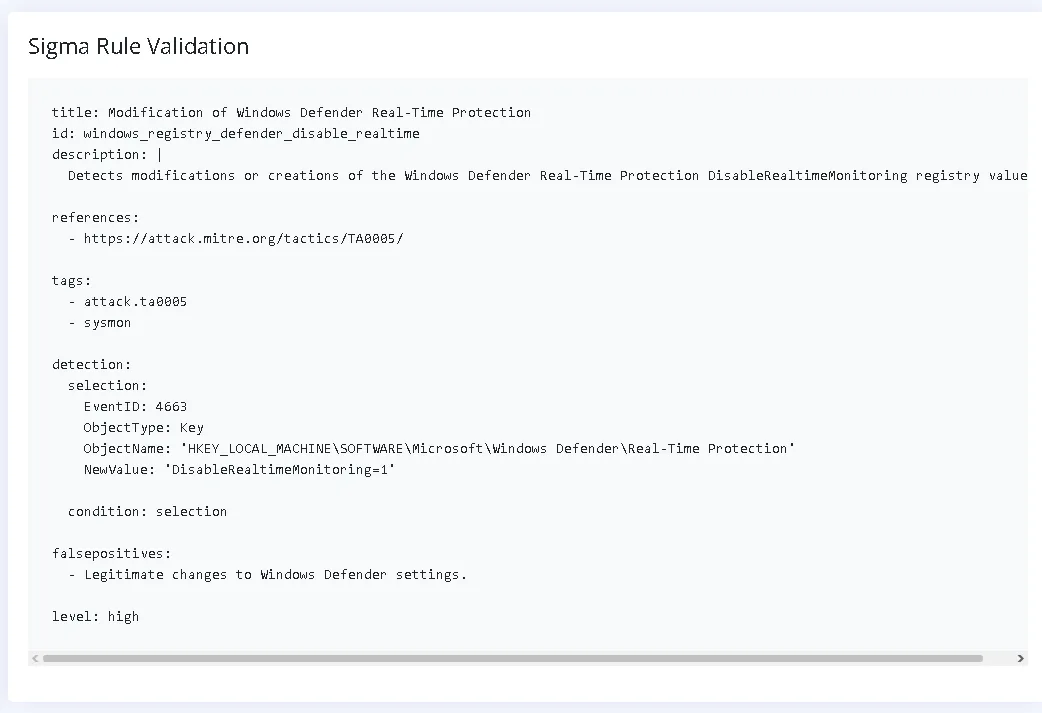
The email received: 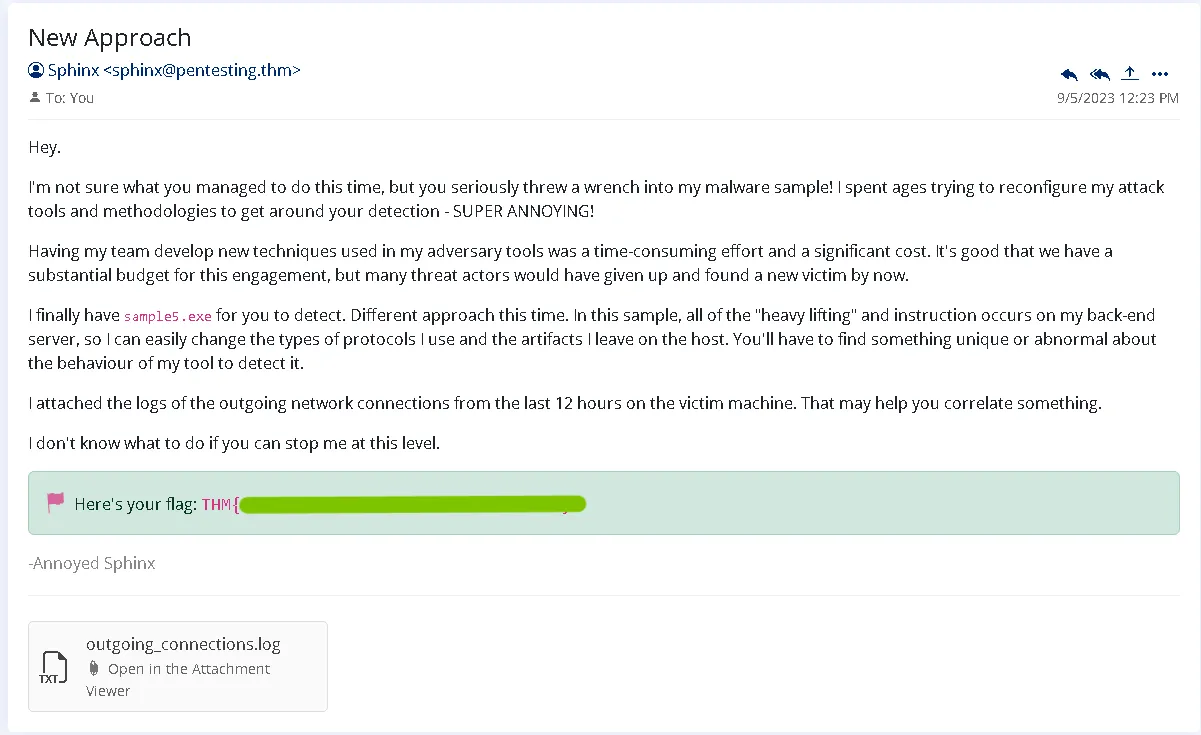
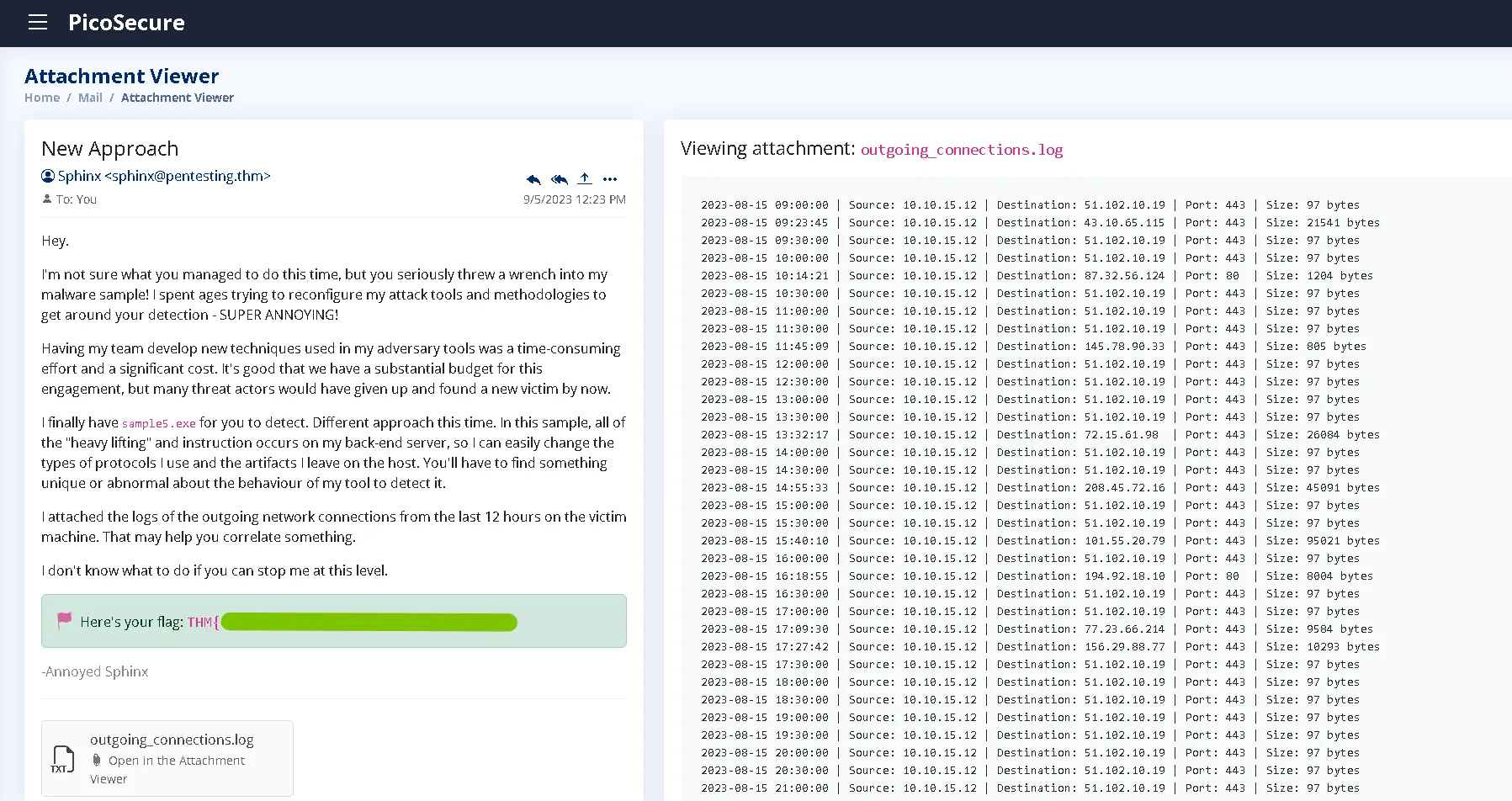
Fifth attachment - outgoing_connections.log
File Overview:
sample5.exeFile Name:
sample5.exe
Sender: Sphinx (sphinx@pentesting[.]thm)
Email Date: September 5, 2023, 12:23 PM
Attached Log:outgoing_connections.logBehaviour Analysis Summary
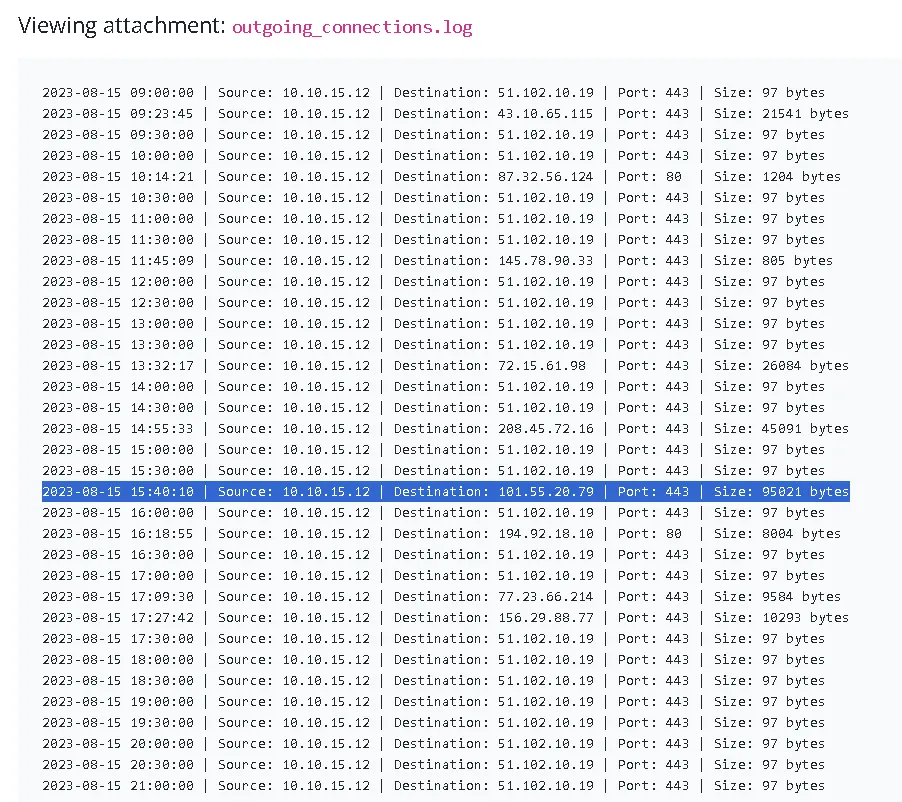
Suspicious: Regular periodicC2 beaconingevery 30 minutes to51[.]102[.]10[.]19on port443with a constant size of97 bytes.
Suspicious: Outbound traffic to multiple external IP addresses on ports80and443with varying data sizes.
First step: Third party Verification / Internal Verification
As we can see, the host 10[.]10[.]15[.]12 is sending 97 bytes every 30 minutes, which is more of an heartbeat signal (“I am alive” message to the attacker). This C2 behaviour is constant through the whole log file.
Let’s use internal Malware Sandbox to check sample5.exe for more details.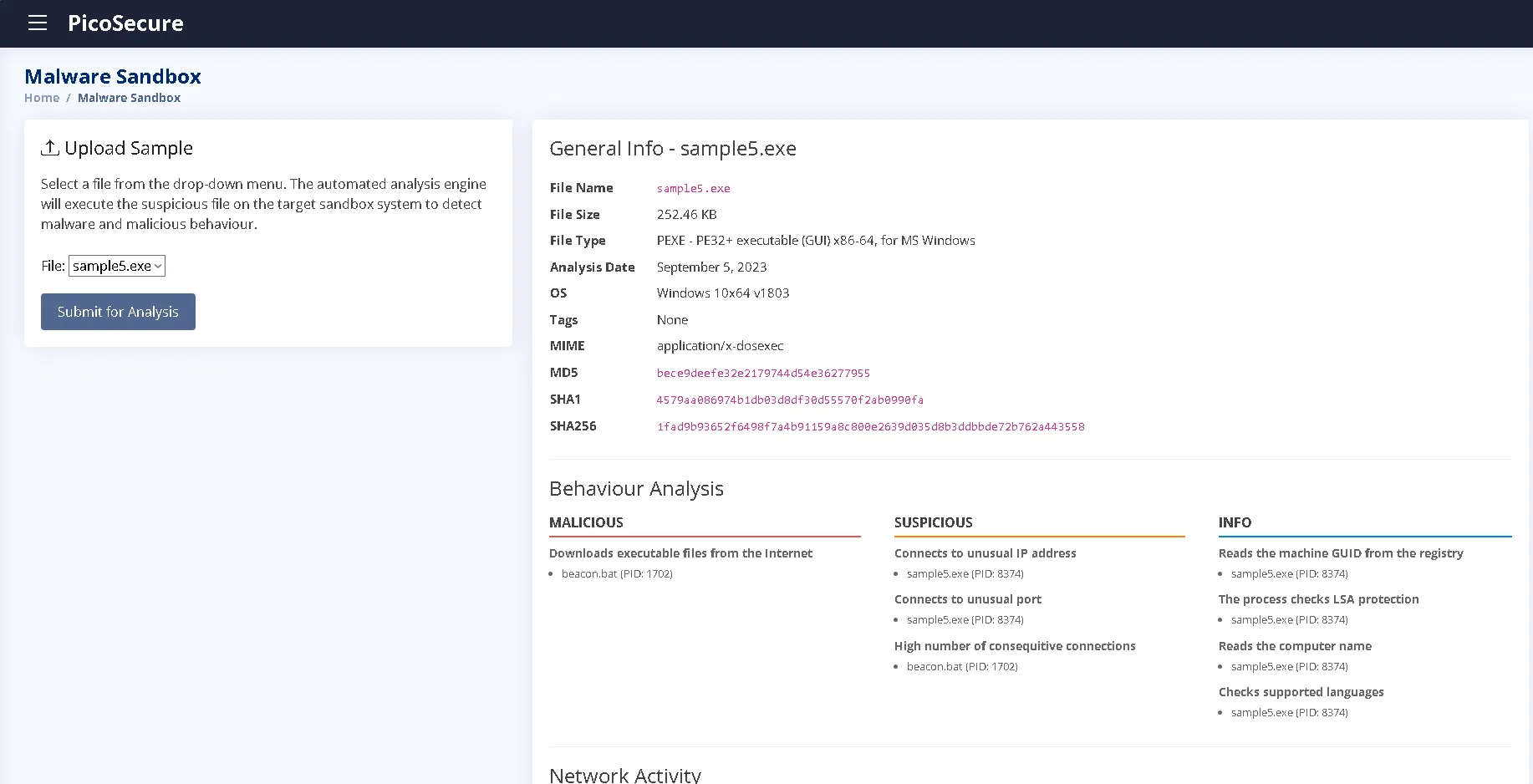
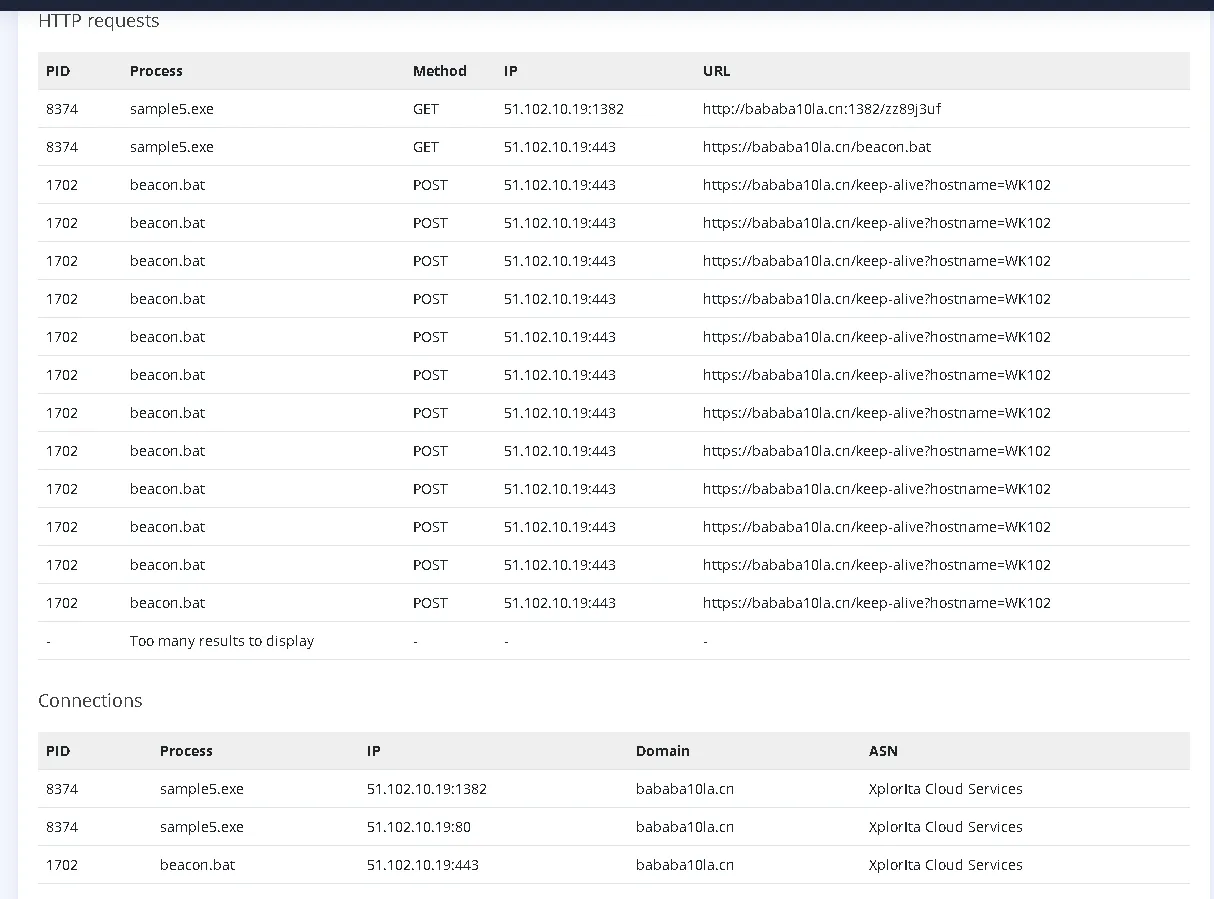

HTTP Request shows 2 instances, one is sample5.exe and another beacon.bat (Self explanatory name). A GET method (to get the beacon.bat) and one is POST (For the keep-alive function). An important fact is that we can see the hostname (?hostname=WK102).
DNS request is showing only one instance: bababa10la[.]cn and based on the information provided, it is a Cloud Service provider that could be a legitimate service. So blocking the whole DNS is not the way to go.
Third Party Services didn’t return anything worth mentioning.
In anyway, we can block the network connections, via a similar way as the behaviour blocking.
Second step: Blocking the malicious file
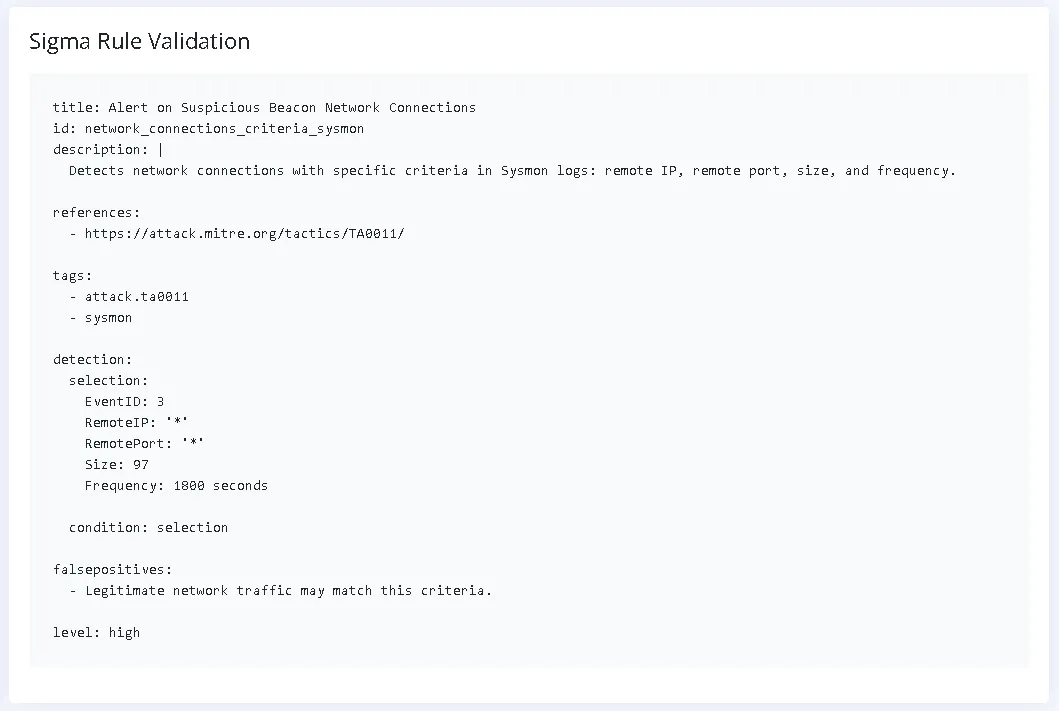
For the blocking method, we are going to use Network Blocking, but we want to block the keep alive signal, which have a constant 97 bytes every 30 minutes.
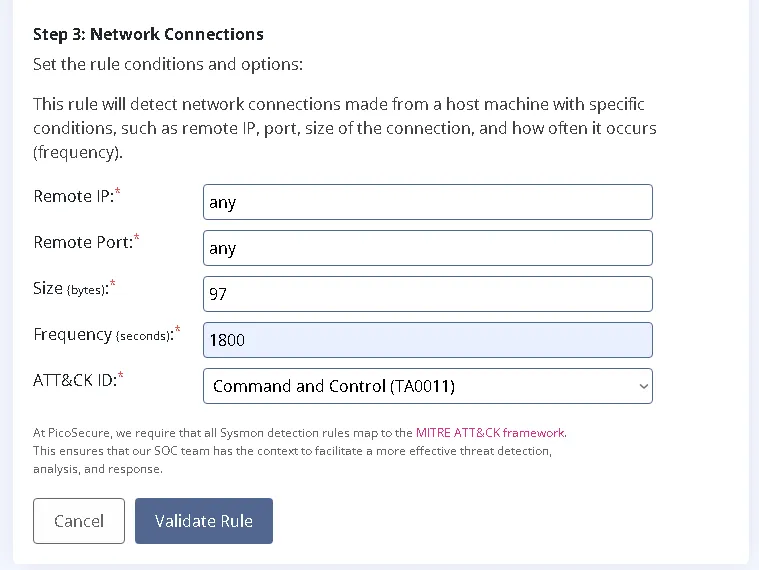
Steps:
- Go to Sigma Rule Builder
- Select Sysmon Event Logs
- Select Network Connections
- Add the remote IP (Any because the IPs can change)
- Add the remote PORT (Any because the ports can change)
- Add Size (97 bytes because the keep alive signal is constant 97 bytes)
- Add frequency
- ATTCK ID (
Command and Control TA0011) - Validate Rule
Sixth attachment - commands.log
File Overview:
sample6.exeFile Name:
sample6.exe
Sender: Sphinx (sphinx@pentesting[.]thm)
Email Date: 9/5/2023 1:02 PM
Attached Log:commands.logBehaviour Analysis Summary
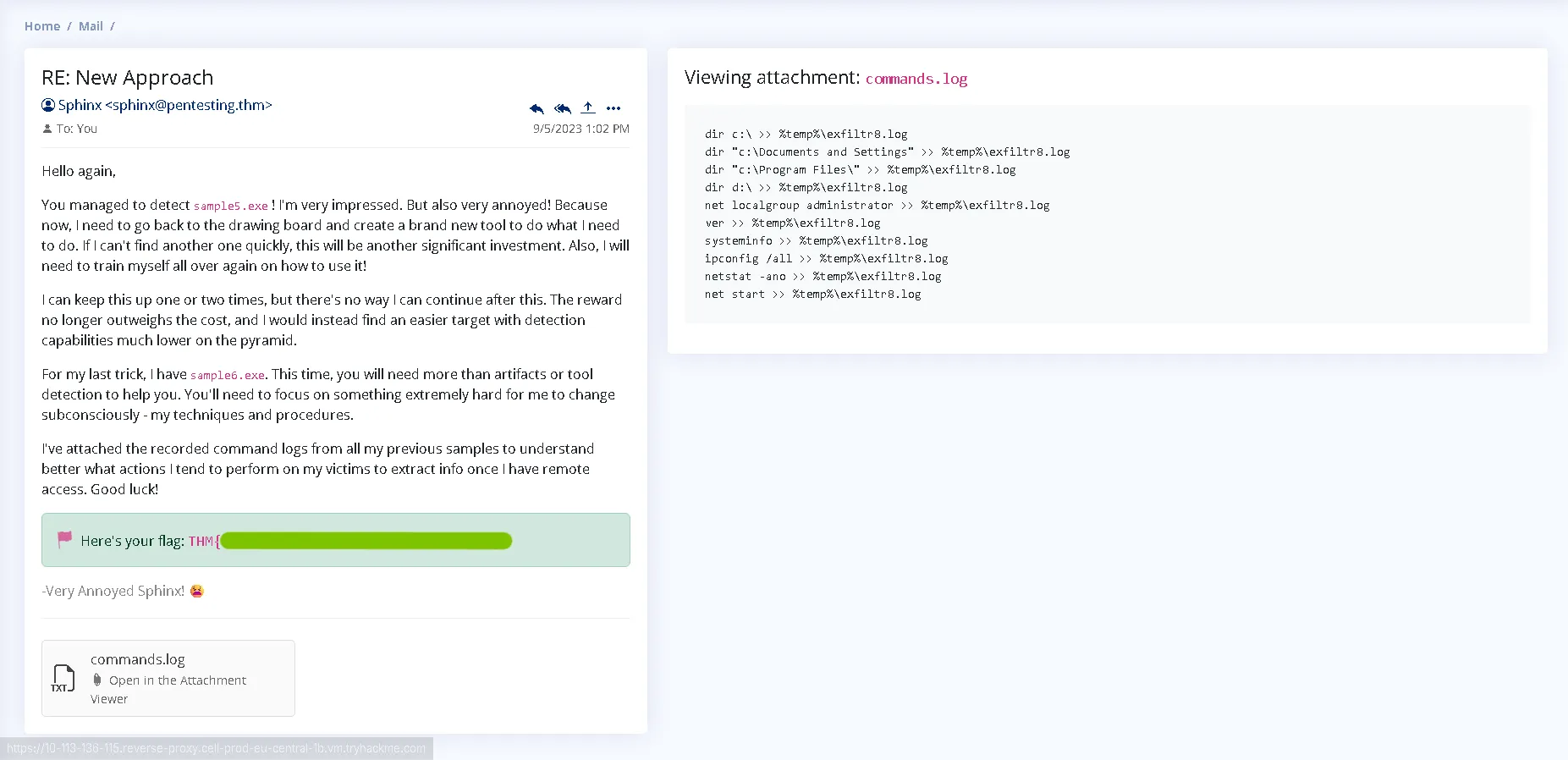
Suspicious: Enumerates system directories and files, redirecting output to a temporary log file.
Suspicious: Enumerates local administrators, network configurations, and active connections.
Suspicious: Gathers system information and running services for data exfiltration.
First step: Third party Verification / Internal Verification
Here we can see a string full of commands with something in common, every command is collected to the exfiltr8.log file from %temp%. So it is a post exploitation log file that collects data from the machine. (Exfiltration - Exfiltr8 is also a name used just to make it obvious).
List and short description of the commands:
dir c:\ >> %temp%\exfiltr8.log - Lists root directory contents
dir "c:\Documents and Settings" >> %temp%\exfiltr8.log - Lists legacy user profiles and folders
dir "c:\Program Files\" >> %temp%\exfiltr8.log- Checks installed software and applications
dir d:\ >> %temp%\exfiltr8.log- Lists secondary drive contents
net localgroup administrator >> %temp%\exfiltr8.log- Identifies local admin users
ver >> %temp%\exfiltr8.log - Gets the Windows OS build/version
systeminfo >> %temp%\exfiltr8.log- Gathers detailed OS, hardware, and patch information
ipconfig /all >> %temp%\exfiltr8.log- Dumps complete network adapter configuration
netstat -ano >> %temp%\exfiltr8.log - Displays active network connections, ports, and PIDs
net start >> %temp%\exfiltr8.log- Lists currently running Windows services
Second step: Blocking the malicious file
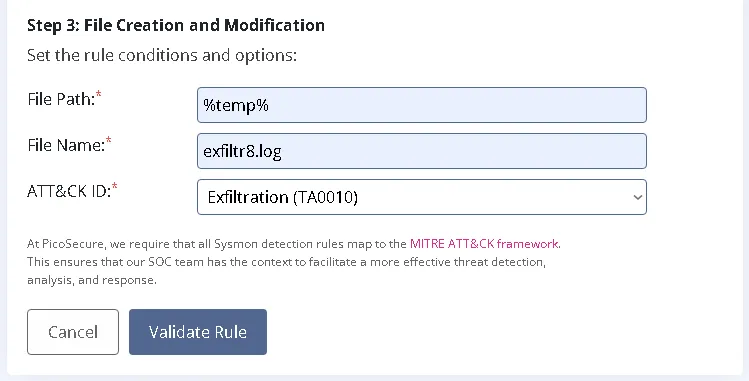
Steps:
- Go to Sigma Rule Builder
- Select Sysmon Event Logs
- Select File Creation and Modification (Storing means modification)
- Add the general file path %temp%
- Add the file name
exfiltr8.log - Add ATTCK ID (Exfiltration TA0010)
- Validate Rule
Ending
Email received after blocking the modifying of the file.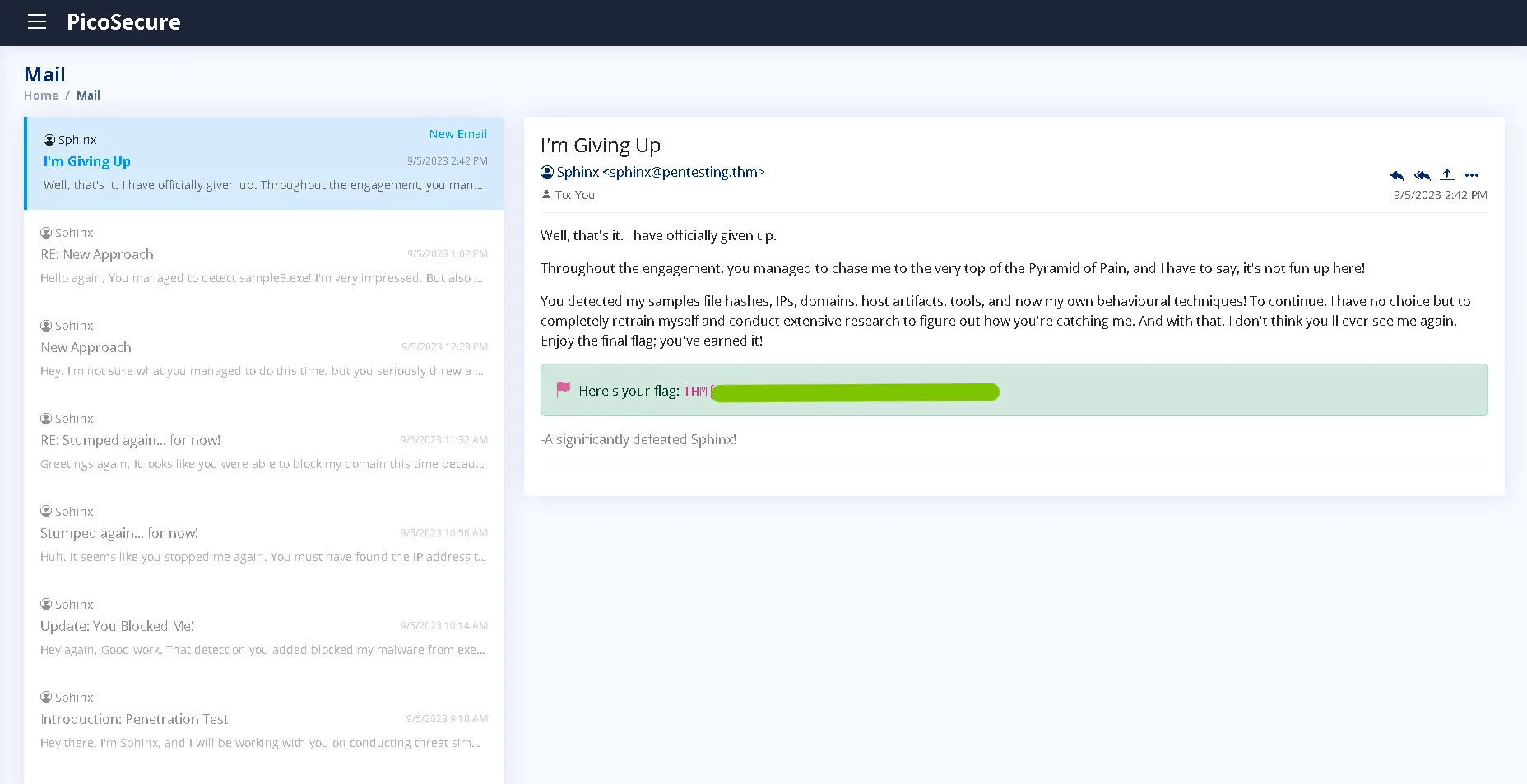
Conclusions and Ending note
Overall, an enjoyable challenge with easy to understand simulated space. Not a true challenge to be fair but at least it puts in perspective the Pyramid of Pain which is really important to also have an hand on support for the theory.
We saw how one malware can go multiple stages to bypass the detections and restrictions. From file sizing, hashes, DNS, behaviours and other artifacts we discovered the file is malicious and reused in other attacks on the same target/host by modifying or adapting based on the rules.