
Pyramid Of Pain Walkthrough
Learn what the Pyramid of Pain is and how it ranks indicators by how painful they are for an adversary to change.
Summary
In this room I’ve learned what is the pyramid of pain and what are the stages of each layer. It is a fundamental concept for any SOC analyst to get used to the different methods and techniques. Also, the examples provided by TryHackMe were really helpful to put into the perspective a real life scenario. Overall, good foundational room packed with references and descriptions with visual examples.
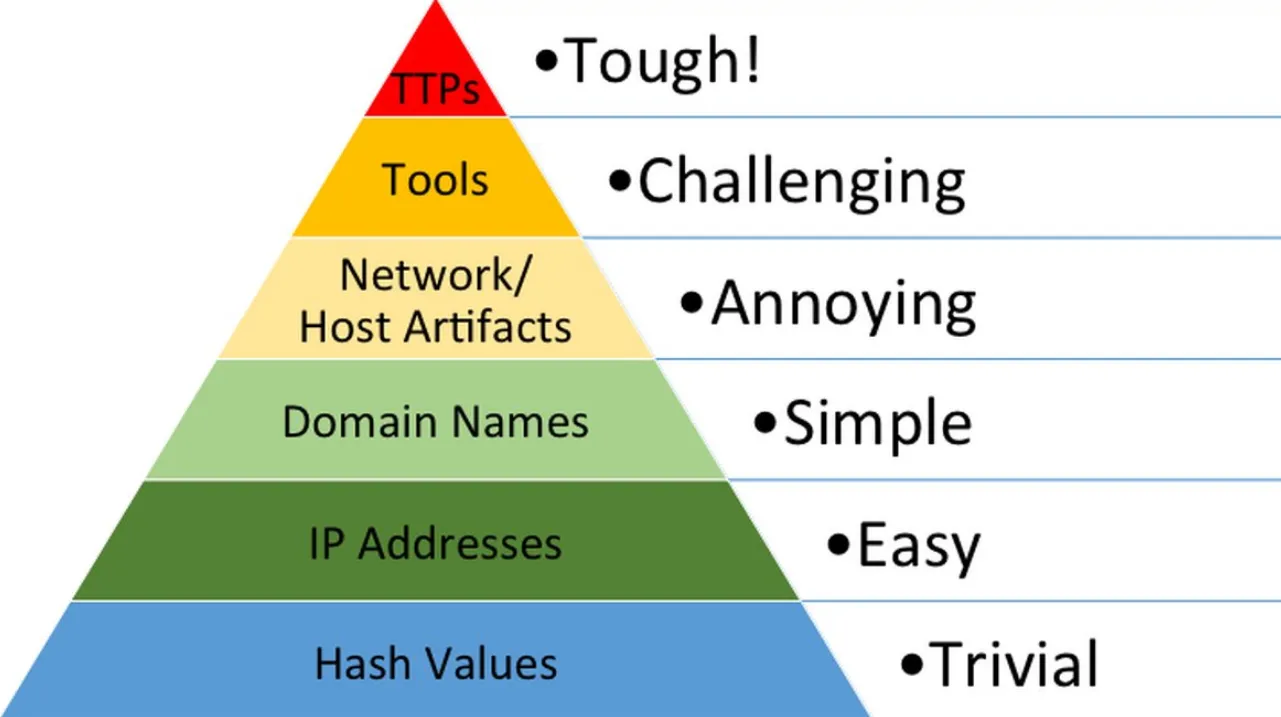 Source: attackiq.com
Hash Values (Trivial)
First colour is blue, the foundation of the pyramid of pain. Hash value is a result of an hash algorithm with fixed length that uniquely identifies data. Some hash algorithms:
- MD5
- SHA-1
- SHA-2 A hash is not considered to be cryptographically secure if two files have the same hash value or digest. With that being said, the hashes are used by professionals to check the samples. Various online tools can be used to do hash lookups like VirusTotal and Metadefender Cloud - OPSWAT.
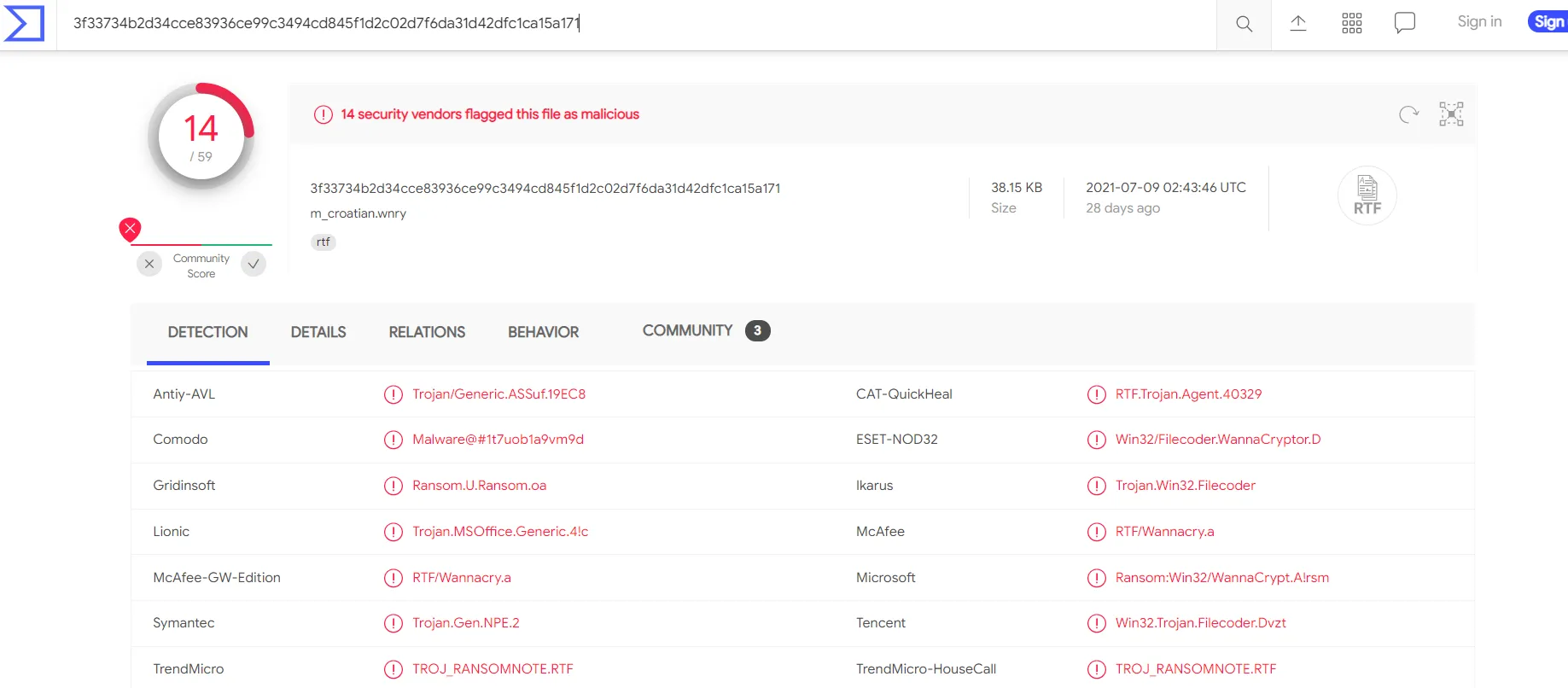
Below the hash in the screenshot above, you can see the filename. In this case, it is “m_croetian.wnry” 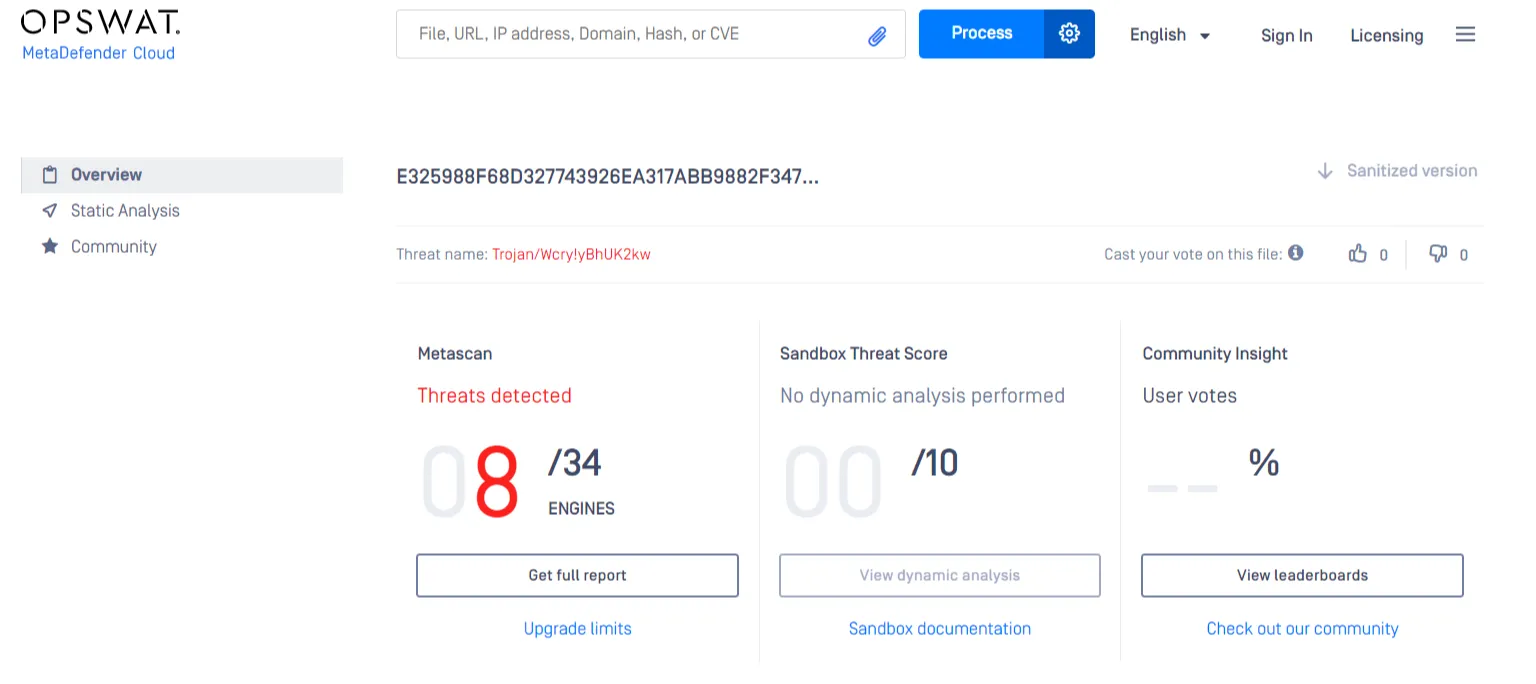
Using the hash is really is to spot the malicious files, but it is a really common for the attacker to change even a bit for the hash to be completely different.
Let’s take a look at an example of how you can change the hash value of a file by simply appending a string to the end of a file using echo: File Hash (Before Modification)
PS C:\Users\THM\Downloads> Get-FileHash .\OpenVPN_2.5.1_I601_amd64.msi -Algorithm MD5Algorithm Hash Path_________ ____ ____MD5 D1A008E3A606F24590A02B853E955CF7 C:\Users\THM\Downloads\OpenVPN_2.5.1_I601_amd64.msiFile Hash (After Modification)
PS C:\Users\THM\Downloads> echo "AppendTheHash" >> .\OpenVPN_2.5.1_I601_amd64.msiPS C:\Users\THM\Downloads> Get-FileHash .\OpenVPN_2.5.1_I601_amd64.msi -Algorithm MD5Algorithm Hash Path_________ ____ ____MD5 9D52B46F5DE41B73418F8E0DACEC5E9F C:\Users\THM\Downloads\OpenVPN_2.5.1_I601_amd64.msiThe difference is actually night and day. So the change of hash is trivial for an real life attack.
IP Address (Easy)
We rely on IP addresses to send and receive the information over the network. So checking the IP addresses is a common practice due to the fact that every device communicating via Networks have an IP, servers, desktops, CCTV cameras.
In the Pyramid of Pain, IP addresses are indicated with the color green. From a defense standpoint, knowledge of the IP addresses an adversary uses can be valuable. A common defense tactic would be to block, deny or drop the inbound connection, but it doesn’t stop the attacker from getting a new public ip for example.
Malicious IP connections 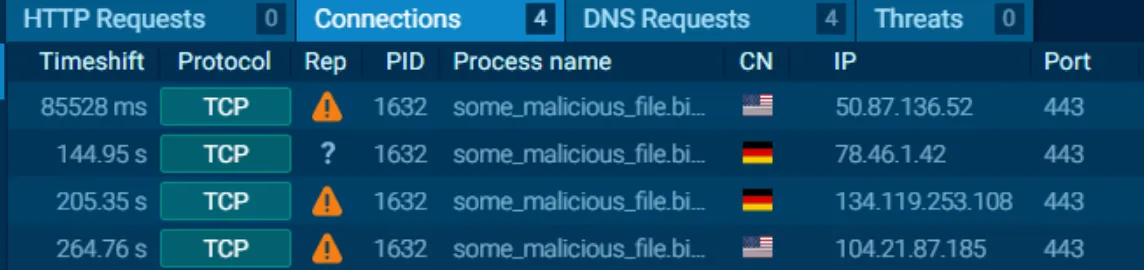 NOTE! Do not attempt to interact with the IP addresses shown above.
One way to make IP blocking difficult could be Fast Flux
“Fast Flux is a DNS technique used by botnets to hide phishing, web proxying, malware delivery, and malware communication activities behind compromised hosts acting as proxies. The purpose of using the Fast Flux network is to make the communication between malware and its command and control server (C&C) challenging to be discovered by security professionals. ”
Then we are given an anyrun report with a couple of questions that can be found in the last section of the article.
Domain Names (Simple)
From green to teal
Domain names can be viewed as simple as mapping an ip address to a string of text. But also a domain name can contain a top level domain or a sub domain. Domain Names can be a little more of a pain for the attacker to change as they would most likely need to purchase the domain, register it and modify DNS records. Unfortunately for defenders, many DNS providers have loose standards and provide APIs to make it even easier for the attacker to change the domain.
Malicious Sodinokibi C2 ( Command and Control Infrastructure) domains:
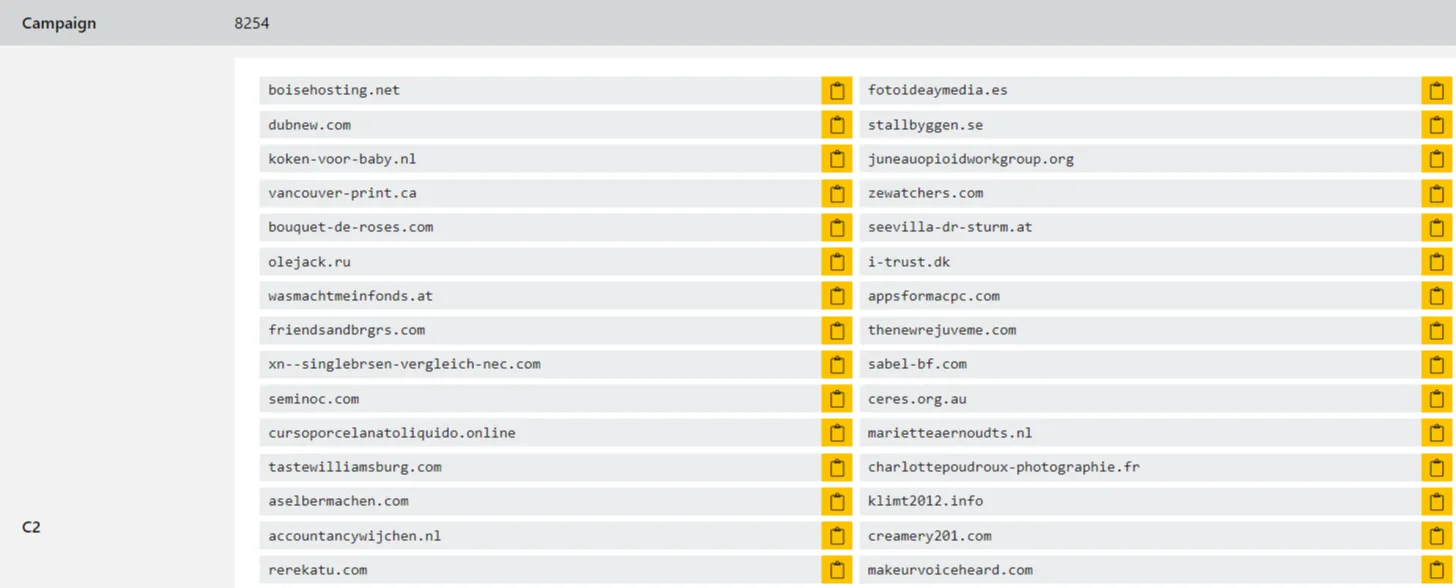
Let’s have a look at some little differences that changes the whole perspective. 
 This is one of the examples of a Punycode attack used by the attackers to redirect users to a malicious domain that seems legitimate at first glance. “Punycode is a way of converting words that cannot be written in ASCII, into a Unicode ASCII encoding.” What you saw in the URL above is
adıdas.de which has the Punycode of http://xn--addas-o4a.de/ Internet Explorer, Google Chrome, Microsoft Edge, and Apple Safari are now pretty good at translating the obfuscated characters into the full Punycode domain name.
To detect malicious domains, proxy logs or web server logs can be used.
Attackers usually hide the malicious domains under URL shorteners. A URL Shortener is a tool that creates a short and unique URL that will redirect to the specific website specified during the initial step of setting up the URL Shortener link. The attackers normally use the following URL-shortening services to generate malicious links:
- bit.ly
- goo.gl
- ow.ly
- s.id
- smarturl.it
- tiny.pl
- tinyurl.com
- x.co You can see the actual website the shortened link is redirecting you to by appending ”+” to it (see the examples below). Type the shortened URL in the address bar of the web browser and add the above characters to see the redirect URL.
NOTE: The examples of the shortened links below are non-existent.
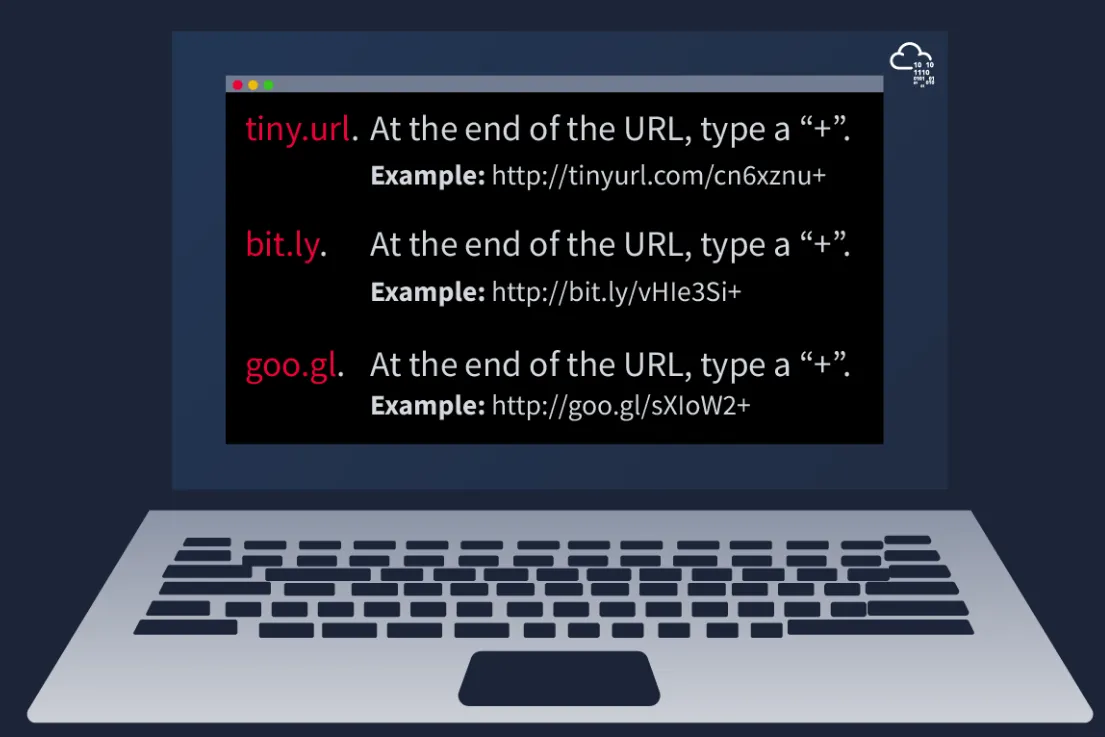
Viewing Connections in Any.run:
any.run is a sandboxing service that can review connections under the network tab. (HTTP requests, DNS or processes communicating with IP addresses)
Please note : you should be extremely cautious about visiting any of the IP addresses or HTTP requests made in a report. After all, these are behaviours from the malware sample - so they’re probably doing something dangerous!
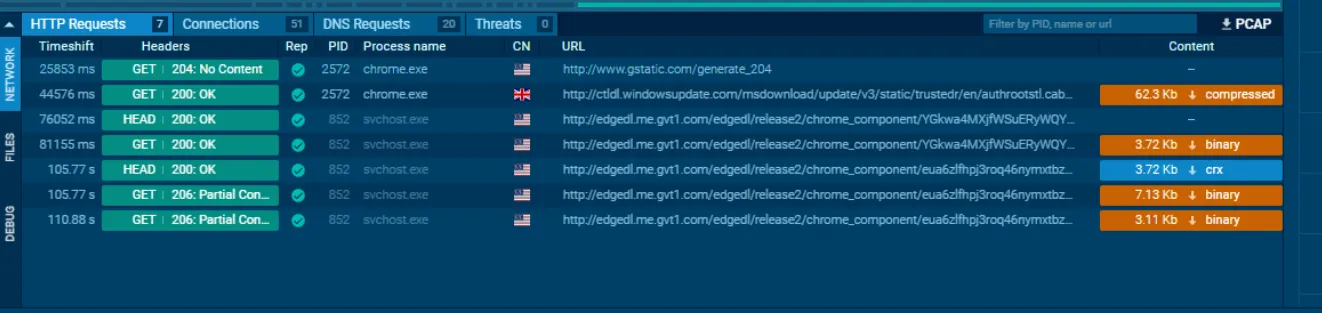
HTTP Requests: This tab shows the recorded HTTP requests since the detonation of the sample.
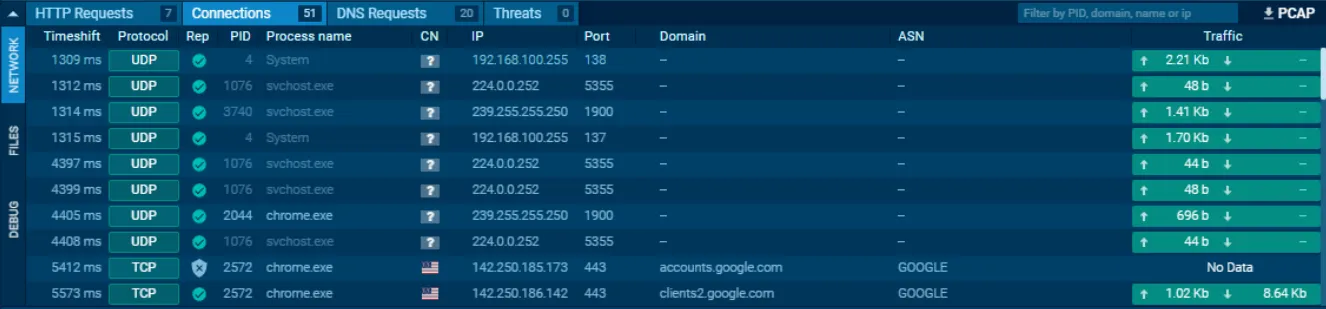
Connections: This tab shows any communications made since the detonation of the sample. This can be useful to see if a process communicates with another host. For example, this could be C2 traffic, uploading/downloading files over FTP, etc.
DNS Requests: This tab shows the DNS requests made since the detonation of the sample. Malware often makes DNS requests to check for internet connectivity (I.e. if It can’t reach the internet/call home, then it’s probably being sandboxed or is useless).
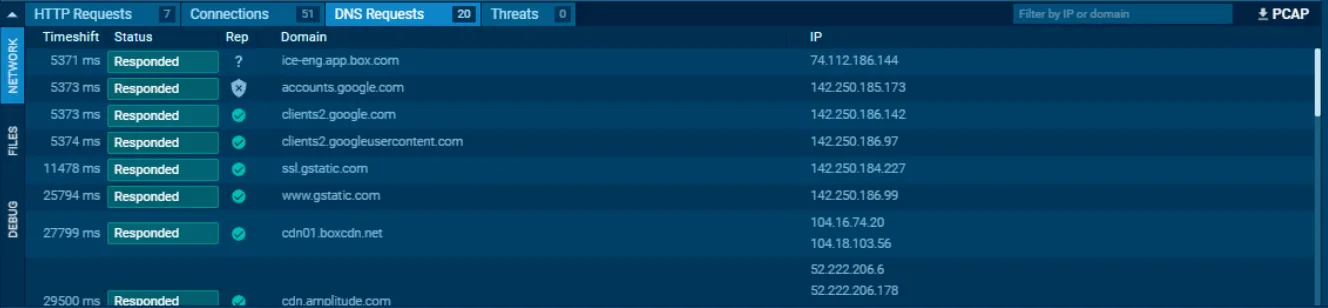
We are asked to search in a report for certain details that I will document it here, but the answers will be noted on the bottom of the article.
Practice Exercise #1
We are asked for the first suspicious domain request in the report: We are going in the DNS Request tab to see the requests as shown. 
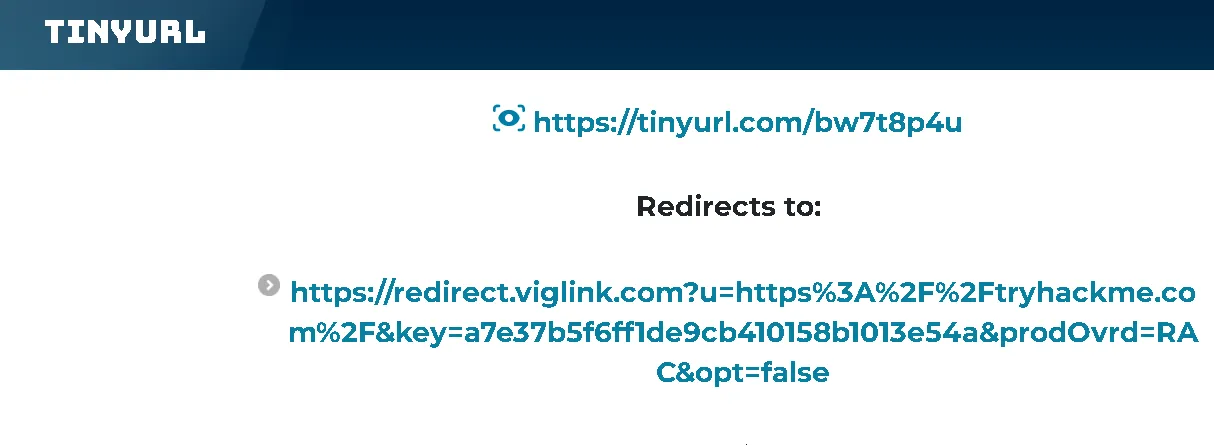
Also, we are asked to see the redirect of a certain link provided by TryHackMe, which is done by adding ”+” symbol at the end of URL, to see the results. It redirects us to: https[:]//tryhackme[.]com/
Host Artifacts (Annoying)
Yellow zone. On this level, the attacker will feel a little more annoyed and frustrated if you can detect the attack. Here, the attacker have to circle back and change methodologies.
Host artifacts are the traces or observables that attackers leave on the system, such as registry values, suspicious process execution, attack patterns or IOCs (Indicators of Compromise), files dropped by malicious applications, or anything exclusive to the current threat.
Suspicious process execution from Word: 
Suspicious events followed by opening a malicious application:
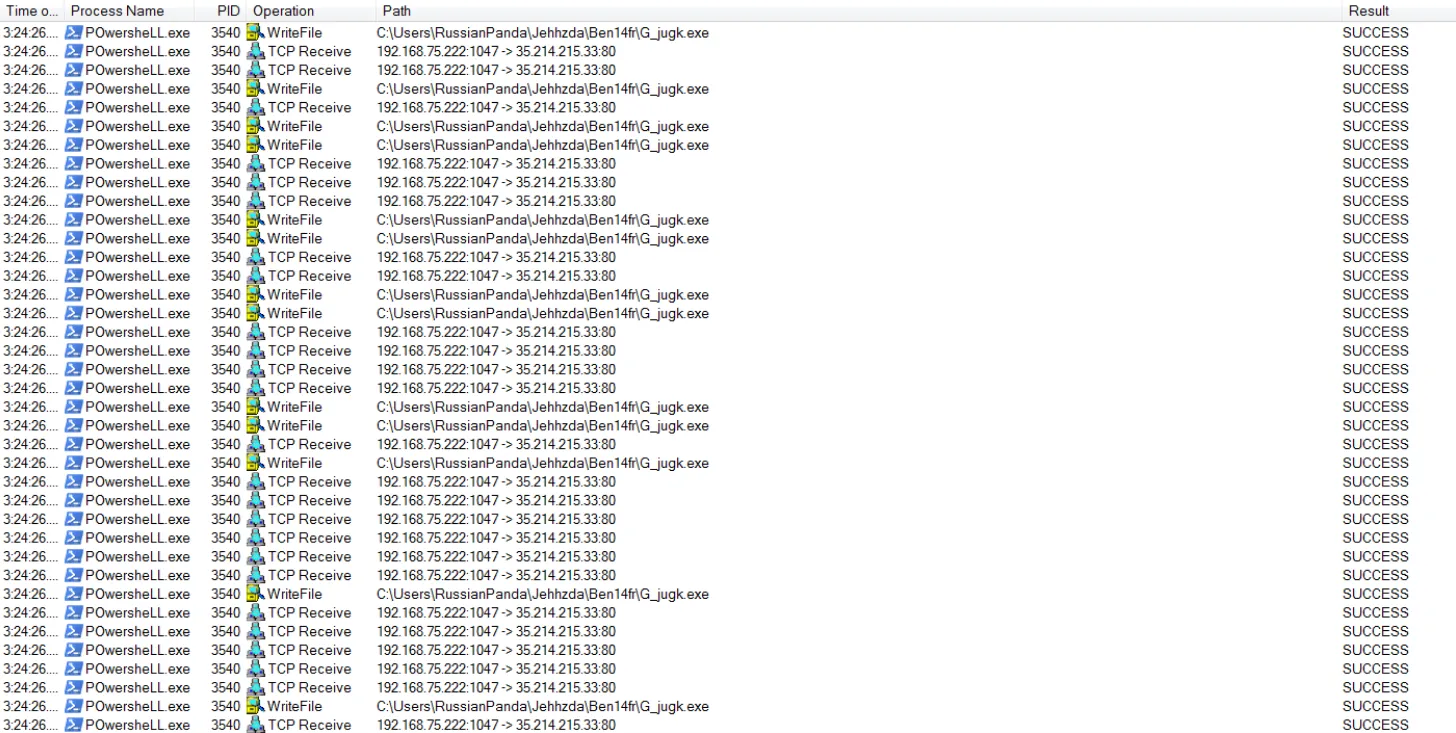
The files modified/dropped by the malicious actor:
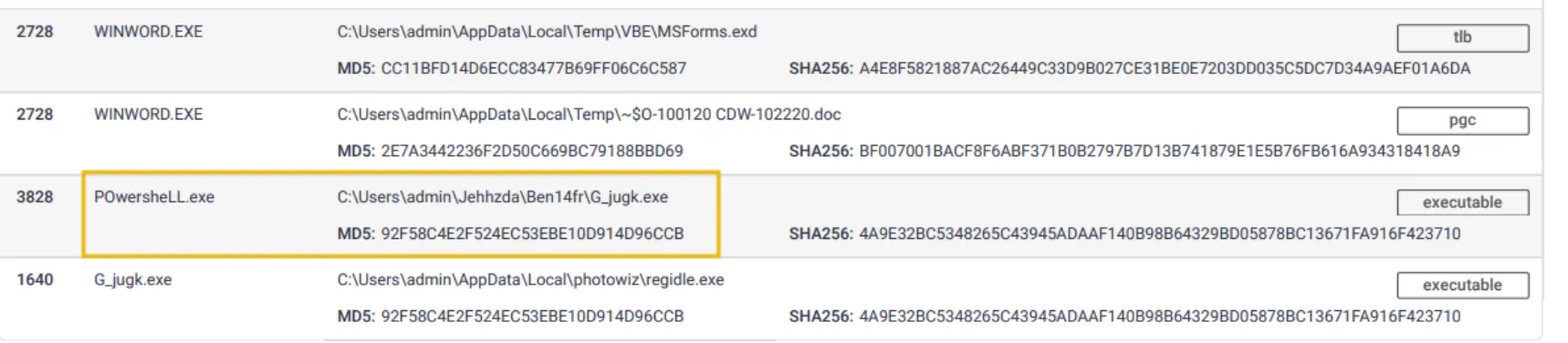
Practice Exercise #2
After that, we are tasked to find regidle.exe process to see the IP address that he POST request to on the 8080 port.
After that, we are asked to see the malicious file that the attacker dropped on the report. Looking at the process tree we can see that g_jugk.exe is the suspicious file. 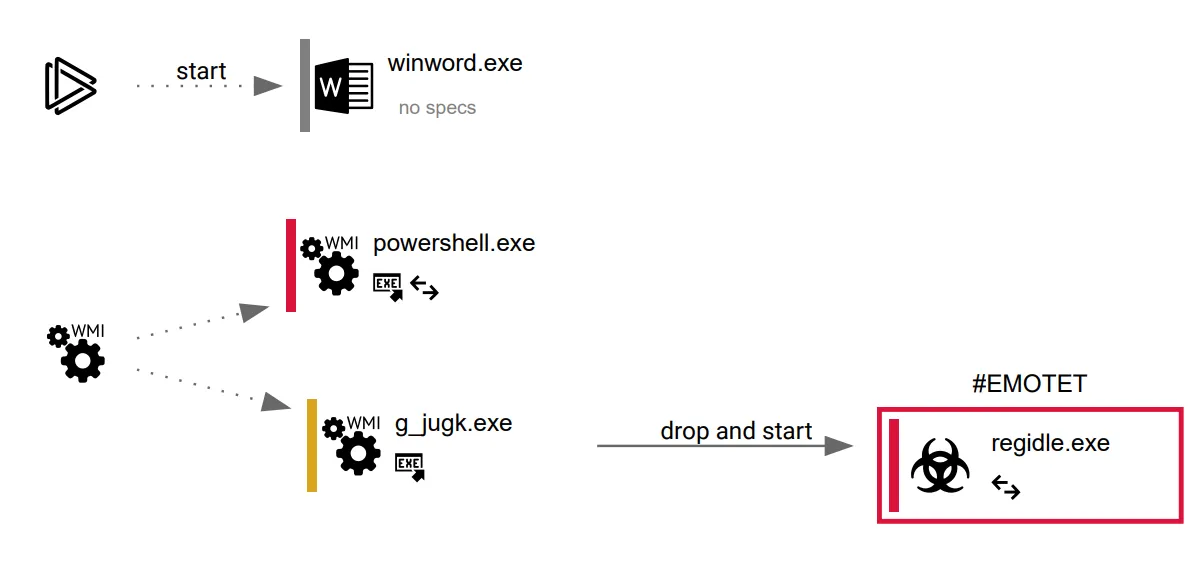
After, we are asked to see the number of vendors that find the IP as being malicious, we are given an VirusTotal raport. It is shown in top left as being 9/93 total vendors. 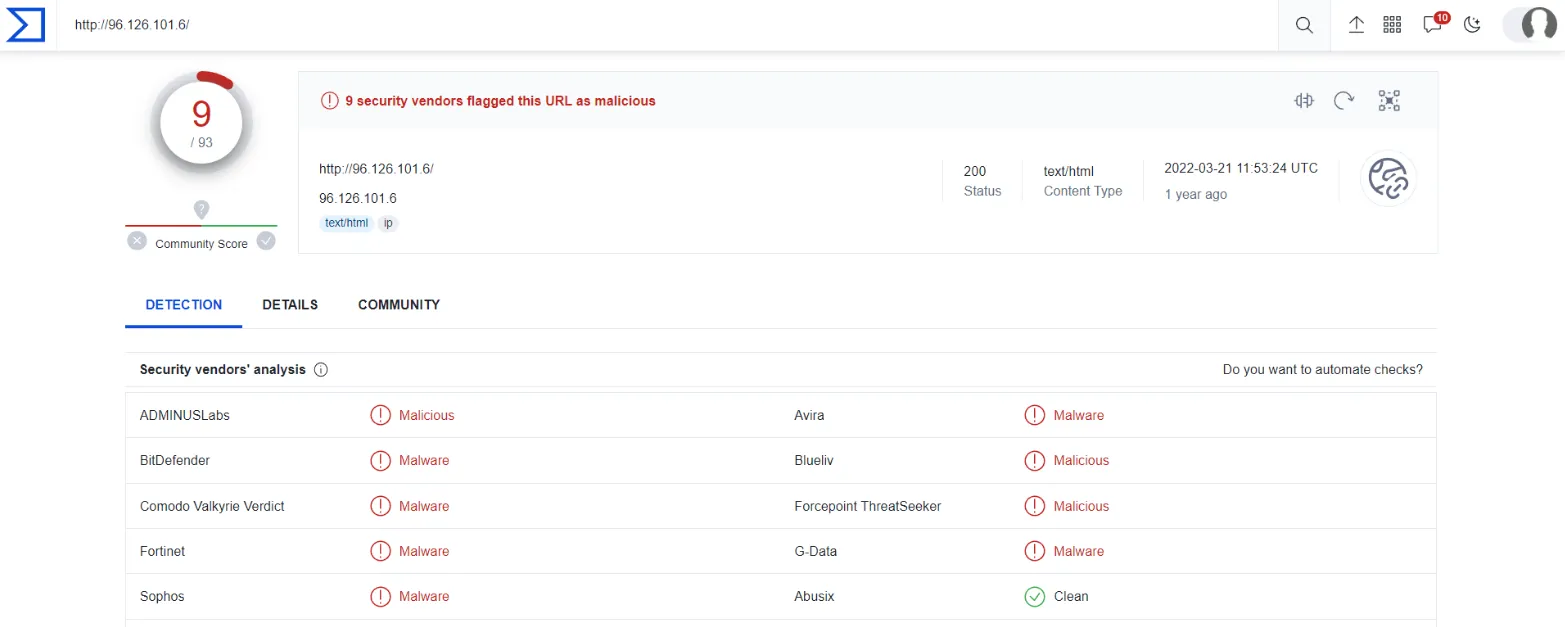
Network Artifacts (Annoying)
Still in the yellow zone. A network artifact can be a user-agent string, C2 information, or URI patterns followed by the HTTP POST requests. An attacker might use a User-Agent string that hasn’t been observed in your environment before or seems out of the ordinary. The User-Agent is defined by RFC2616 as the request-header field that contains the information about the user agent originating the request.
We can view these artifacts from the PCAP files with tools like WireShark, Tshark or IDS solutions like Snort through the alerts.

Useful command in TShark: tshark --Y http.request -T fields -e http.host -e http.user_agent -r analysis_file.pcap 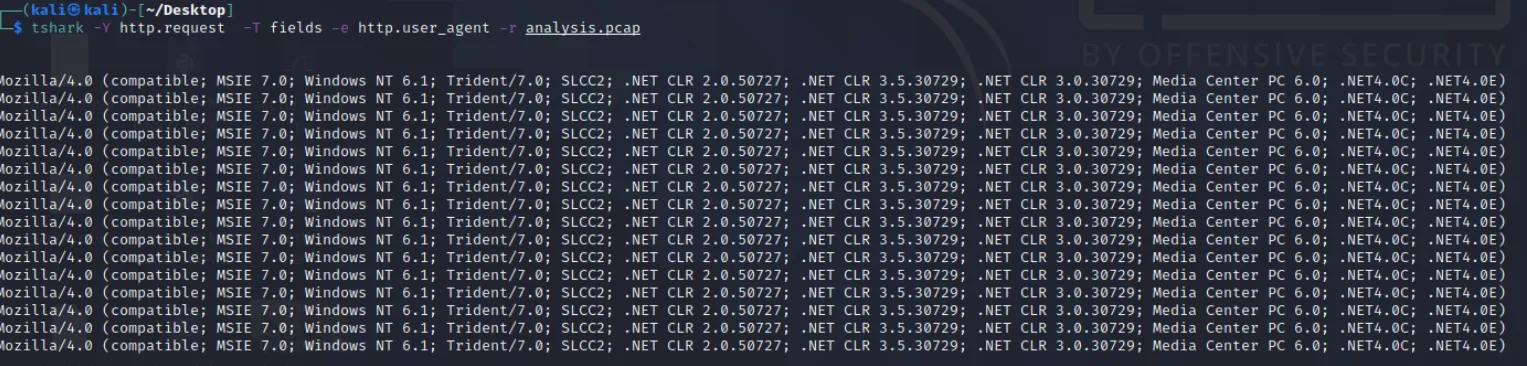
These are the most common User-Agent strings found for the Emotet trojan. If you can detect the custom User-Agent strings that the attacker is using, you might be able to block them, creating more obstacles and making their attempt to compromise the network more annoying.
Tools (Challenging)
Orange colour is representing Challenging stage. Attackers would use the utilities to create malicious macro documents (maldocs) for spearphishing attempts, a backdoor that can be used to establish C2 (Command and Control Infrastructure)↗, any custom .EXE, and .DLL files, payloads, or password crackers. 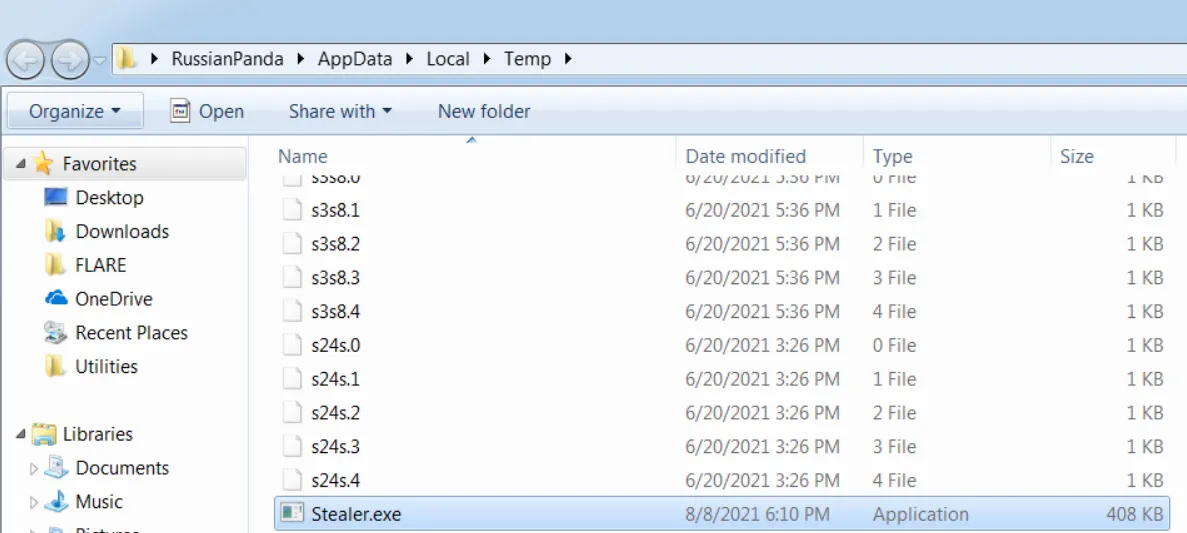
The execution of the suspicious binary:  Antivirus signatures, detection rules, and YARA rules can be great weapons for you to use against attackers at this stage.
There are a couple of resources such as: MalwareBazaar and Malshare. (for threat hunting and incident response.) Platform used by SOC to be up to date: socprime[.]com
Fuzzy hashing is also a strong weapon against the attacker’s tools. SSDeep is a good example.
Example of SSDeep from VirusTotal: 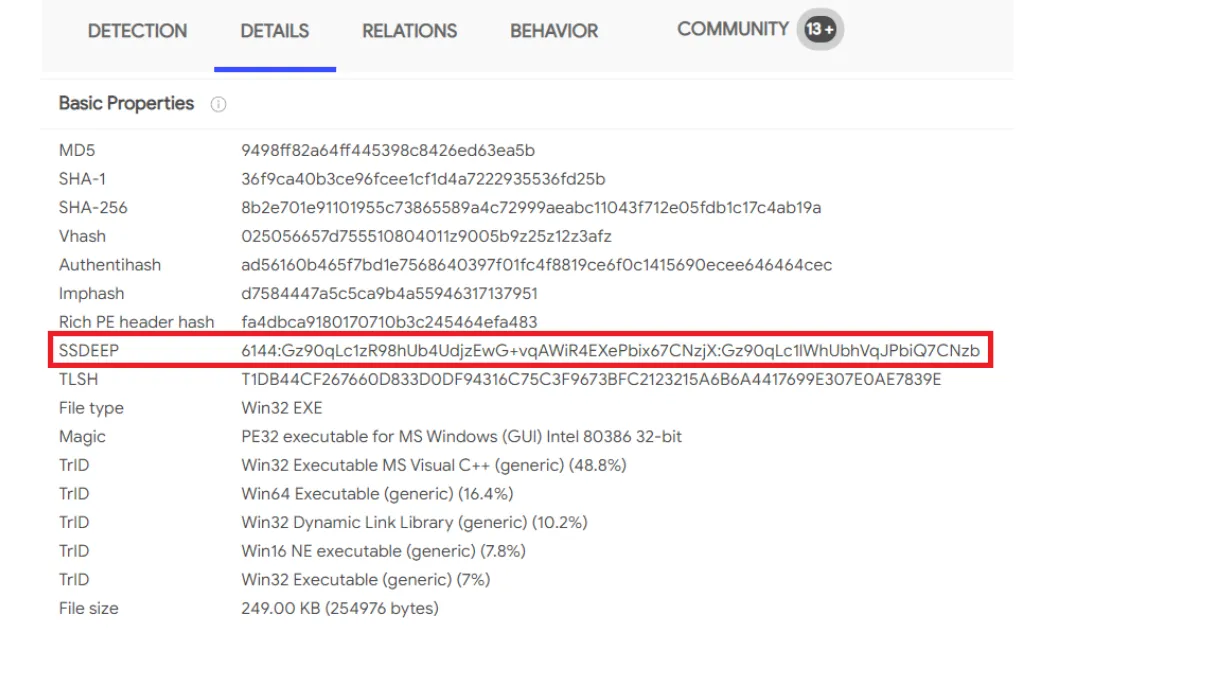
TTPs (Tough)
The last level (red). TTPs stands for Tactics, Techniques & Procedures. (This includes the whole MITRE ATT&CK Matrix, which means all the steps taken by an adversary to achieve his goal, starting from phishing attempts to persistence and data exfiltration.)
For, example if you could detect a Pass-the-Hash attack using Windows Event Log Monitoring and remediate it, you would be able to find the compromised host very quickly and stop the lateral movement inside your network. At this point, the attacker would have two options:
- Go back, do more research and training, reconfigure their custom tools
- Give up and find another target
Option 2 definitely sounds less time and resource-consuming.
Practice Exercise #3
We are tasked to review and note the name of the commercial, remote access tool that Chimera uses for C2 beacons and data exfiltration. 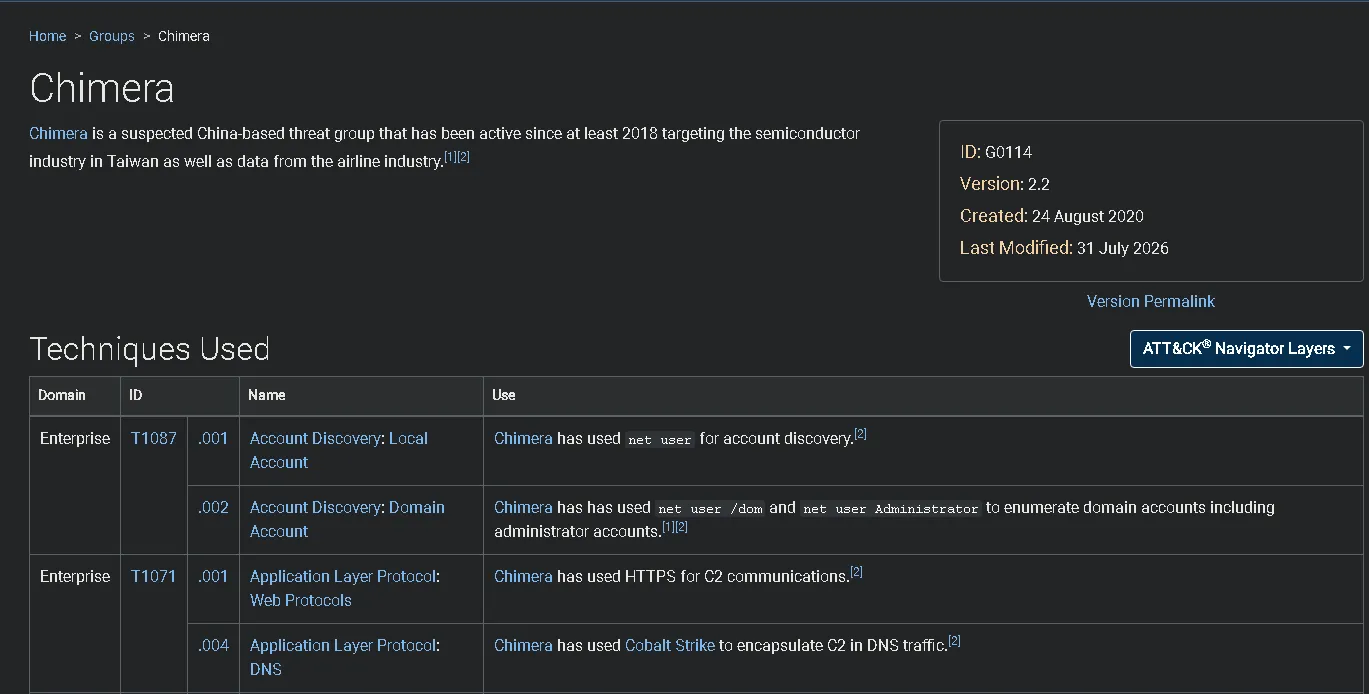 As seen on the bottom, Cobalt Strike is the answer.
And last but not least, the flag is given after we solve a pyramid of pain minigame. I will post the end result of the matching description with the process: 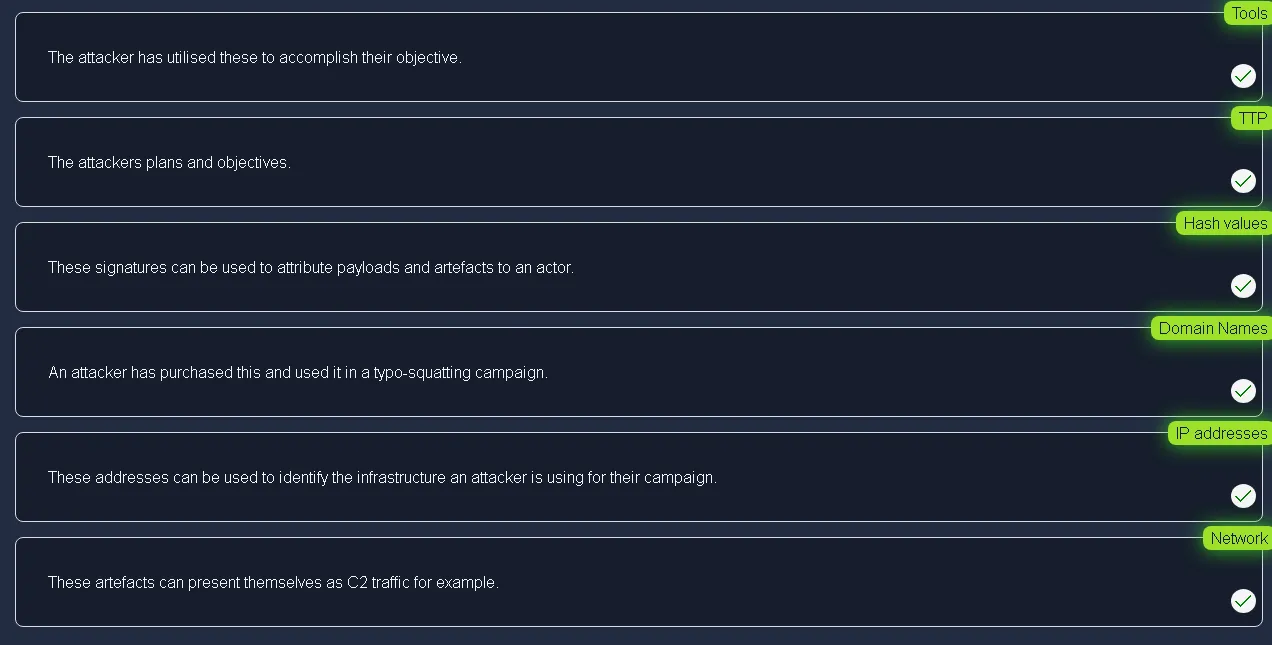
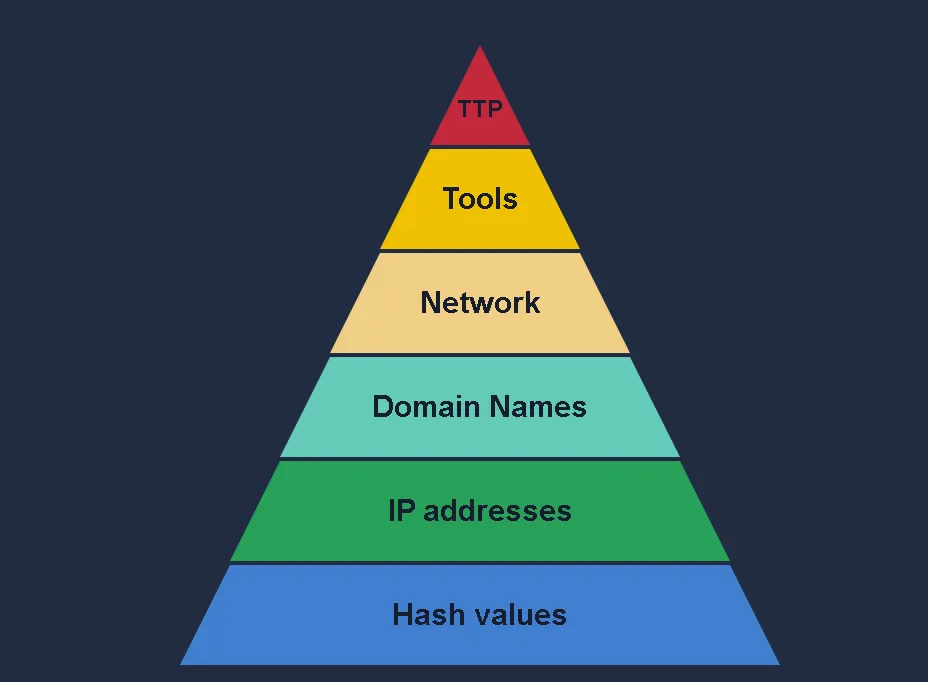 The flag received: THM{PYRAMIDS_COMPLETE}
Q&A
Click to view TryHackMe Room Q&A
Analyse the report associated with the hash “b8ef959a9176aef07fdca8705254a163b50b49a17217a4ff0107487f59d4a35d” https[:]//assets.tryhackme[.]com/additional/pyramidofpain/t3-virustotal.pdf. What is the filename of the sample?
Answer: Sales_Receipt 5606.xlsWhat is the first IP address the malicious process (PID 1632) attempts to communicate with?
Answer: 50.87.136.52What is the first domain name the malicious process (PID 1632) attempts to communicate with?
Answer: craftingalegacy.comprovide the first suspicious domain request you are seeing, you will be using this report to answer the remaining questions of this task.
Answer: craftingalegacy.comWhat term refers to an address used to access websites?
Answer: Domain NameWhat type of attack uses Unicode characters in the domain name to imitate the a known domain
Answer: Punycode attackProvide the redirected website for the shortened URL using a preview: https[:]//tinyurl[.]com/bw7t8p4u
Answer: https[:]//tryhackme[.]comA process named regidle.exe makes a POST request to an IP address based in the United States (US) on port 8080. What is the IP address?
Answer: 96.126.101.6The actor drops a malicious executable (EXE). What is the name of this executable?
Answer: g_jugk.exeHow many vendors determine this host to be malicious?
Answer: 9Which network indicator helped us identify the malware type (Emotet)?
Answer: User-AgentHow many POST requests are in the screenshot from the PCAP file?
Answer: 6Provide the method used to determine similarity between the files
Answer: Fuzzy HashingProvide the alternative name for fuzzy hashes without the abbreviation
Answer: Context Triggered Piecewise Hashes (CTPH)Navigate to ATT CK Matrix webpage. How many techniques fall under the Exfiltration category?
Answer: 9 (at the time of writing, techniques are actually 10, not 9 but it might be outdated)Chimera is a China-based hacking group that has been active since 2018. What is the name of the commercial, remote access tool they use for C2 beacons and data exfiltration?
Answer: Cobalt Strike (described in article how to reach the answer)Complete the static site. What is the flag?
Answer:THM{PYRAMIDS_COMPLETE}