Phishing Prevention Walkthrough
Learn how to defend against phishing emails. And more fundamental parts such as SPF, DKIM, DMARC
Summary
One of the most important rooms from the phishing module with a couple of tools and a little wireshark exercise to better improve detection and detail filtering. Also, SPF, DKIM, DMARC are some of the most important aspects of this lesson and this topic. This room has it all, from explaining to tools to exercises.
Learning Objectives
- Understand core email security controls (SPF, DKIM, DMARC, S/MIME)
- Analyze SMTP network traffic and email content
- Explore anti-phishing protection measures
Sender Policy Framework (SPF)
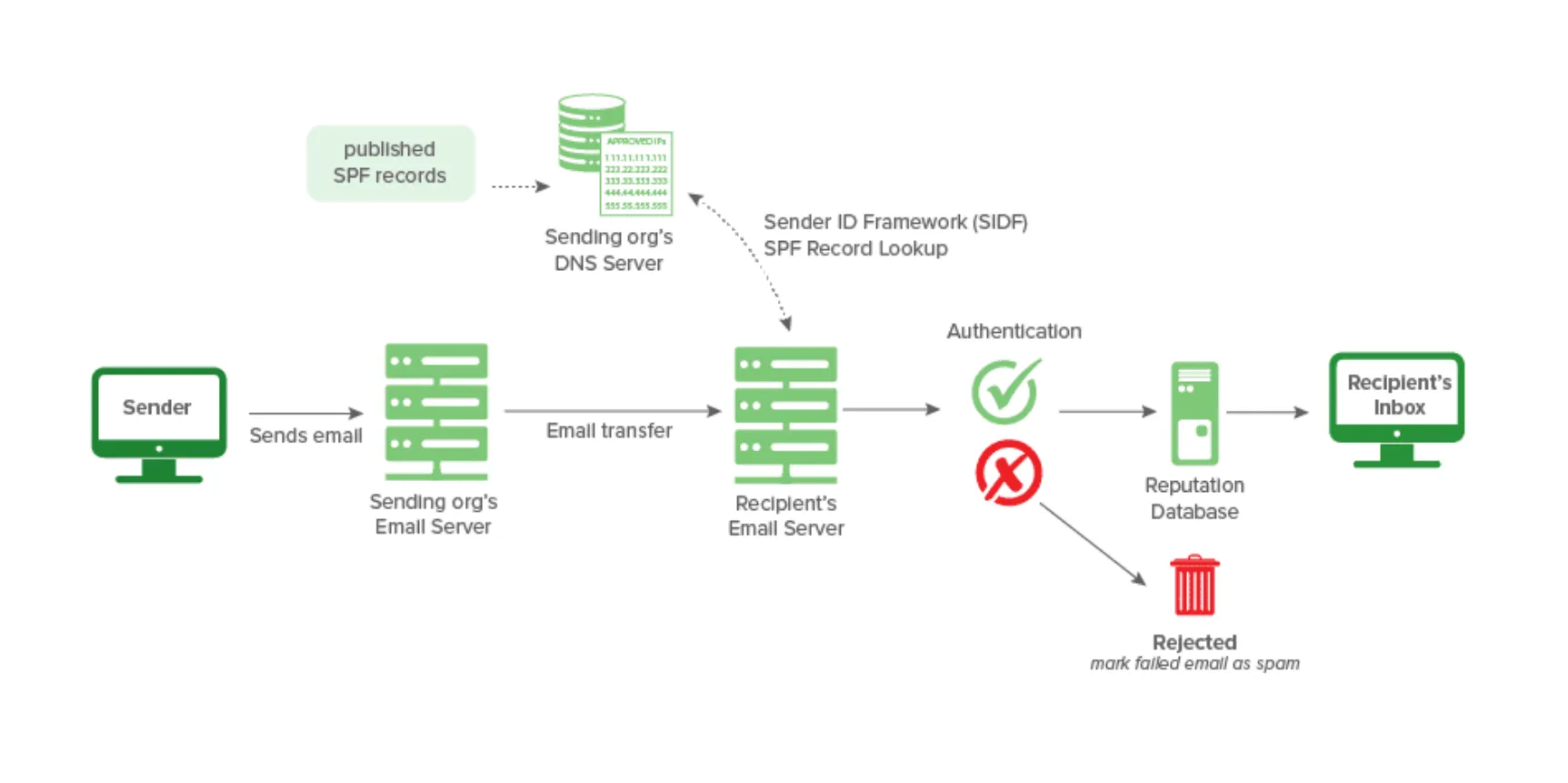
Sender Policy Framework (SPF) is used to authenticate the sender of an email. With an SPF record in place, Internet Service Providers can verify that a mail server is authorized to send email for a specific domain. An SPF record is a DNS TXT record containing a list of the IP addresses that are allowed to send email on behalf of your domain.
| Verification Result | Intended Action |
|---|---|
| Pass, Neutral, None | Accept (Allow and process the email) |
| SoftFail, PermError | Flag (Mark as suspicious but allow) |
| Fail, TempError | Reject (Immediately discard the email) |
SPF Records
v=spf1 ip4:127.0.0.1 include:_spf.google.com -all
v=spf1Signifies the start of the SPF recordip4:127.0.0.1Specifies which IP can send mail (IPv4 in this case)include:_spf.google.comSpecifies which domain can send mail-allNon-authorized emails will be rejected
The SPF Surveyor tool from dmarcian enables us to gain a visual look at DNS records. It also helps ensure the record uses the correct syntax.

You may notice that no IP addresses are visibly present in the main record, but three domains are listed. In this case, all IP addresses authorized by the domains will be recognized as legitimate senders.
_spf.google.comemail.chargebee.com7168674.spf05.hubspotemail.net
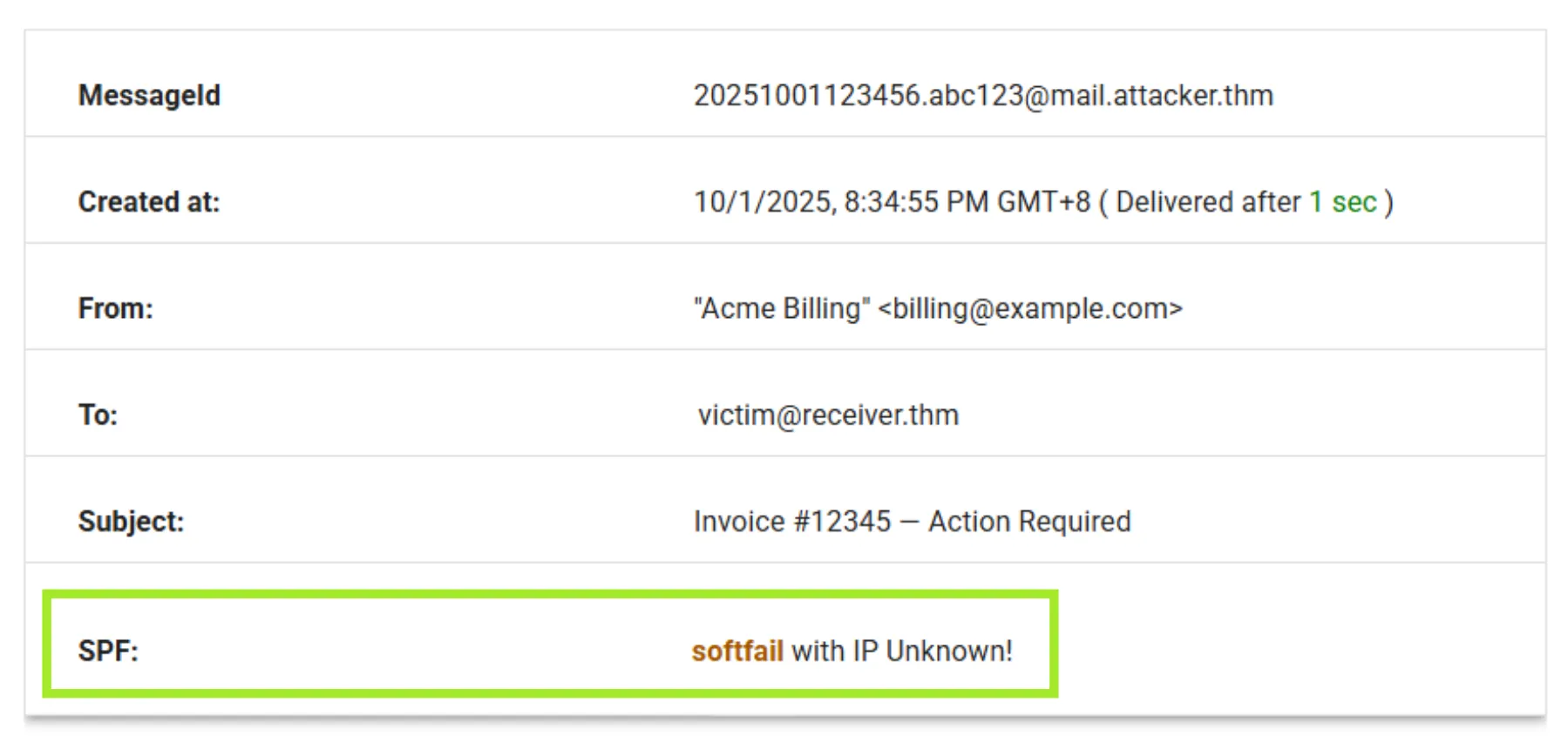
Google Admin Toolbox Messageheader allows you to analyze delivery details using an email’s full header. It shows various record results, including SPF. Check out the example below, which shows the SPF record as softfail with IP Unknown!. A SoftFail means the sending mail server is not listed as an authorized sender, but the receiving server will still accept the email and flag it as suspicious. In this case, the sending IP address could not be verified.
DomainKeys Identified Mail (DKIM)
DKIM stands for DomainKeys Identified Mail and is used for the authentication of an email that’s being sent. Like SPF, DKIM is an open standard for email authentication that is used for DMARC alignment. A DKIM record exists in the DNS, but it is more complex than SPF. DKIM’s advantage is that it can survive forwarding, which makes it superior to SPF and a foundation for securing your email.
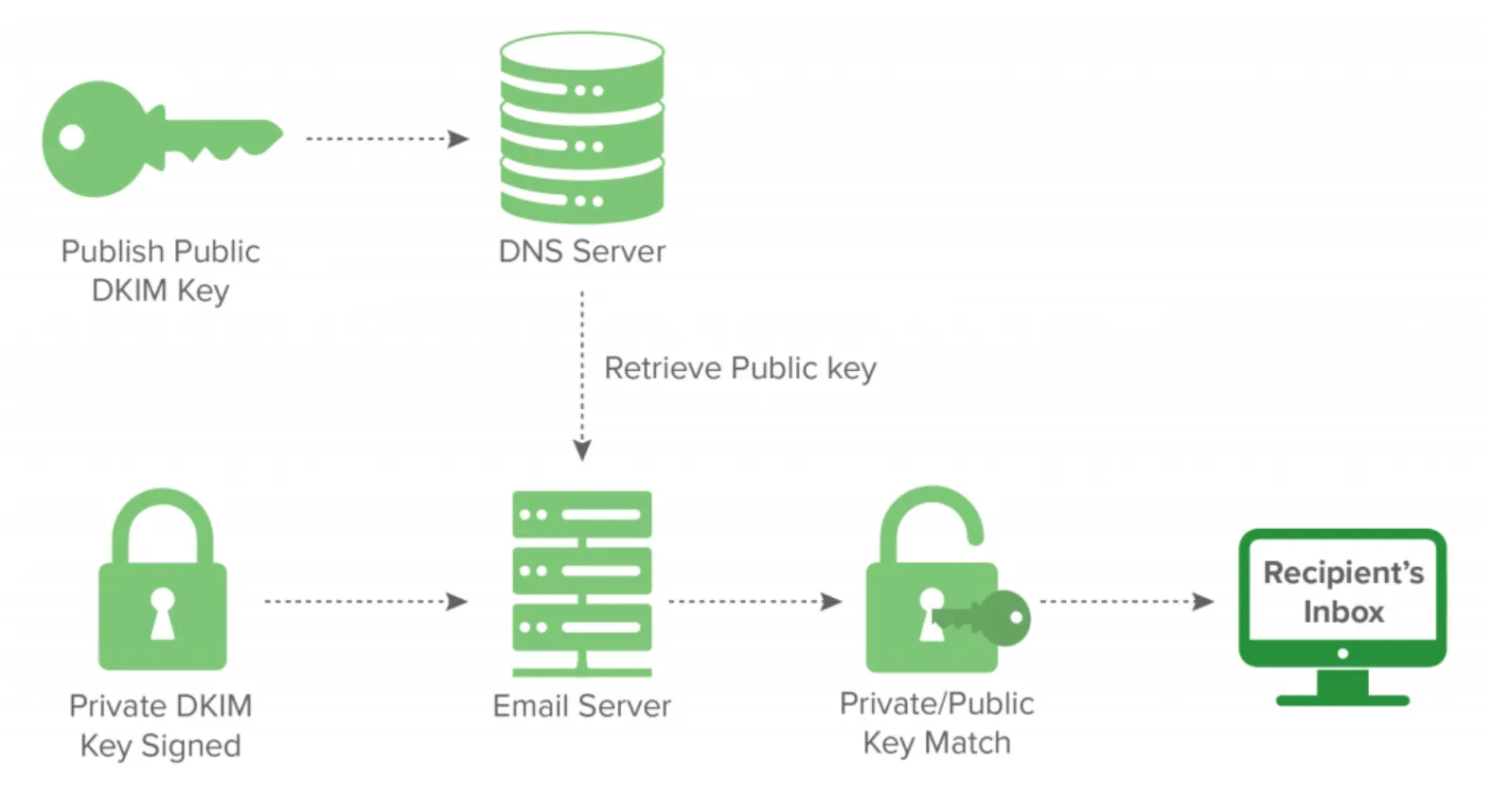
When an email is sent, the sending mail server uses a private key to add a digital signature to the email. The receiving server retrieves the public key from the domain’s DKIM record to verify that the message truly came from the domain. If the signature matches, the email is authentic; otherwise, it may be flagged or rejected.
DKIM Records
Here is a sample DKIM record, along with its components.
v=DKIM1; k=rsa; p=<public_key>
v=DKIM1Specifies the version of DKIM being used (optional)k=rsaThe key type. The RSA encryption algorithm is standardp=This is the public key that will be matched to the private key to verify the DKIM signature
Note: DKIM record formats vary and may include other tags depending on the mail provider or implementation.
Sample Spam Email Header
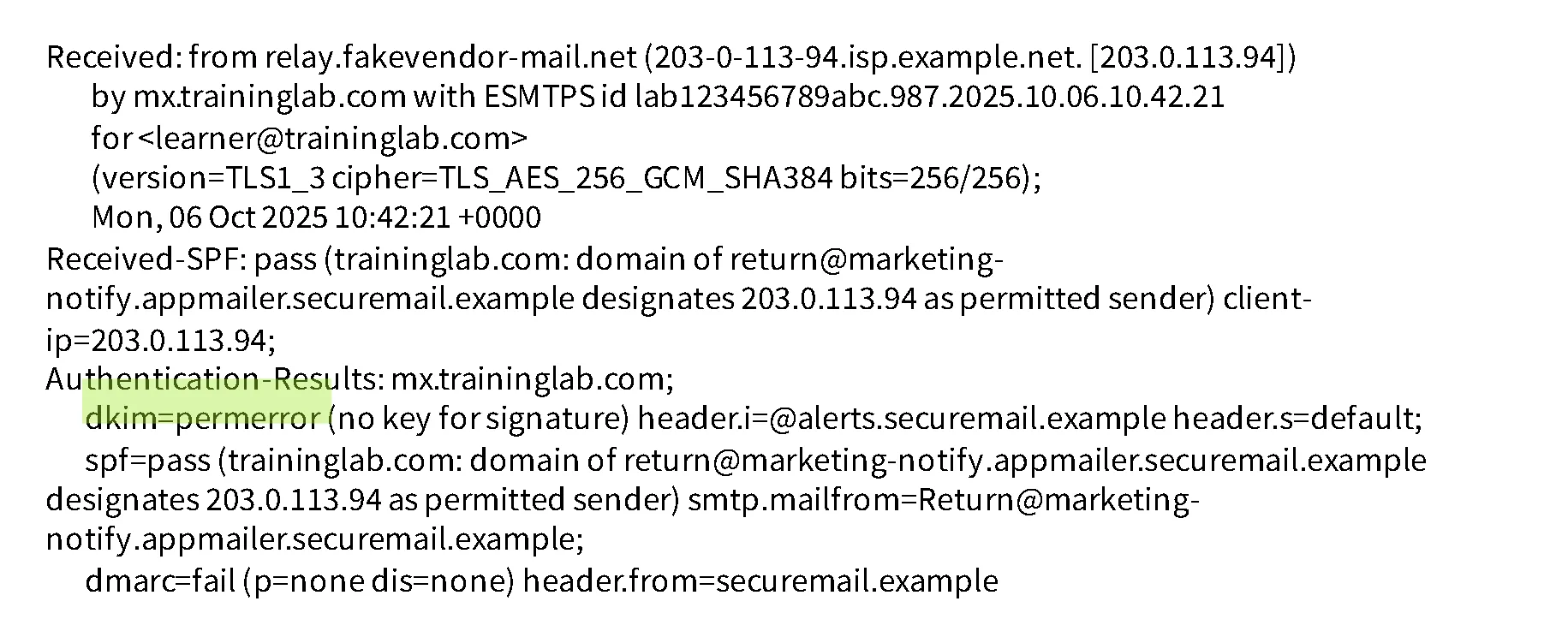
The image below is a snippet of an email header that was marked as spam with a DKIM result of permerror, indicating a permanent failure in DKIM verification. This could be the result of an invalid signature, a missing or incorrect DNS record, a forwarding server making a modification, or a misconfiguration in DKIM setup.
Domain-Based Message Authentication, Reporting, and Conformance (DMARC)
DMARC, an open source standard, uses a concept called alignment to tie the result of two other open source standards, SPF (a published list of servers that are authorized to send email on behalf of a domain) and DKIM (a tamper-evident domain seal associated with a piece of email), to the content of an email.
DMARC Records
Here is a breakdown of a DMARC record and its components.
v=DMARC1; p=quarantine; rua=mailto:[email protected]
v=DMARC1: The version of DMARC (required)p=quarantineThe DMARC policy (quarantine = move to the spam folder)rua=mailto:[email protected]An optional tag. In this case, aggregate reports will be sent to the email specified
Domain Checker
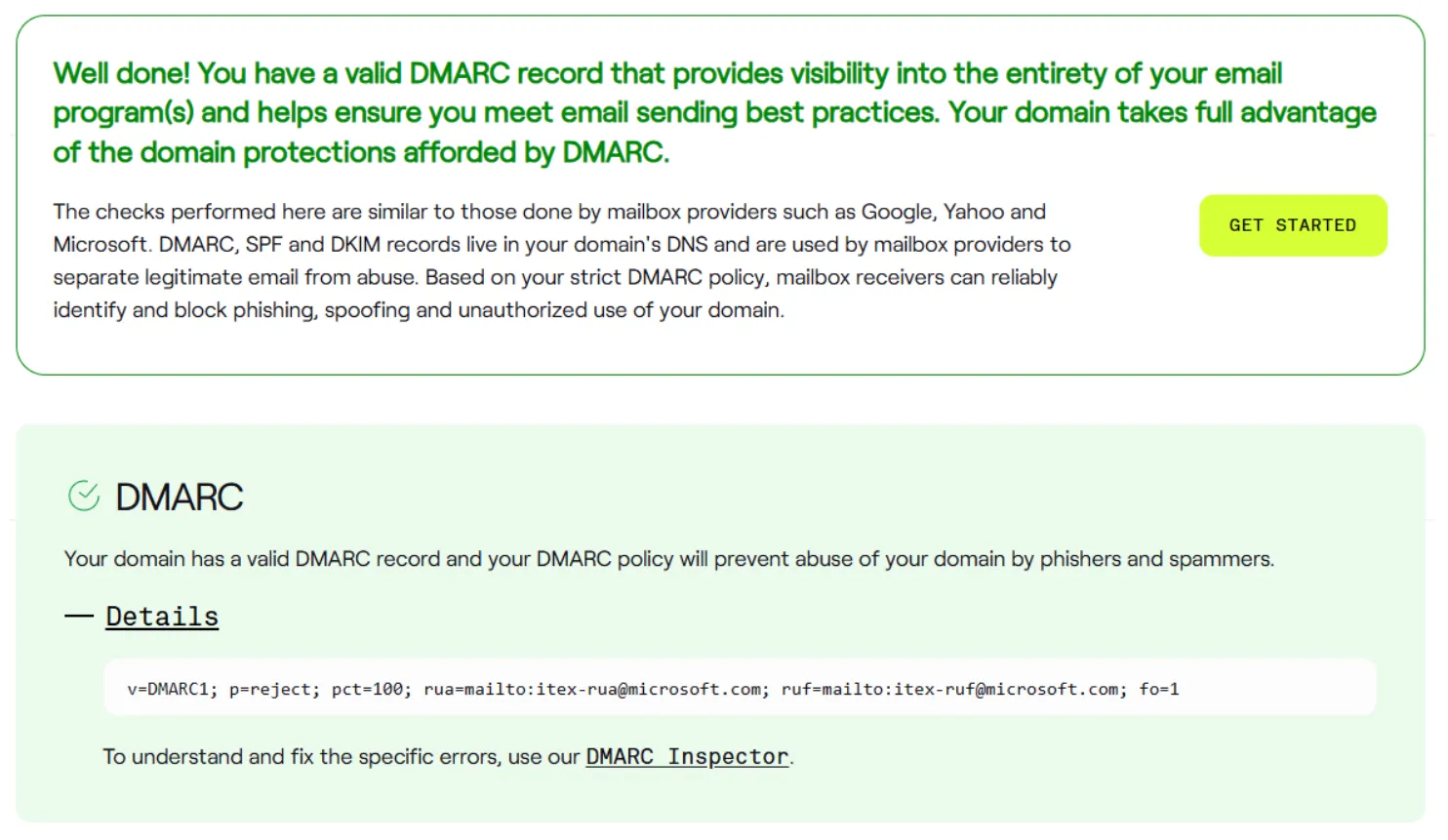
In the screenshot below, you can see that microsoft.com passed all the checks. Clicking the details will allow you to examine each record and policy more closely. As shown in the record below, all emails that fail the DMARC check will be rejected based on the p=reject policy tag.
Secure/Multipurpose Internet Mail Extensions (S/MIME)
Secure/Multipurpose Internet Mail Extensions (S/MIME) is a standard protocol for sending digitally signed and encrypted messages. It is based on public key cryptography, where the private key is never shared and the public key can be distributed openly. The two main components and security features of S/MIME are:
Digital Signature
The sender signs the message with their private key, the recepient verifies the sender’s identity using the sender’s public key. This security feature provides:
- Authentication: Confirms the sender’s identity through their digital certificate
- Non-repudiation: Ensures the sender cannot deny sending the message
- Data Integrity: Detects any changes to the message after it’s signed
Encryption
The sender encrypts the message using the recipient’s public key, allowing only the recipient to decrypt it with their private key. This security feature provides:
- Confidentiality: Keeps the content private and readable only by the intended recipient
S/MIME Example
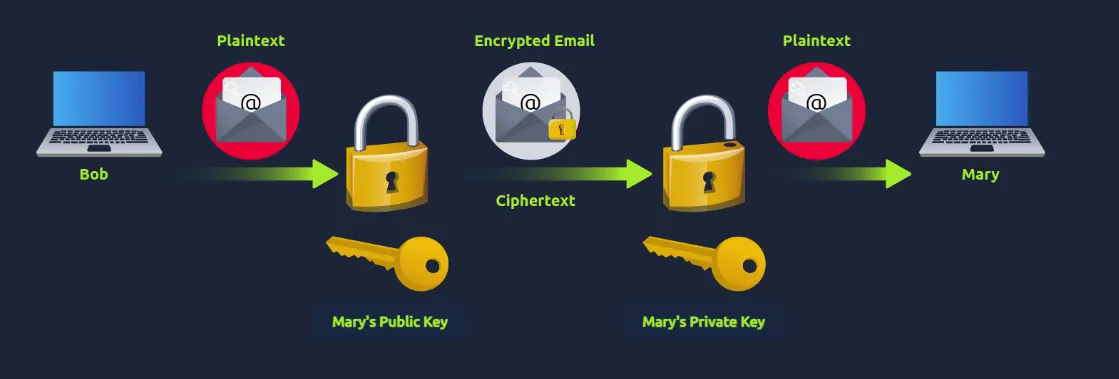
Bob wishes to securely send the email with S/MIME to Mary
Bob creates a digital certificate to generate the Digital Signature
Bob “signs” the email message with his private key (Digital Signature)
Bob openly shares his public key with Mary (Digital Signature)
Bob also asks the public key of Mary to encrypt the email (Encryption)
Mary verifies Bob’s message with Bob’s public key (Digital Signature)
Mary decrypts the received message with her private key (Encryption)
To send a reply email, Mary performs the same procedure from the start
Both Bob and Mary will now have each other’s certificates for future correspondence
Practical - Analyzing SMTP Responses
We are tasked to review a couple of traffic logs and narrow them down to find processes.
First task is, Which Wireshark filter can you use to narrow down your results based on SMTP response codes?
For that, we can simply type smtp.response.code in the filter bar. 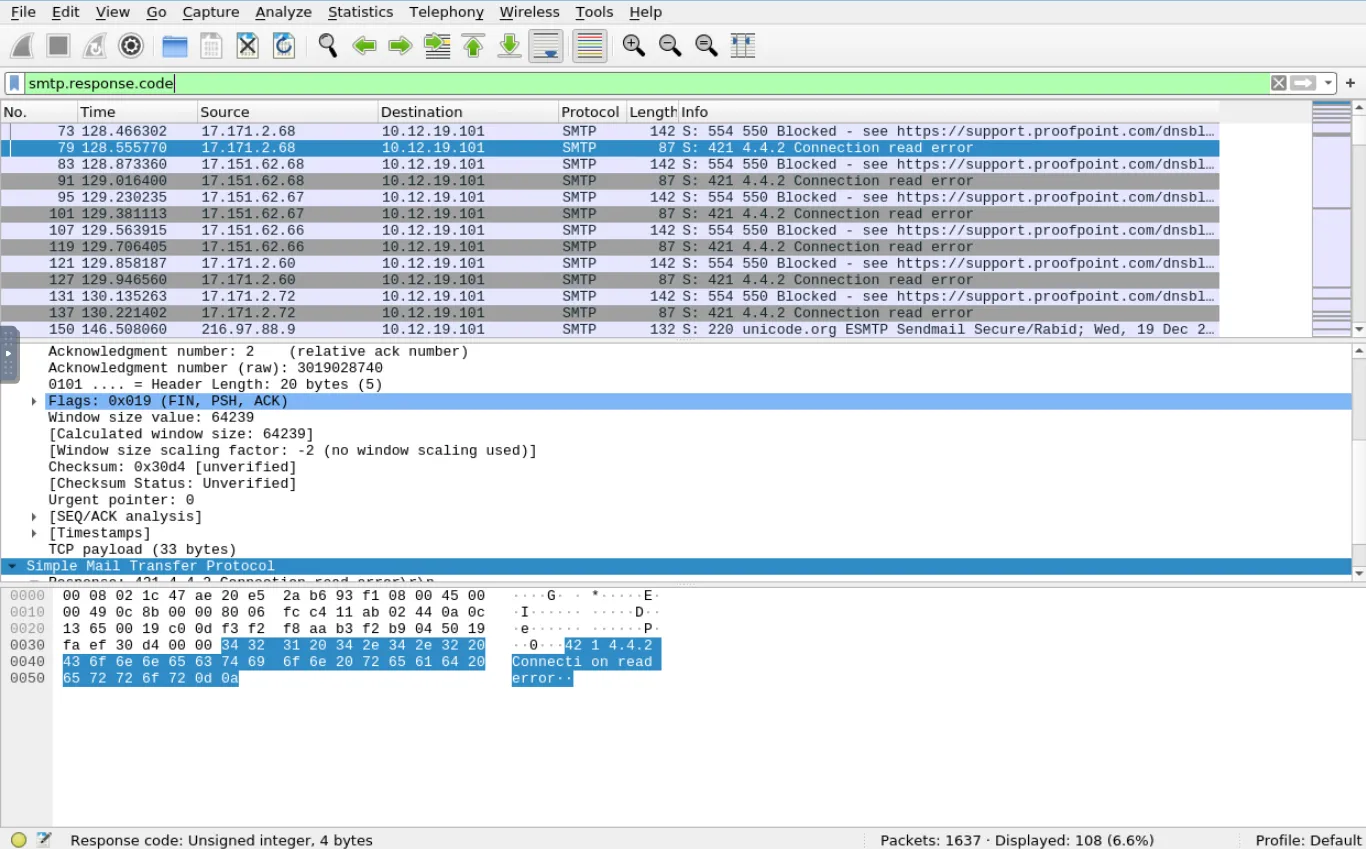 The following question: How many packets in the capture contain the SMTP response code
220 Service ready? 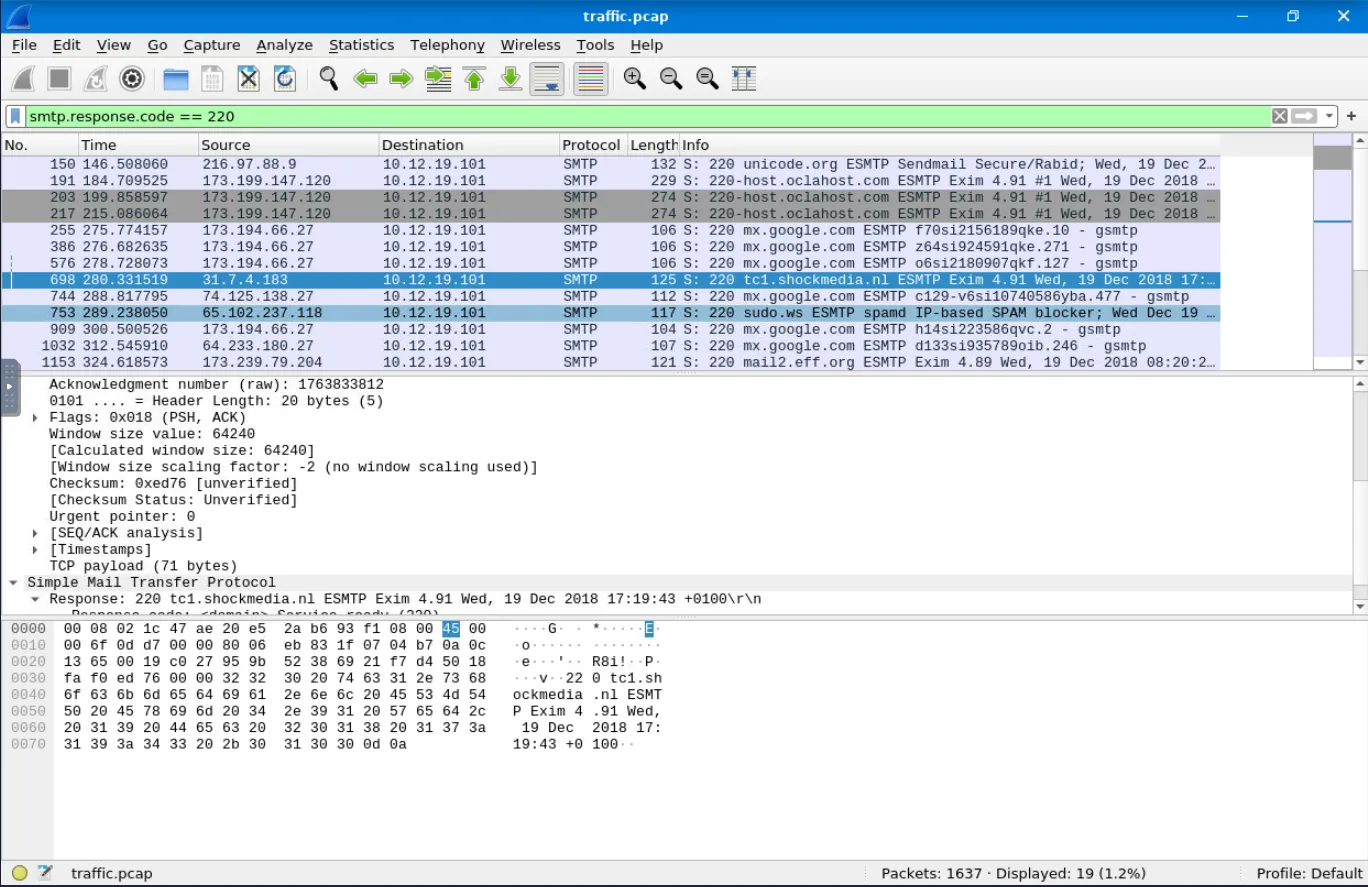
 Displayed
19, because of the filter.
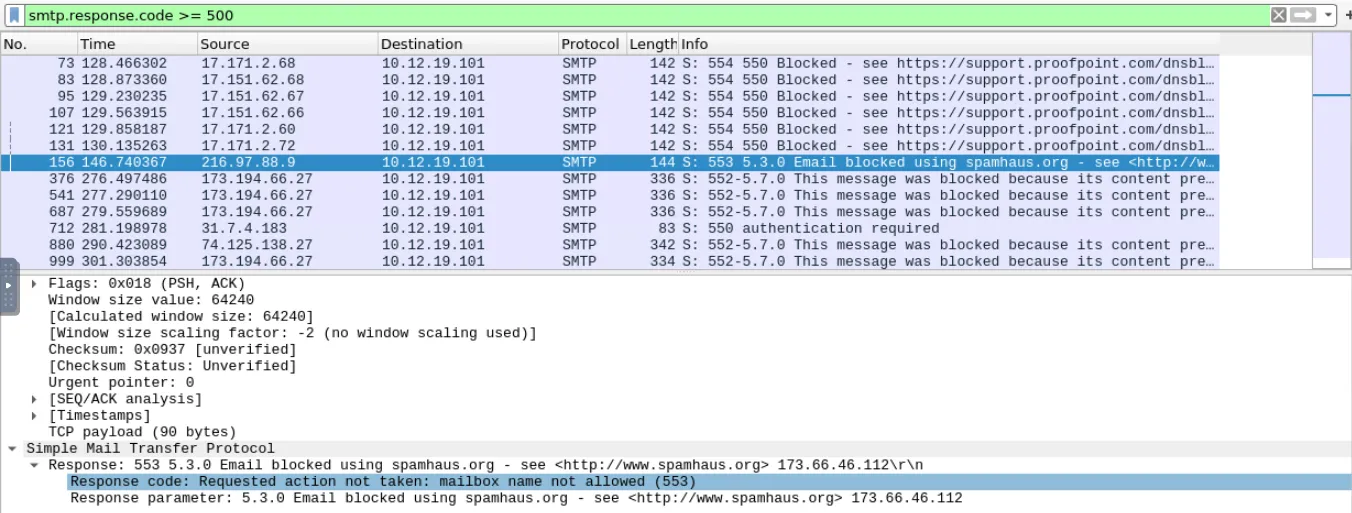
One SMTP response indicates that an email was blocked by spamhaus.org. What response code did the server return? We can search for the smtp.response.code >= 500 to see the blocked connections. Each code adds an extra number, so we have to search for each 500+ code response. 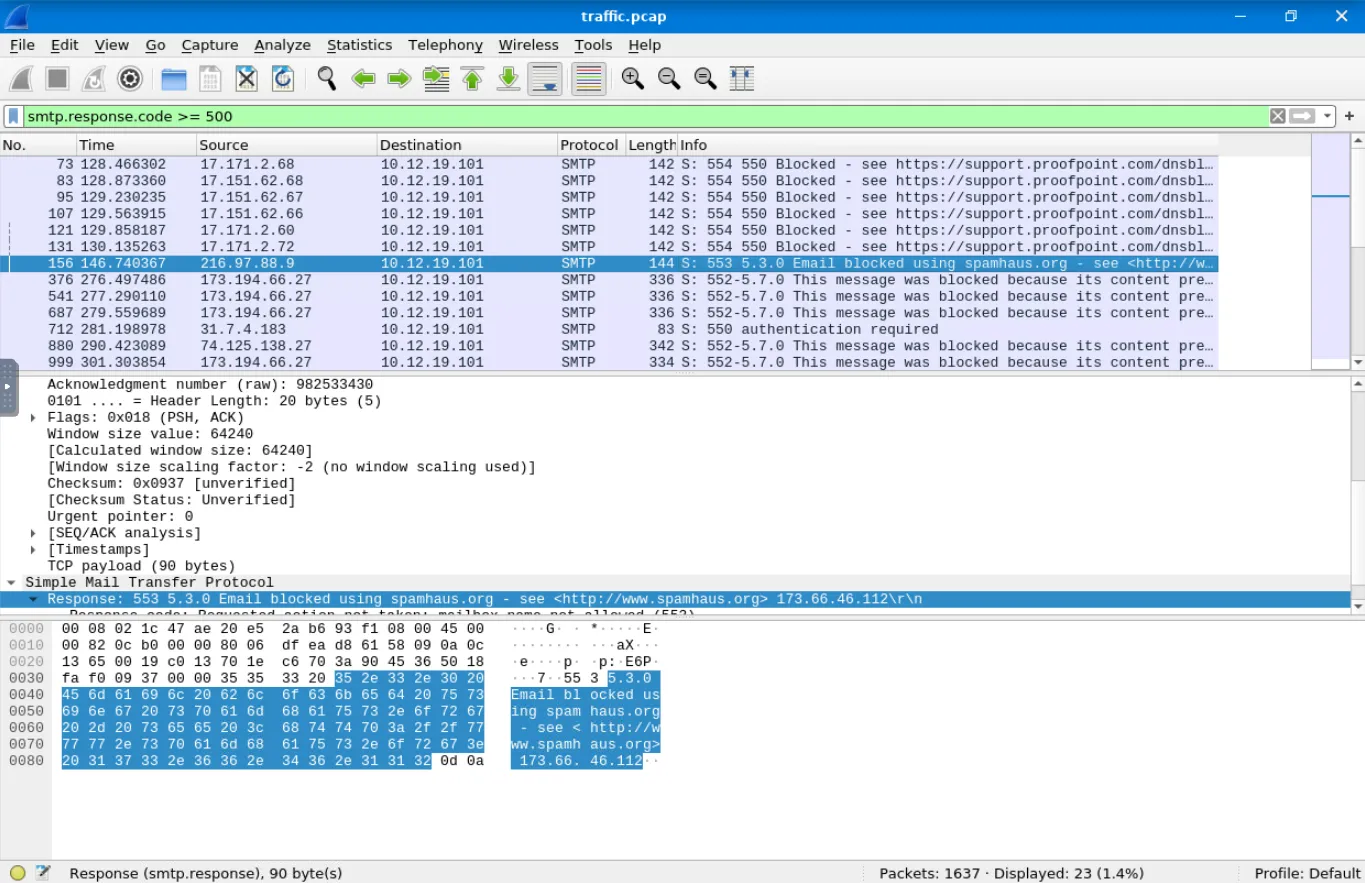 Based on the packet from the previous question, what is the full
Response code: message? Requested action not taken: mailbox name not allowed (553)
Search for response code 552. How many messages were blocked for presenting potential security issues? Search for smtp.response.code == 552
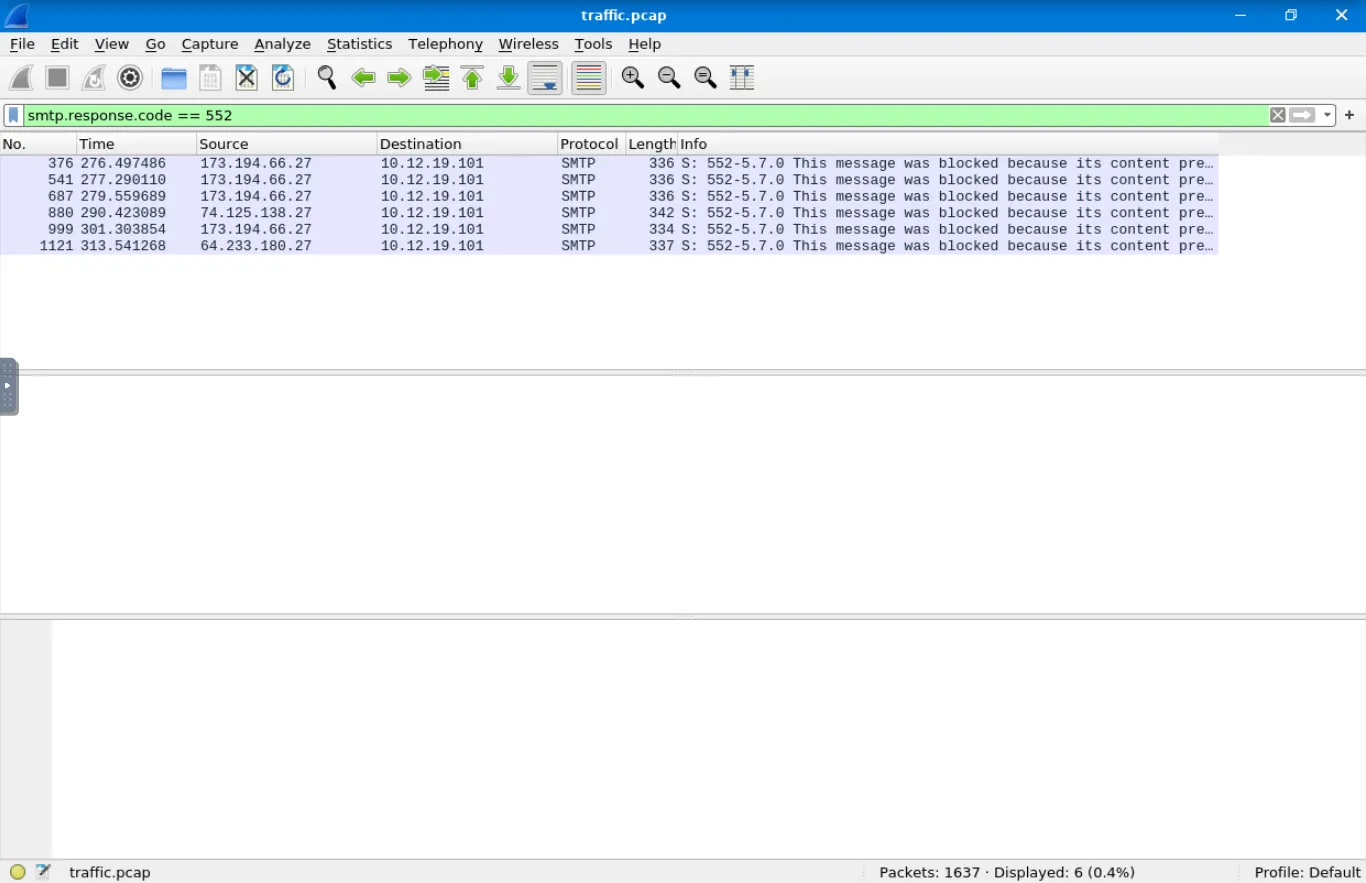
 Answer: 6
Practical - Inspecting Emails and Attachments
In this task, you’ll move beyond SMTP status codes and responses and begin analyzing SMTP traffic using the same traffic capture from the task above. You will utilize the Internet Message Format (IMF) to examine the inner details of emails, such as sender and recipient fields, content type, and attachments.
Task: How many SMTP packets are available for analysis? Filter used is: smtp. 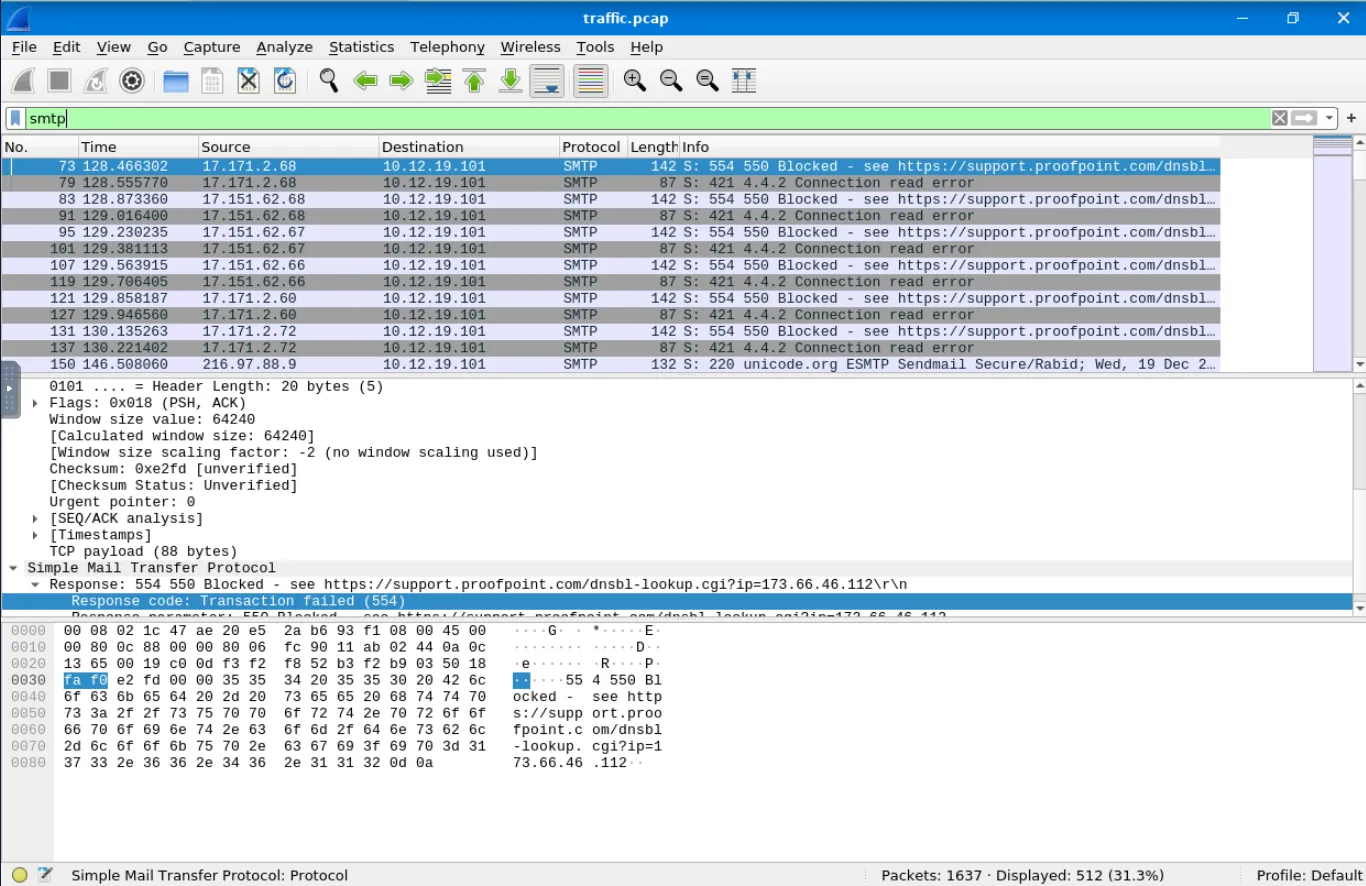
What is the name of the attachment in packet 270? Go to packet = 270 Extend details about the attachment and look in the mail We can see the document.zip. 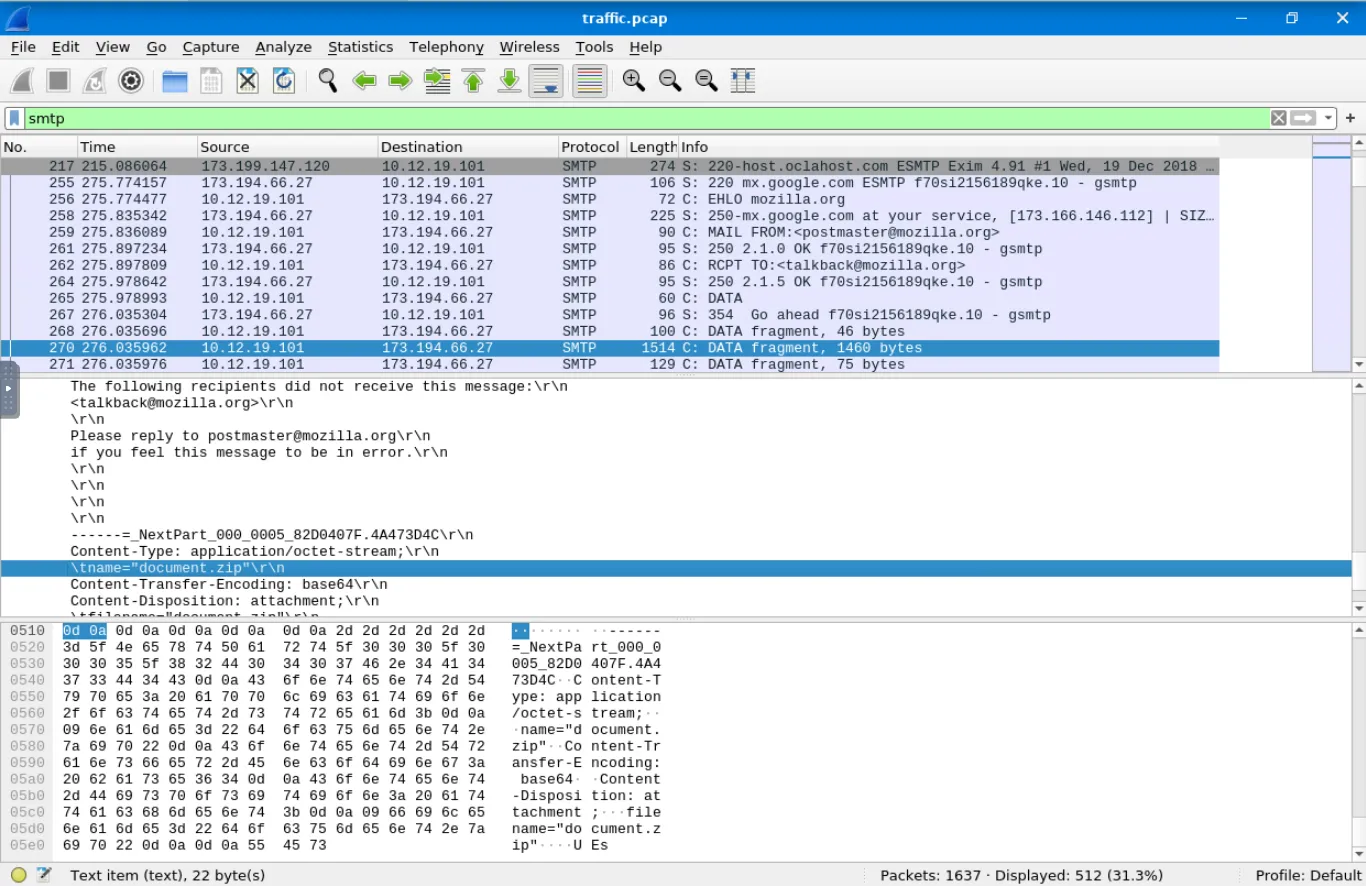 According to the message in packet
270, which Host IP address is not responding, making the message undeliverable?
Search in the mail for details to see the IP: 212[.]253[.]25[.]152. 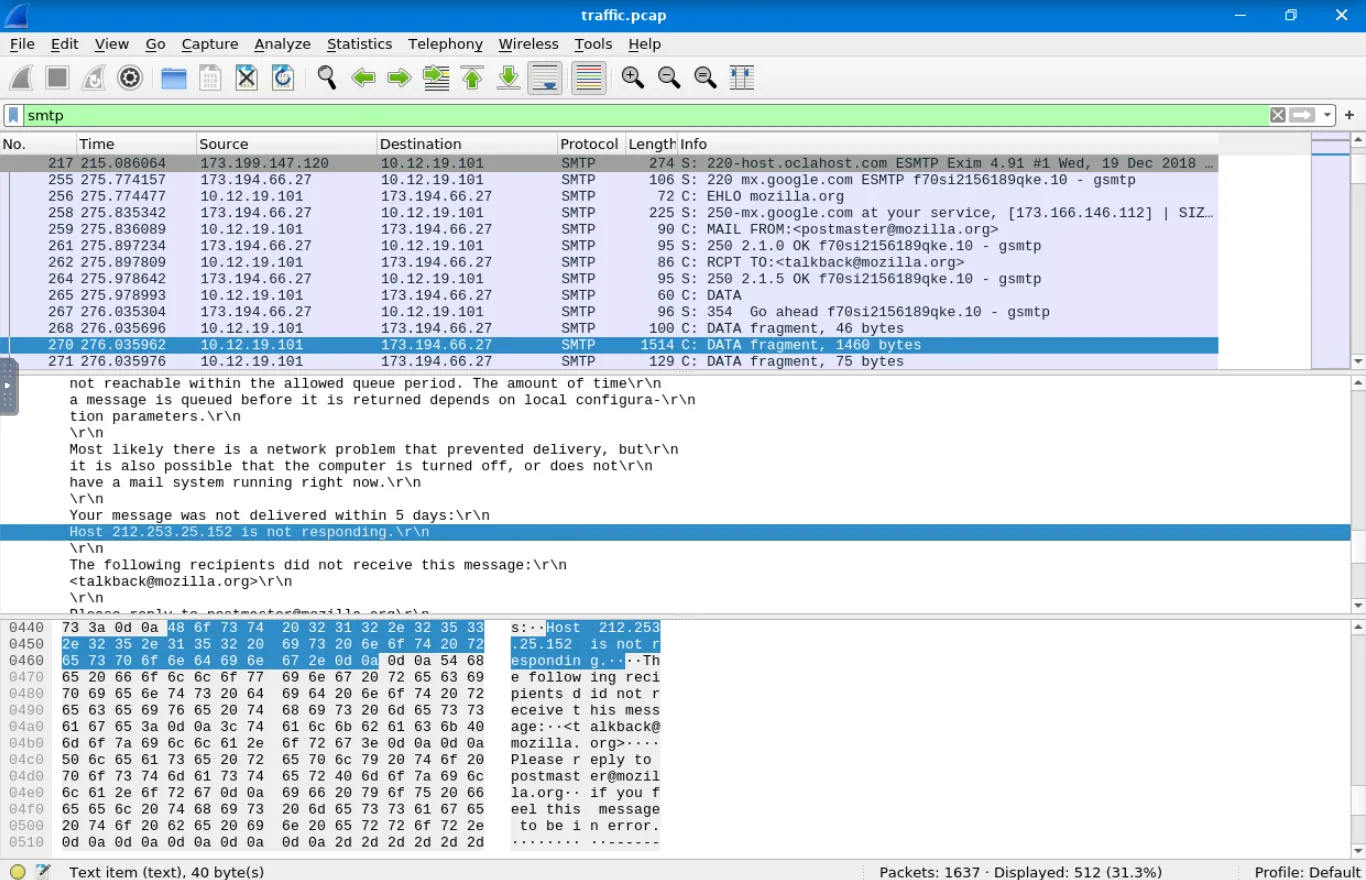
By filtering for imf, which email client was used to send the message containing the attachment attachment.scr?
This is an interesting one because he asks us to double filter a packet to see the email client
For that we are going to search for imf and select any mail
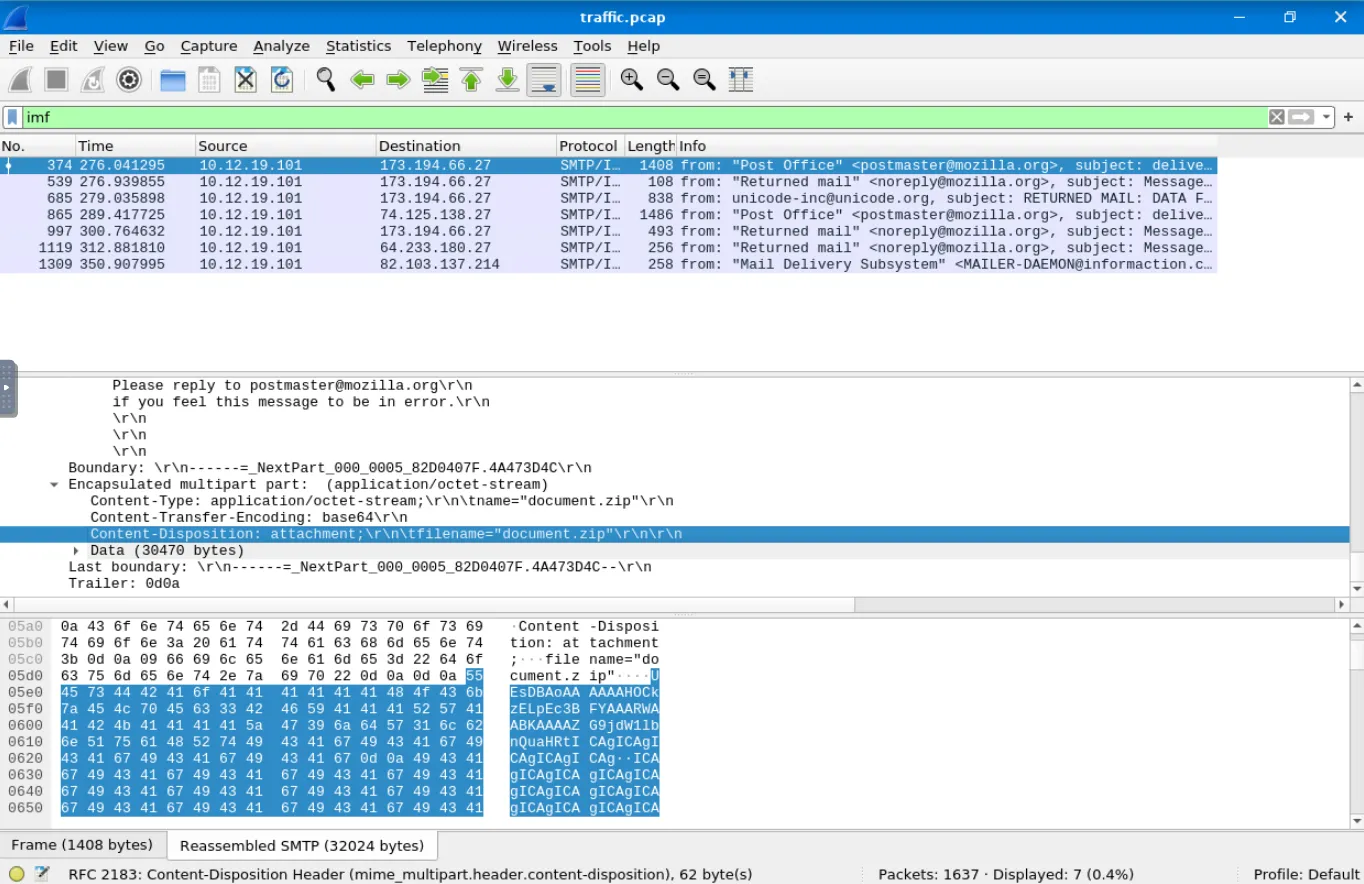
After that, we can right click the attachment and select filter -> .. and select
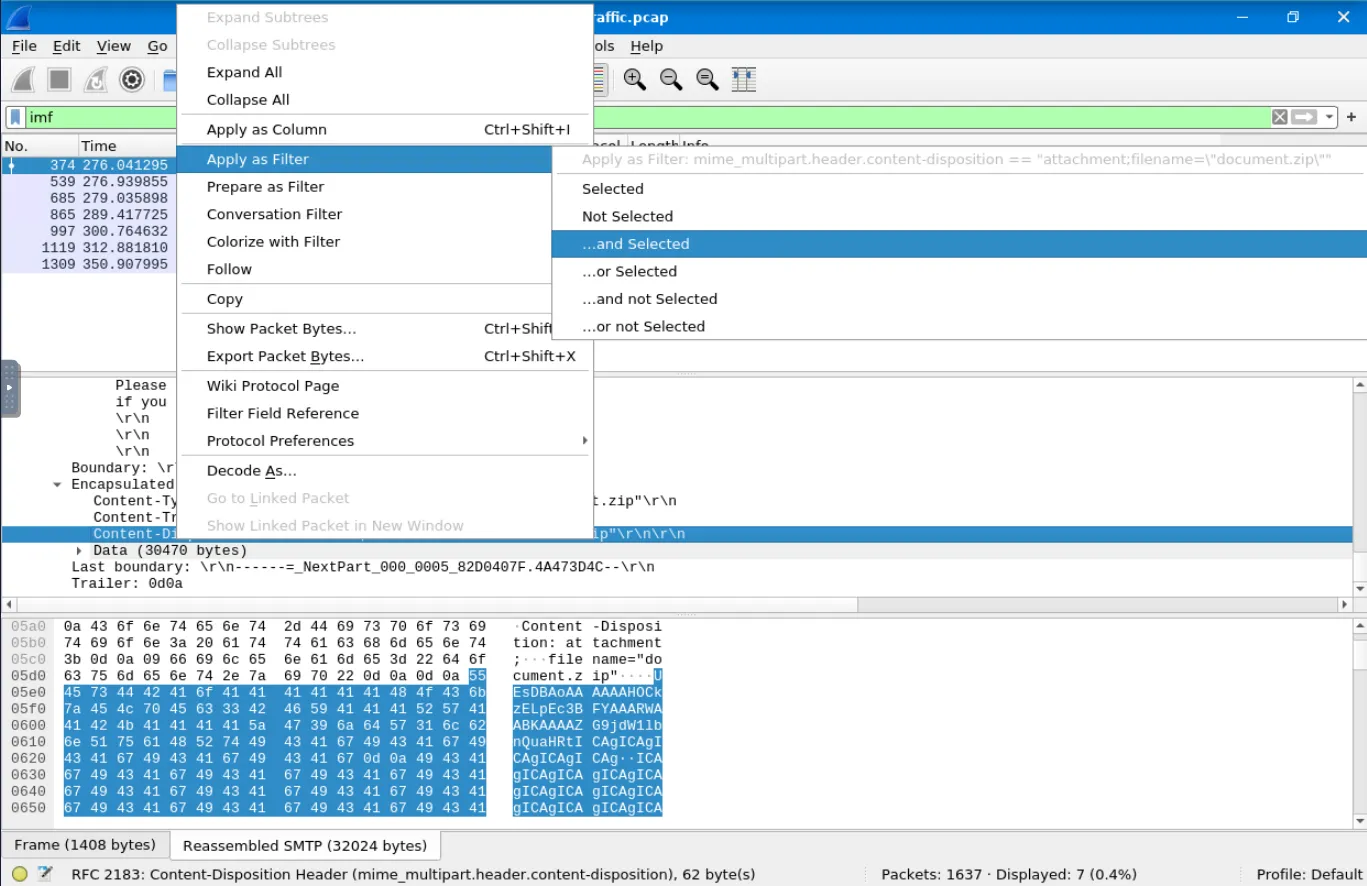
And change the document.zip to attachment.scr.
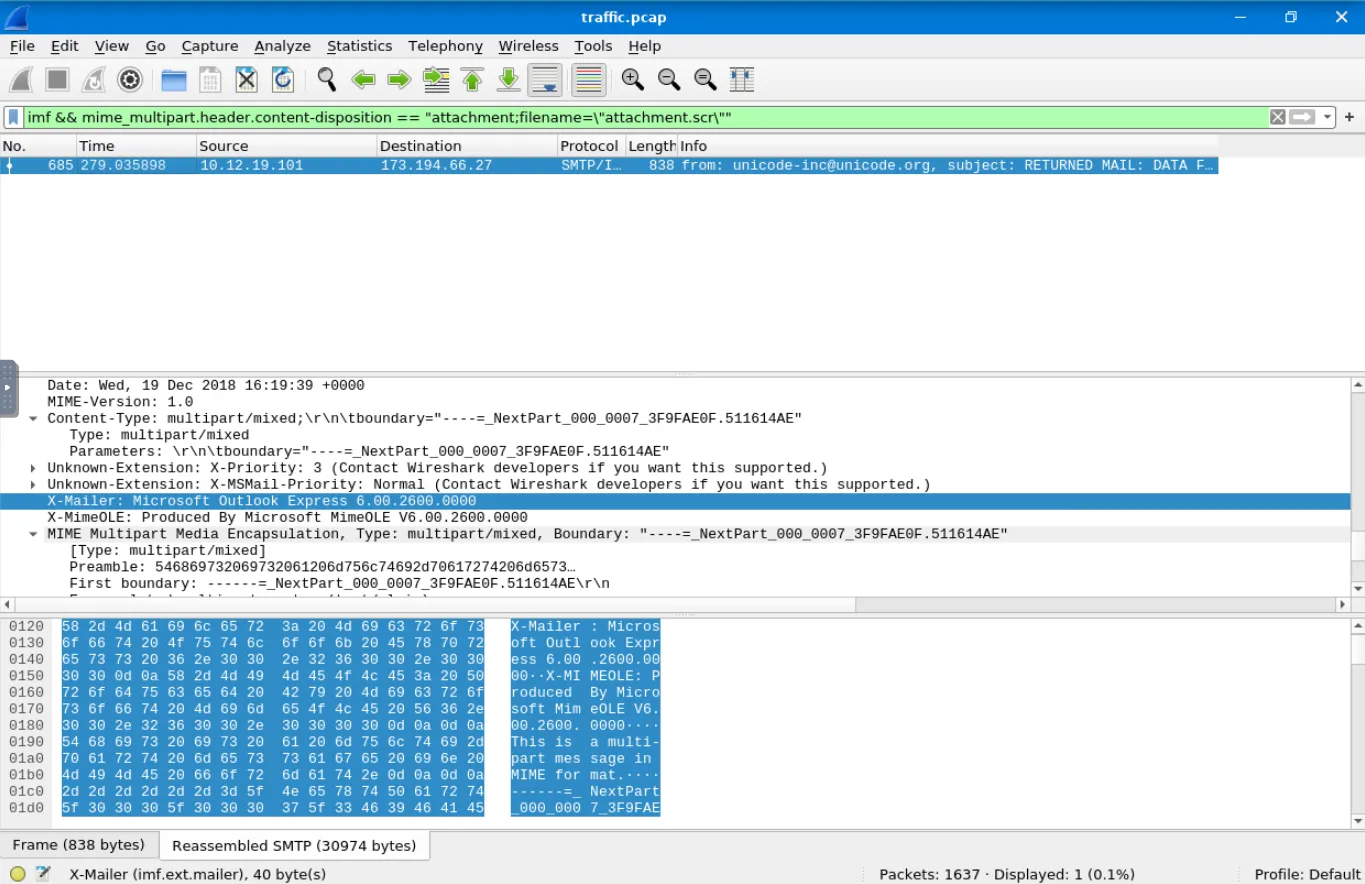 We can scroll up to find the client: Microsoft Outlook Express 6.00.2600.0000
Which type of encoding is used for this potentially malicious attachment? 
base64 is the right answer.
How Organizations Stop Phishing
some modern solutions that enhance email security and reduce phishing risks.
Technical Defenses
Modern email systems employ various technical controls to help detect and block phishing messages before they reach users.
- Email Filtering: Provides filtering based on IP and domain reputation, allowing for blocking or quarantining of suspicious messages.
- Secure Email Gateways (SEGs): Scan messages to detect impersonation attempts, spoofing, and other phishing techniques that other filters might miss.
- Link Rewriting: Replaces suspicious or unknown URLs with safe, redirected ones, giving the system time to scan and verify the link.
- Sandboxing: Isolates and tests suspicious links or attachments in a secure, virtual environment to check for malicious behavior.
User-Facing Tools & Training
Even with strong technical defenses in place, some phishing emails will inevitably reach users. Giving users clear visual cues and education is essential.
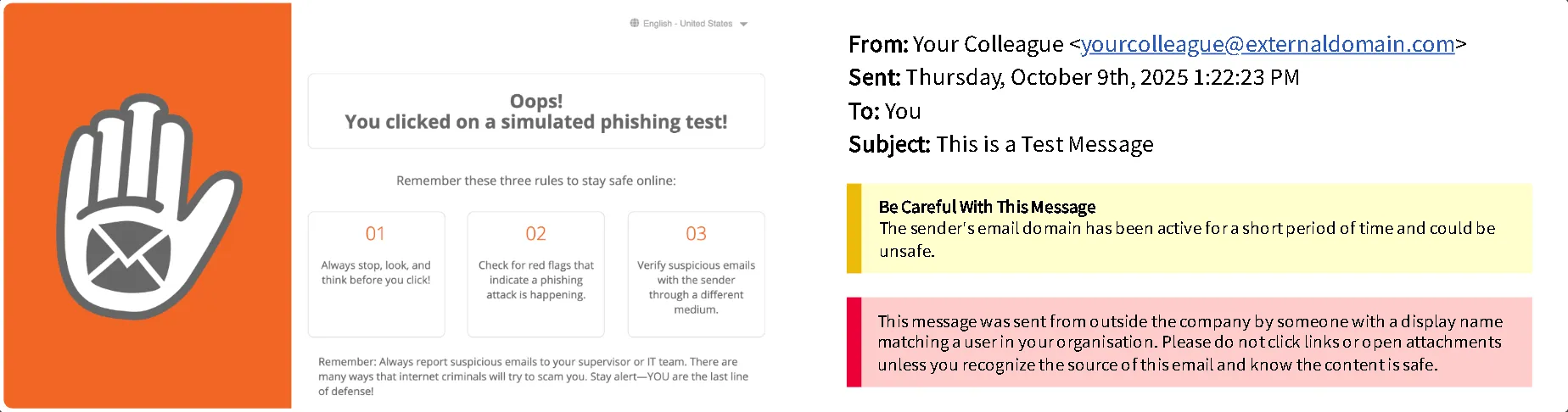
- Trust & Warning Indicators: Modern email platforms display visual cues to help users understand if a message is safe. A banner may read “External Sender,” “Suspicious Link,” or signify that a message is from a trusted organization or sender.
- Phishing Reporting: Easy, in-email reporting options that let users quickly report suspicious messages.
- User Awareness Training: Train employees on identifying phishing attempts, social engineering tactics, and safe email practices.
- Phishing Simulation Exercises: Run controlled phishing campaigns to test and reinforce employee training.
Q&A
Click to view TryHackMe Room Q&A
Based on TryHackMe’s SPF record above, how many domains are authorized to send email on its behalf?
Answer: 3What is the intended action of an email that returns a
SoftFailverification result?
Answer: FlagBased on the sample header above, what is the reason for the
permerror?
Answer: no key for signatureWhich DMARC policy provides the greatest amount of protection by blocking emails that fail the DMARC check?
Answer: p=rejectWhich S/MIME component ensures that only the intended recipient can read the contents of an email message?
Answer: EncryptionWhich Wireshark filter can you use to narrow down your results based on SMTP response codes?
Answer: smtp.response.codeHow many packets in the capture contain the SMTP response code
220 Service ready?
Answer: 19One SMTP response indicates that an email was blocked by
spamhaus.org. What response code did the server return?
Answer: 553Based on the packet from the previous question, what is the full
Response code:message?
Answer: Requested action not taken: mailbox name not allowed (553)Search for response code
552. How many messages were blocked for presenting potential security issues?
Answer: 6How many SMTP packets are available for analysis?
Answer: 512What is the name of the attachment in packet
270?
Answer: document.zipAccording to the message in packet
270, which Host IP address is not responding, making the message undeliverable?
Answer: 212[.]253[.]25[.]152By filtering for
imf, which email client was used to send the message containing the attachmentattachment.scr?
Answer: Microsoft Outlook Express 6.00.2600.0000Which type of encoding is used for this potentially malicious attachment?
Answer: base64A security team wants to implement a control to detect hidden malware inside email attachments.
They need a way to analyze suspicious files without risking infection on real systems.
Which protective technique would allow them to observe a file’s behavior safely?
Answer: Sandboxing