
Introduction to EDR Walkthrough
Learning the fundamentals of EDR and explore its features and working.
Summary
Endpoint Detection and Response is a complimentary solution for the detections solutions that is capable through sensors or agents to detect anomalies even without past experience unlike antiviruses. EDR is working based on the behaviour, IOC, Mitre chain of action and anomalies overall. AV on the other hand, is not capable of adapting to newer problems, some issues would still pass the antivirus solution. So it is important to go hand in hand to improve security of the host and collect telemetry to further improve visibility, which is one of the three pillars of EDR, detect the anomaly and response in time.
1. The Three Pillars of EDR
A comprehensive EDR solution relies on three core capabilities:
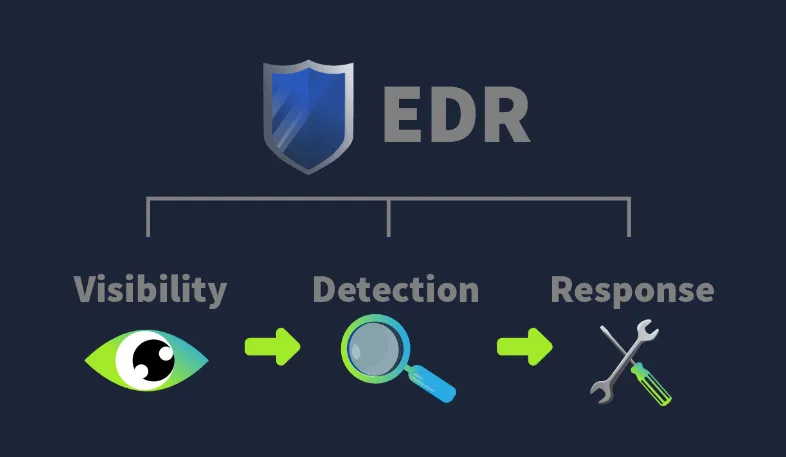
A. Visibility
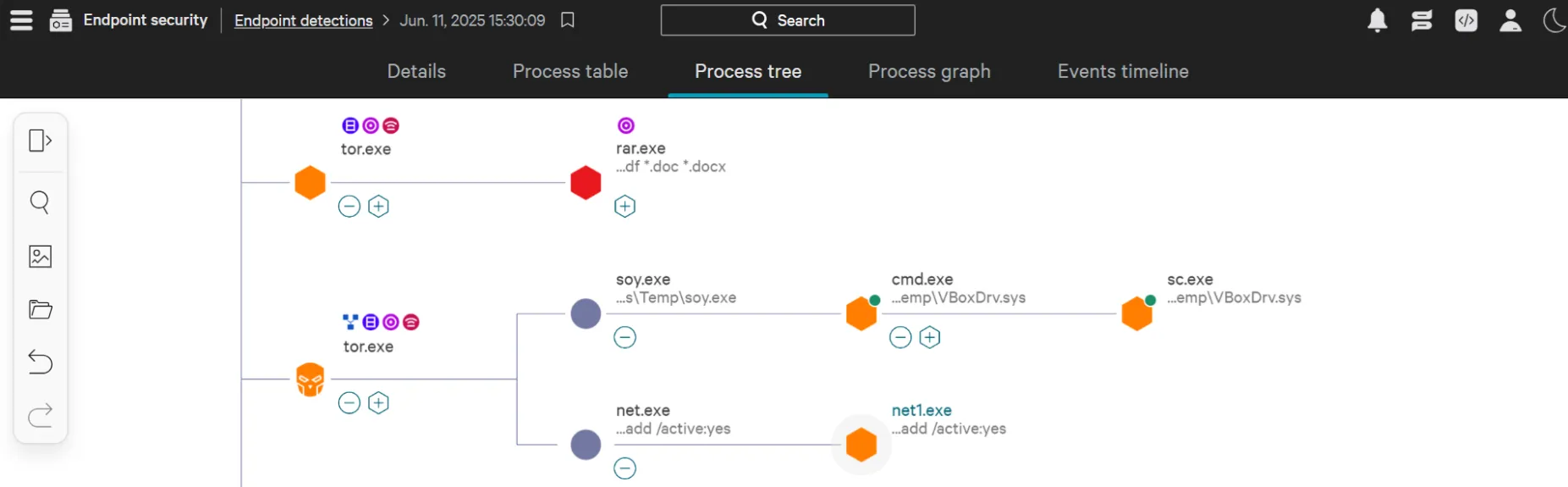
Visibility is a top priority for any SOC Analyst. EDR consoles expose full process trees alongside complete execution timelines, eliminating blind spots:
| Process Modifications | Registry Modifications | File And Folder Modifications | User Actions | Advanced Telemetry |
|---|
B. Detection
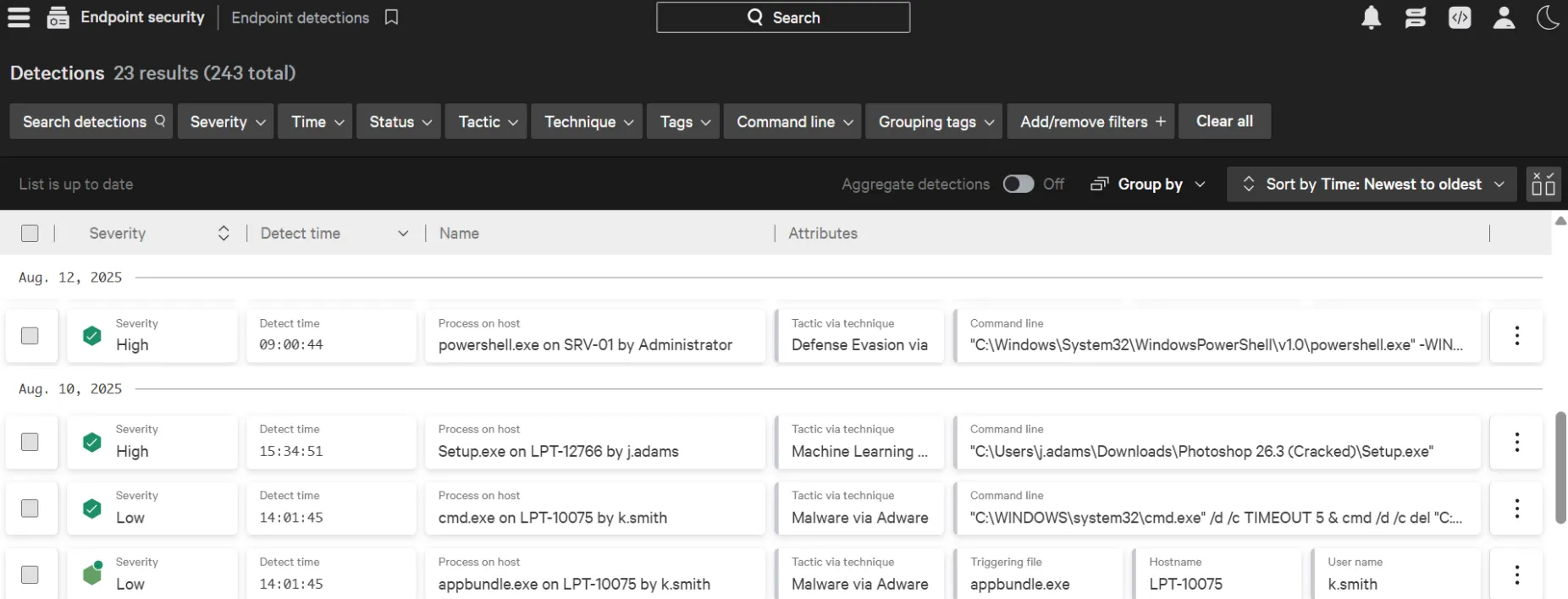
Beyond traditional signature checks, EDR platforms integrate behavioral analytics and machine learning engines to baseline normal host activity and flag anomalies. This design detects in-memory attacks and fileless malware, while still allowing teams to inject custom Threat Intelligence indicators (IOCs).
Every alert provides granular metadata: severity, timestamp, triggering process, target host, user context, and mapping to the MITRE ATT&CK framework.
C. Response
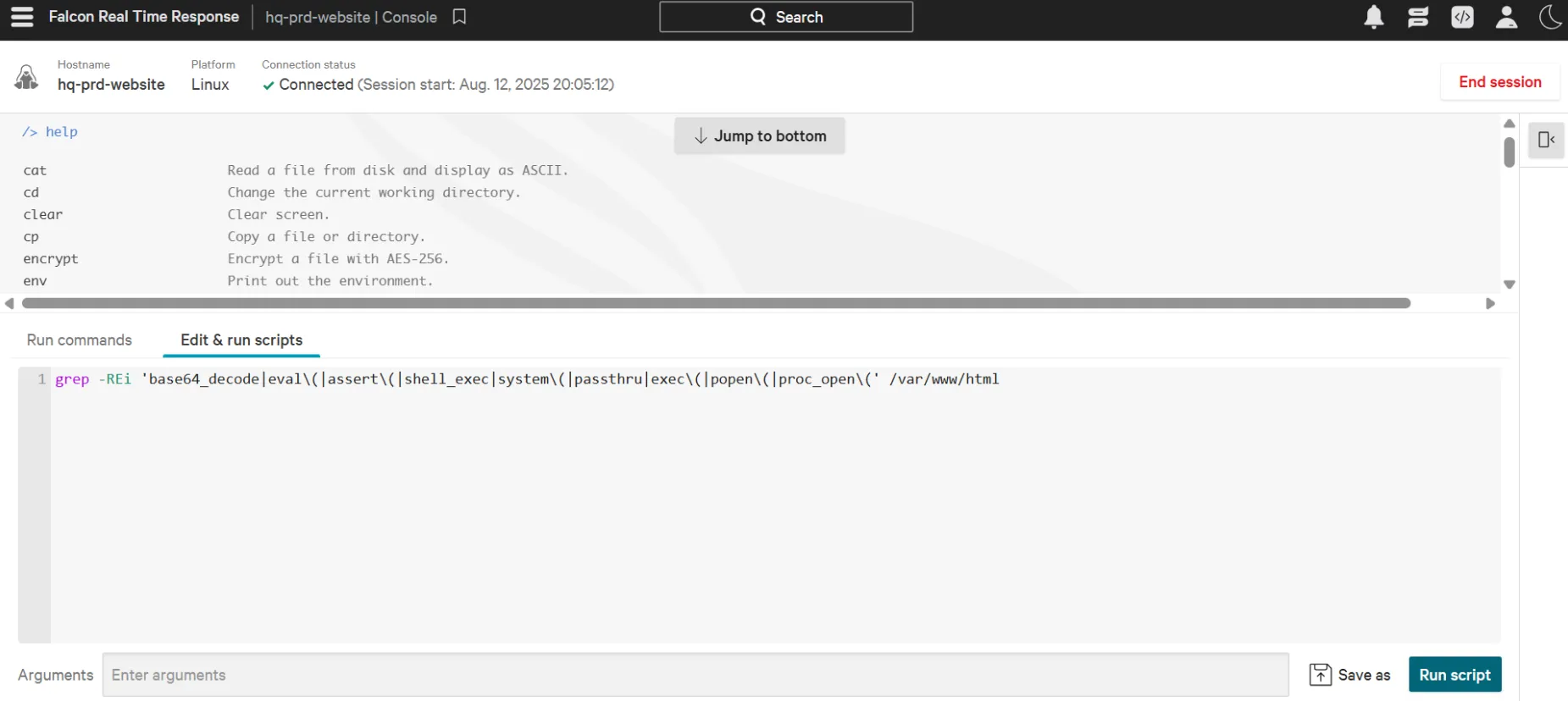
When an alert is validated, the analyst can execute response measures directly from the centralized management interface: host network isolation, process termination, file quarantine, or initiating remote shell sessions for deeper inspection.
2. Beyond Traditional Antivirus: Why EDR Is Essential
A common question in enterprise security is why an Antivirus (AV) solution alone is insufficient. Both tools protect the host, but the depth of coverage and operational philosophy differ significantly.
The Airport Analogy:
Think of an endpoint as an airport facility.
- Antivirus (AV) acts like the Immigration Checkpoint: it screens incoming travelers against a database of known criminals (signatures). If an offender appears in the database, entry is blocked. However, if an individual with no prior criminal record enters with malicious intent, immigration lets them pass.
- EDR functions like the Security Officers and CCTV inside the terminal: it continuously observes post-entry behavior (e.g., unauthorized access attempts, abandoned bags, suspicious movements).
Analyst Note: Deploying both layers provides depth; when a threat lacks a prior hash signature or leverages legitimate system utilities, EDR behavioral detection covers the visibility gap.
Attack Scenario Breakdown
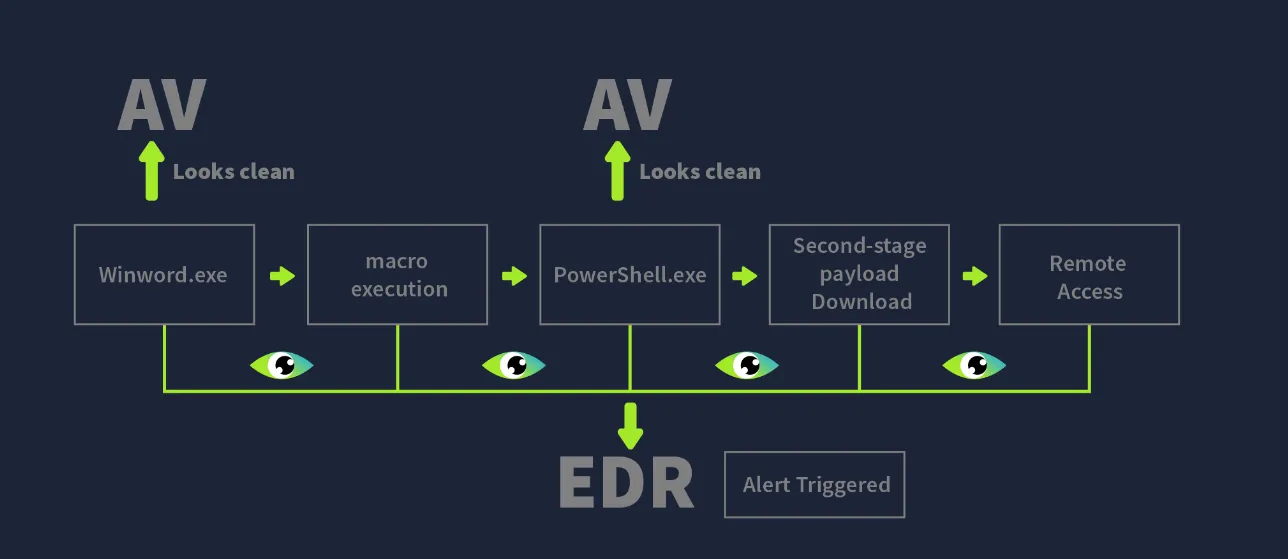
| Attack Step | Antivirus (AV) Response | EDR Response |
|---|---|---|
| Step #1: Malicious macro-embedded document received via phishing | Inactive if the file hash is absent from the signature database. | Logs file creation and records associated hash telemetry. |
| Step #2: User executes document | Inactive; winword.exe is a legitimate executable. | Logs the process start of winword.exe and monitors children. |
| Step #3: Macro spawns PowerShell silently | Inactive if macro code lacks known signature patterns. | Flags Alert: Suspicious parent-child relationship (winword.exe -> powershell.exe). |
| Step #4: Obfuscated PowerShell pulls stage-2 payload | Script obfuscation frequently evades standard AV pattern matching. | Flags suspicious command-line execution and staging behavior. |
Step #5: Payload injected into svchost.exe | No visibility into runtime memory space injection. | Detects Process Injection targeting legitimate system binaries. |
| Step #6: Outbound connection established to C2 server | Lacks socket-to-process correlation visibility. | Flags abnormal outbound network activity originating from svchost.exe. |
| Final Outcome | May mark activity as clean. | Generates alert with full attack chain context. |
3. Architecture & Operational Mechanisms
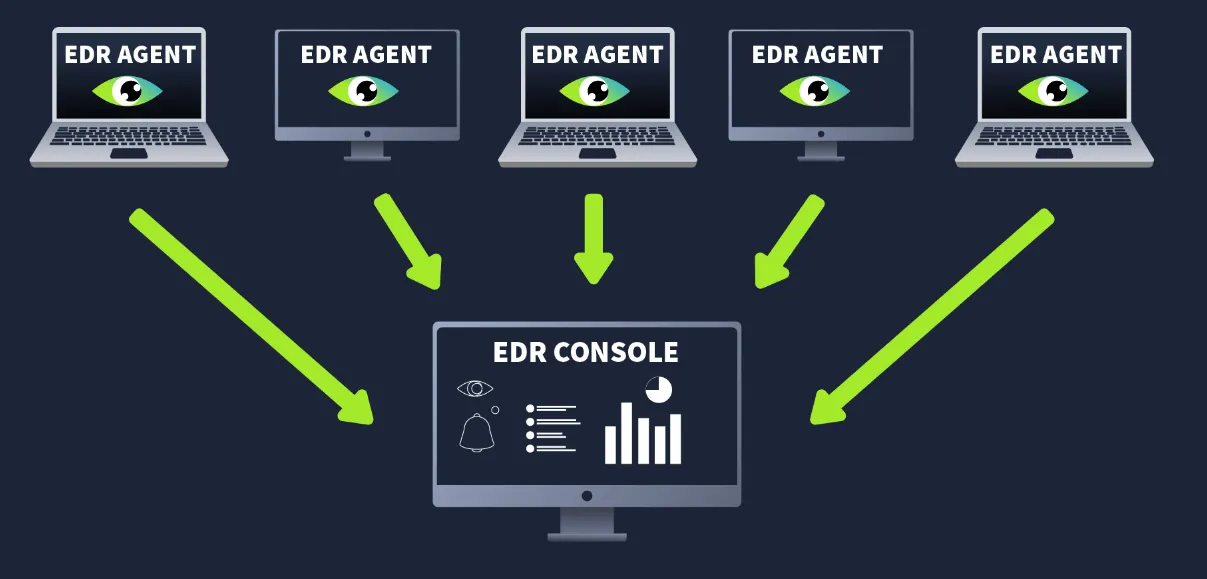
- Agents (Sensors): Lightweight services running on the operating system to collect endpoint telemetry and execute basic local detections.
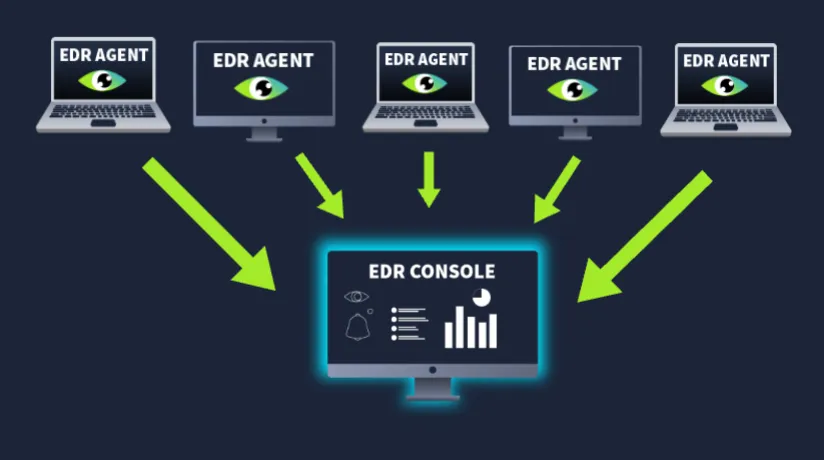
- EDR Console: The aggregation layer where agent telemetry is evaluated against correlation logic, machine learning models, and threat intelligence.
- Ecosystem Integration: While EDR provides granular endpoint visibility, enterprise environments forward EDR events into a central SIEM alongside firewalls, proxies, DLPs, and email gateways for holistic correlation.
Key Telemetry Categories
- Process Tracking: Tracks executions and terminations, uncovering anomalous parent-child relationships.
- Network Connections: Identifies outbound C2 sockets, unauthorized ports, and lateral movement attempts.
- Command-Line Activity: Captures raw CLI arguments and parameters, exposing obfuscated scripting.
- File System Auditing: Monitors staging directories for ransomware preparations or malware drops.
- Registry Modifications: Detects changes to startup keys, services, and persistence mechanisms.
Detection Strategies

- Behavioral Detection: Evaluates process actions dynamically (e.g., document editors spawning command shells).
- Anomaly Detection: Flags deviations from baseline workstation activity.
- IOC Matching: Matches hashes, IPs, and domains against curated Threat Intel feeds.
- MITRE ATT&CK Alignment: Translates observed operations directly into standardized tactics and techniques.
Response & Forensics
Beyond standard quarantine and process kills, consoles provide live containment options and interactive remote shells (e.g., CrowdStrike Falcon Real Time Response - RTR).
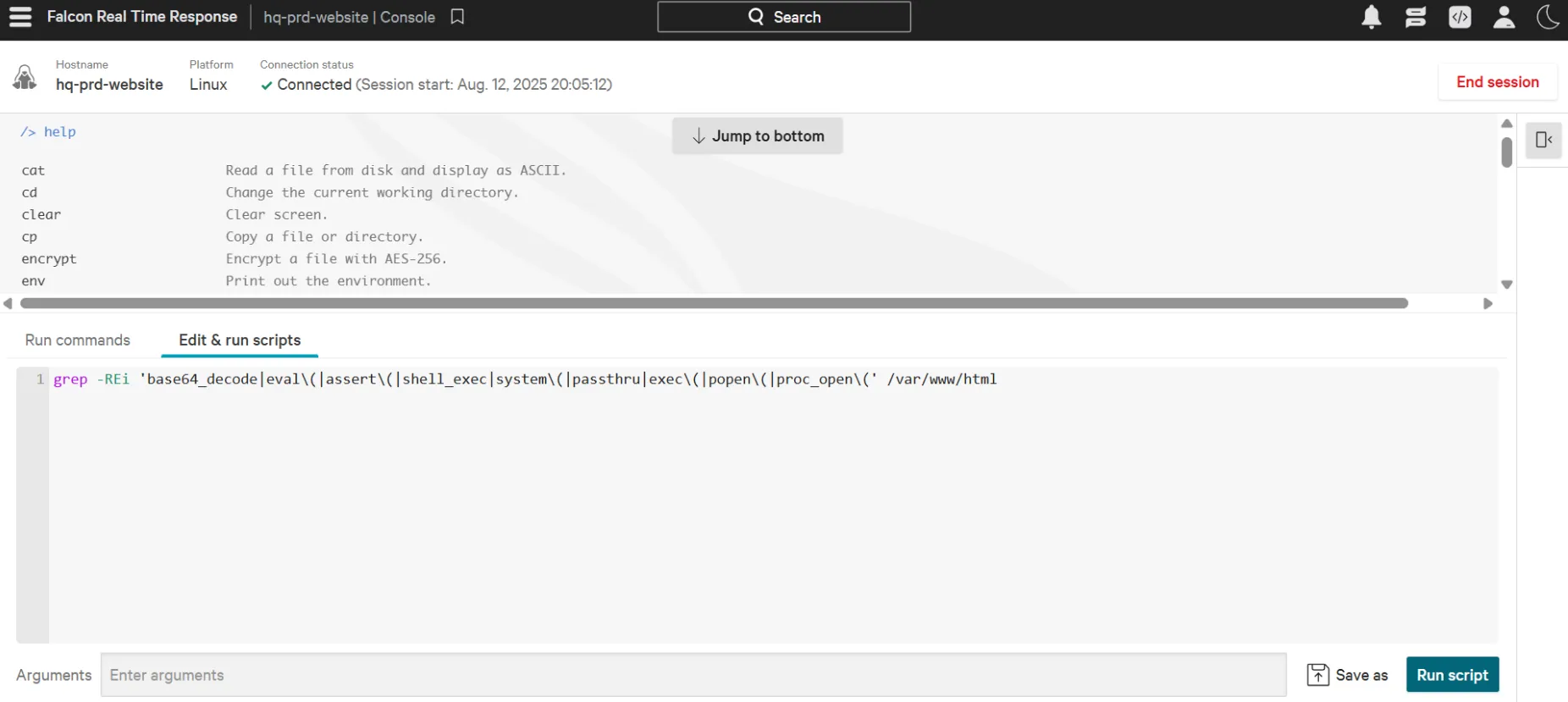
Analysts can collect volatile evidence remotely without physical access:
- Memory dumps
- Windows Event logs
- Specific file and folder paths
- Registry hives
4. Triage Scenario: Investigating Endpoint Detections
Assuming the role of a SOC Analyst at TECH THM, alert triage was conducted on multiple endpoint detections across the environment.
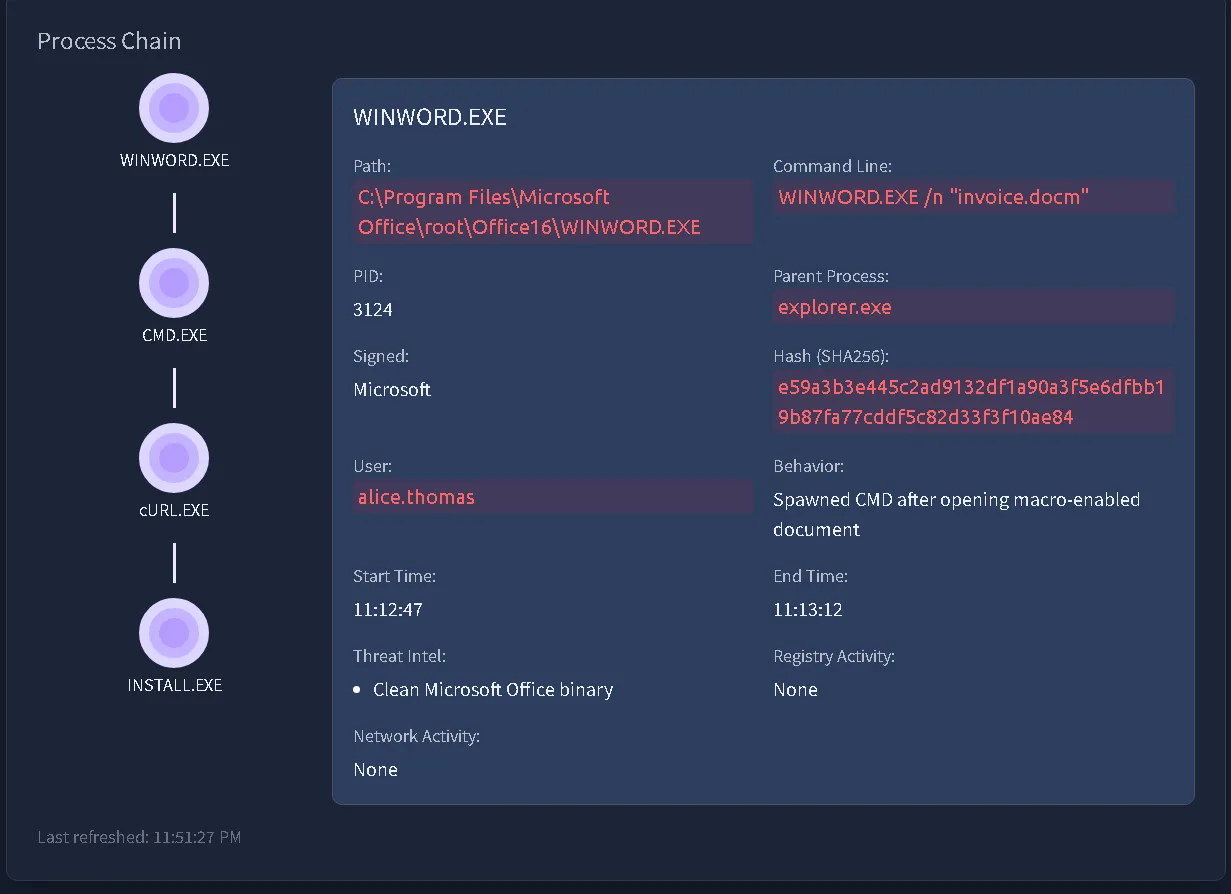
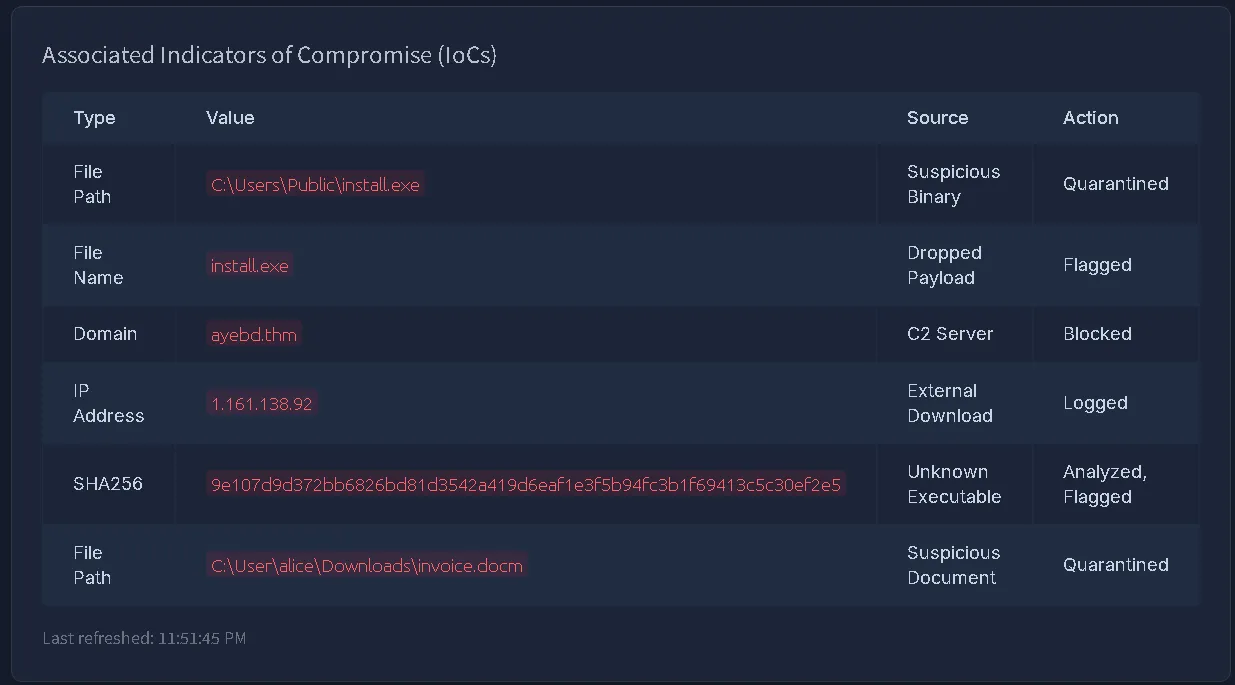
Incident 1: Payload Retrieval (DESKTOP-HR01)
- Trigger Process:
cmd.exelaunched a download utility. - Tool Utilized:
CURL.exe - Downloaded File Path:
C:\Users\Public\install.exe - Analysis: The command line reflects external binary retrieval directly into
C:\Users\Public. Because this path provides write permissions to standard user accounts, it is routinely abused by threat actors for payload staging.
Incident 2: Suspicious Process & Exfiltration Attempt (WIN-ENG-LAPTOP03)
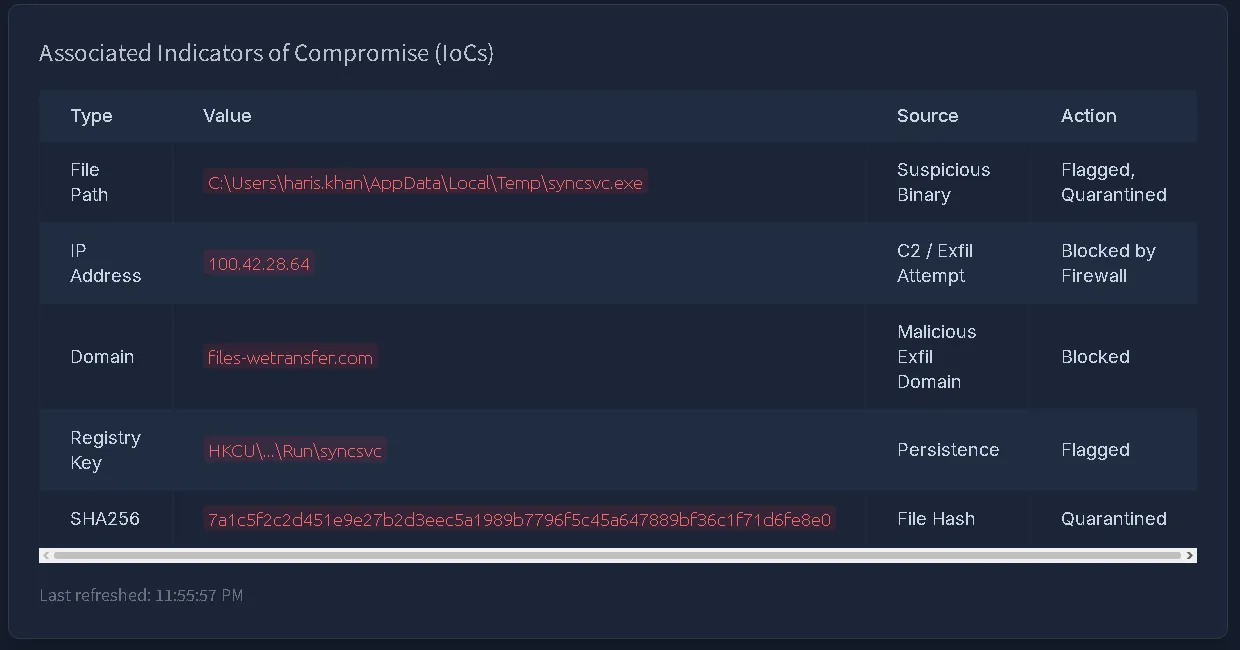
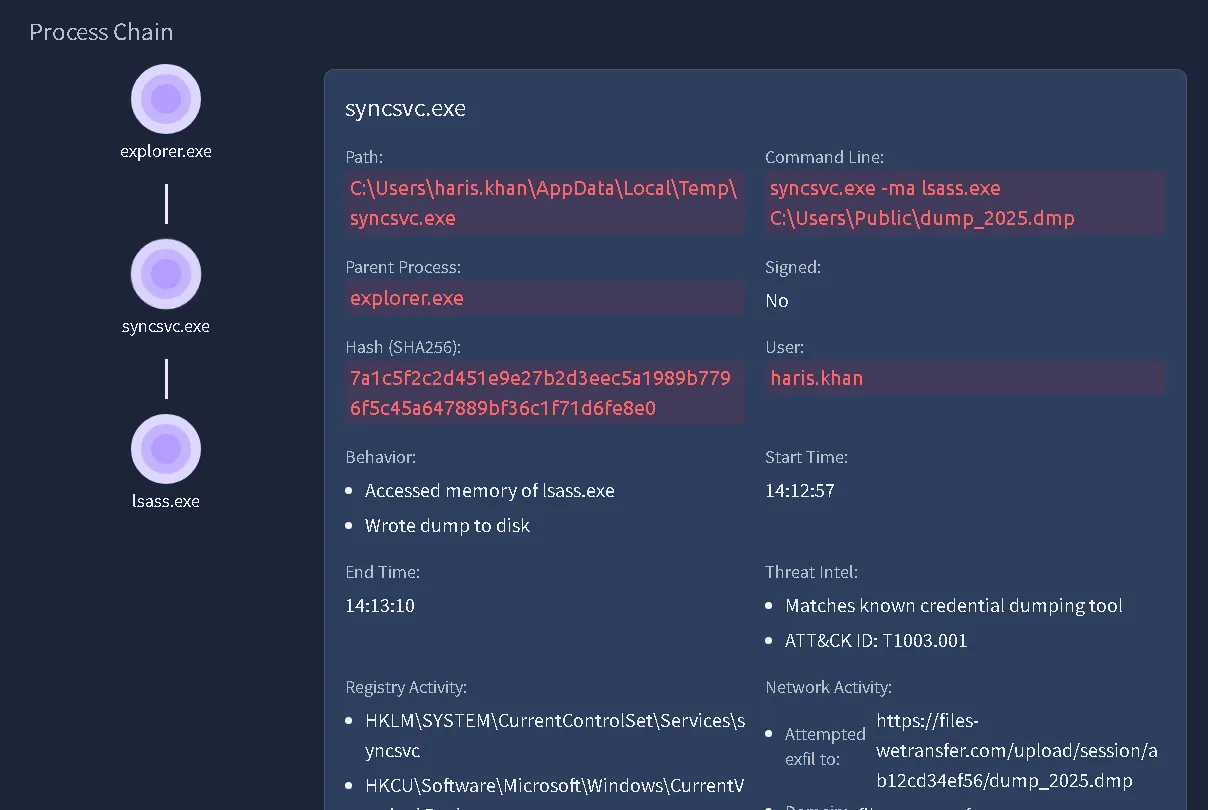
- Suspect Binary:
syncsvc.exe - Binary Path:
C:\Users\haris.khan\AppData\Local\Temp\syncsvc.exe - Target Destination:
https[:]//files-wetransfer[.]com/upload/session/ab12cd34ef56/dump_2025.dmp - Analysis: A rogue executable staged under a user
AppData\Local\Temppath attempted an outbound transmission of a.dmpfile toward a public file-transfer service, suggesting credential or memory dumping followed by exfiltration.
Incident 3: Administrative Activity Validation (DESKTOP-DEV01)
- Binary Assessed:
UpdateAgent.exe - Threat Intel Classification:
Known internal IT utility tool - Verdict: Validated internal administrative activity; marked as a False Positive (FP).
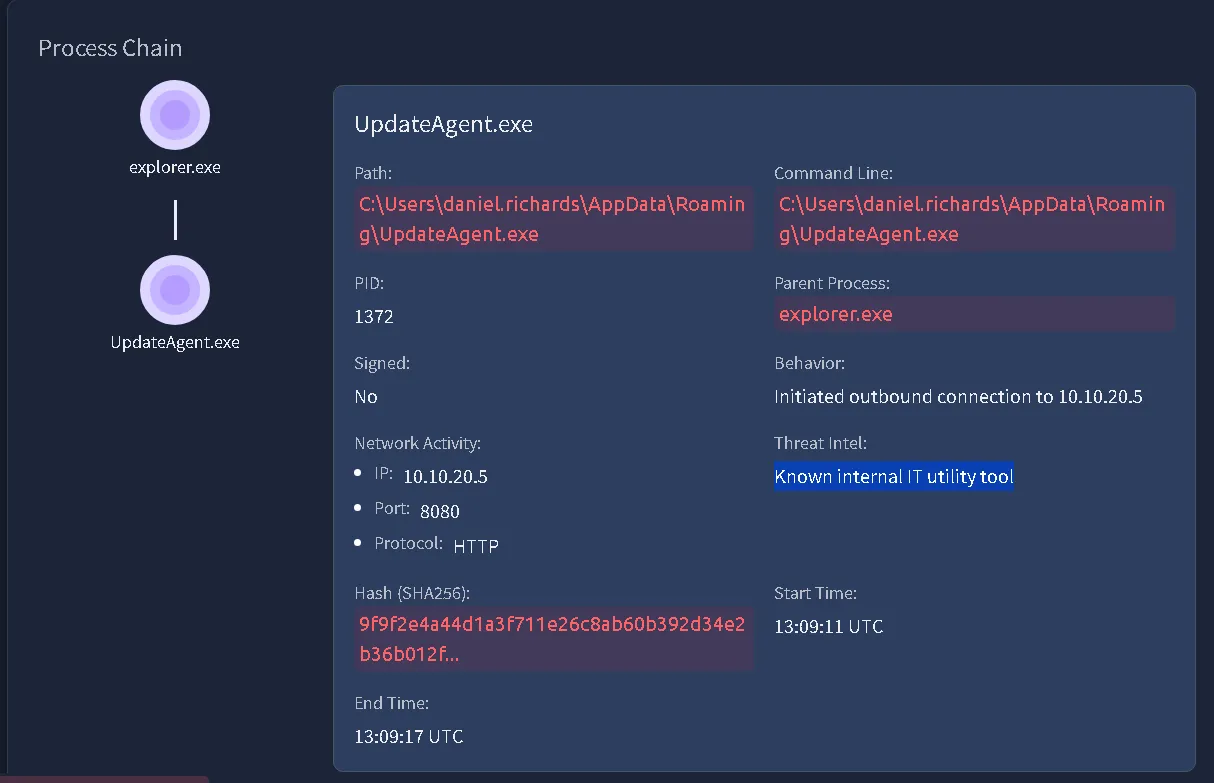
Identified Indicators of Compromise (IOCs)
| Type | Indicator | Context / Source |
|---|---|---|
| File Path | C:\Users\Public\install.exe | Staged payload downloaded via curl.exe (DESKTOP-HR01) |
| File Path | C:\Users\haris.khan\AppData\Local\Temp\syncsvc.exe | Unsigned/masqueraded service binary (WIN-ENG-LAPTOP03) |
| URL | https[:]//files-wetransfer[.]com/upload/session/ab12cd34ef56/dump_2025.dmp | Exfiltration destination URL (WIN-ENG-LAPTOP03) |
Q&A
Questions from the room
- Which feature of EDR provides a complete context for all the detections?
Answer:Visibility - Which process spawned sc.exe?
Answer:cmd.exe(identified by tracing the process tree hierarchy) - In the given analogy, what presents an AV?
Answer:Immigration Check - Which legitimate process was hijacked by the attacker in the scenario?
Answer:svchost.exe(referenced in Step 6 of the attack progression) - Which security solution might mark this activity as clean?
Answer:Antivirus - Which component of the EDR is responsible for collecting telemetry from the endpoints?
Answer:Agent - An EDR agent is also known as a?
Answer:Sensor - Which telemetry data helps in detecting C2 communications?
Answer:Network Connections - Where are the configuration settings of a Windows system primarily stored?
Answer:Registry - Which feature of the EDR helps you identify threats based on known malicious behaviours?
Answer:IOC matching - Which tool was launched by CMD.exe to download the payload on DESKTOP-HR01?
Answer:CURL.exe - What is the absolute path to the downloaded malware on the DESKTOP-HR01 machine?
Answer:C:\Users\Public\install.exe - What is the absolute path to the suspicious syncsvc.exe on the WIN-ENG-LAPTOP03 machine?
Answer:C:\Users\haris.khan\AppData\Local\Temp\syncsvc.exe - On which URL was the exfiltration attempt being made on WIN-ENG-LAPTOP03?
Answer:https[:]//files-wetransfer[.]com/upload/session/ab12cd34ef56/dump_2025.dmp - What was UpdateAgent.exe labelled by Threat Intel on DESKTOP-DEV01?
Answer:Known internal IT utility tool